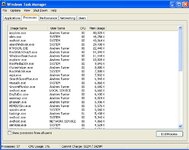
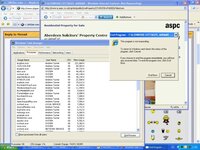
Does anyone know what these lot do???

AndyT

Well-known member
UKGSer Subscriber
Joined
Jun 26, 2002
Messages
8,331
Reaction score
10
Location
Stuck in SE Asia.....Thank you Covid 19
My PC is getting so slow and IEplorer is often just not responding and hangs up.
When I look in task manager the meory usage and processor often up around 85%.

Can anyone tell me if there are anything suspicious about the big memory users from this screen shot as some of them I don't recognise. I think the Roxwatch thing is to do with the CD creator Roxio which I alomost never use and have no idea what any of the others are.
I didn't have iExplorer running at the time but when I do this is normally the higherst.

Any help much appreciated.:bow


AndyT
 
Screen Shot

Can you post a screen shot of the processes ?
 
That's not a lot of activity, to be honest.

You've not even got Outlook/Winword - which are usually two of the most resource hungry.

Is your hard disk badly fragmented? :nenau

or - do you have two anti-virus/firewall applications running? They tend to fight each other - I think.

Al :confused:
 
That's not a lot of activity, to be honest.

You've not even got Outlook/Winword - which are usually two of the most resource hungry.

Is your hard disk badly fragmented? :nenau

or - do you have two anti-virus/firewall applications running? They tend to fight each other - I think.

Al :confused:

Hi Al,
the only Anti Virus I have on is ESET32 which has never (knowingly) given me a problem. Just checked and IEplorer is now running at 220kb Mem usage!!

and its not responding on one of the tabs:(
 

Attachments

  • Poor Performance.jpg
    Poor Performance.jpg
    71.7 KB · Views: 257
I've got three tabbed IExplorers going just now on a total of 150Kb usage.

Could be a prob with I-Explorer - are you still frequenting those dodgy animal-sex websites? :eek

Al :augie
 
I've got three tabbed IExplorers going just now on a total of 150Kb usage.

Could be a prob with I-Explorer - are you still frequenting those dodgy animal-sex websites? :eek

Al :augie

They're not dody the are very good, this ones dodgy www.chevron.com

Is there any thing I need to clean out in IExplorer temp internet files and the like (I can never find them with XP any more):(

It maybe time to move over to Mozzilla or something similar - any thouhts?
 
Andy download CCleaner from here - http://www.filehippo.com/download_ccleaner/ - install it making sure NOT to include the Yahoo toolbar.

Run the 'Run Cleaner' until it shows 'no bytes removed'

Then scan the registry for issues, delete anything it throws up it will not damage your system in any way, you might have to run it more than once to clear the crap.

Go into tools and then Start Up, from the list you can at the very least delete anything to do with Roxio and Itunes and no doubt a pile of others.
To give you an idea on my pc I've got 13 progs running in Start UP and I could delete 3 or 4 of them.
 
Nothing obvious. It could be a flash or java script element on one of the web pages open that's causing the slow down / memory usage. Not sure what search bar you have on there but that may not help.
Grab a copy of hijack this and run it, then post those results. That may reveal something.
 
Andy download CCleaner from here - http://www.filehippo.com/download_ccleaner/ - install it making sure NOT to include the Yahoo toolbar.

Run the 'Run Cleaner' until it shows 'no bytes removed'

Then scan the registry for issues, delete anything it throws up it will not damage your system in any way, you might have to run it more than once to clear the crap.

Go into tools and then Start Up, from the list you can at the very least delete anything to do with Roxio and Itunes and no doubt a pile of others.
To give you an idea on my pc I've got 13 progs running in Start UP and I could delete 3 or 4 of them.

Thanks Dickie - I'll give this a go.:thumb2


Nothing obvious. It could be a flash or java script element on one of the web pages open that's causing the slow down / memory usage. Not sure what search bar you have on there but that may not help.
Grab a copy of hijack this and run it, then post those results. That may reveal something.

Plan "B" watch this space, if I'm not back by teatime its been a disaster:D

Cheers guys:thumb2
 
Remove and reinstall Roxio

I had a similar problem. It seems Roxio does lots of stuff in the background including indexing files. I only use it for burrning CD's and DVD's and a I managed to turn off some off the background stuff but can't remember how.
 
On my desktop, I find that IE8 locks up when starting, two out of three times. It also locks up at other times, especially when opening another tab. Hence I've switched to using Firefox as my main browser. I have to use IE8 from time to time, as Egg Money Manager will not work with any other browser.

On my ancient laptop, I use Firefox too. It seems to use fewer of the meagre resources available, especially if you tweak it with Firetune.

As Firefox works perfectly well I haven't bothered investing much time finding out what is conflicting with IE8.
 
You will probably find that you are running all sorts of shite in the background that you just do not need. To show what is running go to start - run and typ msconfig

You will get a pop up box with some tabs. Here you should see one called startup and this will show you everything that runs on your PC along with a description. Most applications like Roxio do not need to run in the background all the time. Anything that does not need to run can be unticked. All you need to do then is to restart and see the results.

Let me know how you get on !

Preach - Firefox is always better than internet exploiter
 
Andy download CCleaner from here - http://www.filehippo.com/download_ccleaner/ - install it making sure NOT to include the Yahoo toolbar.

Run the 'Run Cleaner' until it shows 'no bytes removed'

Then scan the registry for issues, delete anything it throws up it will not damage your system in any way, you might have to run it more than once to clear the crap.

Go into tools and then Start Up, from the list you can at the very least delete anything to do with Roxio and Itunes and no doubt a pile of others.
To give you an idea on my pc I've got 13 progs running in Start UP and I could delete 3 or 4 of them.

Just an update,
I couldn't get this page to open up without IE freezing up again. I also did the Configsys routine and there were loads of programs although when I ubnticked some it didn't seem to make any difference so I have loaded Firefox and will give this a try.

Mt IE was ver7 by the way.

I'll keep you posted - many thanks again

AndyT:thumb2
 
I found that when I first got IE7 it froze up a lot. The next windows update seemed to solve the problem.
 
I've got an IT 'Guru' buddy out in the States, and most of the stuff mentioned above is the sort of thing he recommends occasionally. A few others I'd suggest:

1) Ditch I.E and get Firefox. I haven't used I.E. for five years now. But if you don't want to do that, see if there is some way to clear your chache, posssibly under 'tools'. It's amazing the crap that builds up there.

Also, 'Thunderbird' works just as well for me a 'Outlook'. And isn't as resourse hungry.

2) Download 'Spy-Bot Search and Destroy' and 'Malawarebytes'. They both do the same thing, look for 'nasties' that aren't viruses. Run then sequentially, as one may pick up stuff the other missed.

3) I'm going on about this again; 'Cloud' anti-virus. See the link in my signature. I was getting really peed off with how my laptop was slowing down, so much so that I installed Ubuntu. Then my Guru mate suggested this. I'd been running 'Avira' for six years with no problems, but decided to try Cloud anyway. Tim said to give it about twenty-four hours. A day later, my lappy was back up to speed; running so bloody fast I struggled to keep up with it for the first twenty minutes. (I'd got used to waiting for it to do things, now they were happening straight away, but I was still waiting...)

If you decide to try 'Cloud', uninstall your current AV first, but keep the instalation files, just in case you want to go back to it. And don't start a scan manually when you instal 'cloud'; it starts one automatically, and having two running concurrently slows things right down.

'Cloud' did find two trojans that Avira had missed. I also think that, as I had Avira set to update its definition files every day, these had acumulated to the extent that it slowed the machine down just through having so much to read through as it did its job. But I've no way of proving this.

What ever, hope you get sorted soon. Nowt much as anoying as a slow comp...

Dave.

P.S. 'Cloud' also had the same effect on my eight year old desktop. XP Pro, Athlon 1Gb, 380 Mb RAM (Don't ask! ;D) It was running so fast I could eat a five course meal while waiting for applications to fire up. Now it's about as fast as the laptop was before I put Cloud on that. Lappy is Vista HP, Turion Dual Core 1.9GHz, 2Gb Ram.
 
Well Firefox Ver 3.5 seems to have cured all my problems so I can at least discount my router and the fact that the pc is taking ages to start up now suggests something else is the root cause so i will try and use Dickie Boys clean up tool and see what happens next:comfort


Back
Top Bottom