Does anyone remember a scam from around about 2016 allegedly from UK Met Police?

John Roberts

Well-known member
UKGSer Subscriber
Joined
Mar 4, 2005
Messages
7,287
Reaction score
519
Location
North Wales
There's a note with the computer with ukmetpol scam scrawled on it, no doubt it refers to the reason it was dumped. The owner said that the computer worked fine until the scam came up on screen saying that the police had identified a whole range of possible activities that were not allowed or illegal, and that a fine would be payable with instructions on how to make the payment on line. She said she'd tried sorting it out by following online (YouTube?) instructions but didn't get anywhere. I've tried a search but can't find anything of use, any ideas, please?
 
Yes the old europol bitcoin scam

I cant remember the exact way to delete it, but a startup file springsbto mind

Just refomat the hard drive and reinstall windows
 
Yes the old europol bitcoin scam

I cant remember the exact way to delete it, but a startup file springsbto mind

Just refomat the hard drive and reinstall windows
Bitcoin… she didn’t mention bitcoin, I’ll try to get in touch but it’s been years since she abandoned it. As for startup file, I’ve no idea what that is, sorry - is that something I have to get that’s special for this particular scam?
Reformatting… isn’t that something that involves wiping the memory clean?

I just re read the above, I don’t mean to be negative in the least, it’s just that I’m painfully aware of my lack of learning potentially being being a dangerous thing!
:beerjug:
 
Just refomat the hard drive and reinstall windows

This would be my suggestion too. If it's got one bit of malware on it then expect there to be others too.

Safer to do a full erase of the disc, or if it's easy to get to maybe even just replace it with a new one.

If it's not something you're comfortable doing then it's something most IT companies will do for you, or find a friend who knows how to do it and buy them a pint :thumb2

It's not difficult, but it will take several hours to properly and securely wipe the data.
 
This would be my suggestion too. If it's got one bit of malware on it then expect there to be others too.

Safer to do a full erase of the disc, or if it's easy to get to maybe even just replace it with a new one.

If it's not something you're comfortable doing then it's something most IT companies will do for you, or find a friend who knows how to do it and buy them a pint :thumb2

It's not difficult, but it will take several hours to properly and securely wipe the data.
There's a picture of my late dad stored stored in it, will it be possible to find that and perhaps save it on another computer before zapping everything else? There's a copy of Photoshop on it as well, it would be good to save that as Photoshop is only available on line these days I believe. What I'm asking really is whether it's possible to pick and choose, or is it an all or nothing sort of thing?
When you say it's a big job, do you mean it will take hours of work or just a certain amount of work by whoever's doing the work or that it would take a long time while the computer hums and does the actual deleting/wiping on its own?

PS Sorry for all the questions :blush and thank you both.

:beerjug:
 
If the computer starts up OK then you should be able to retrieve the photo and save it onto a USB stick.

Keeping Photoshop might be a bit harder, but if you have the licence key then you should be able to find a legacy download

Then you can do a secure data wipe from the drive, scan the USB stick for viruses before copying the photo back and then download and install Photoshop. Alternatively you can use Photopea online free which is a Photoshop clone. It does 99% of what Photoshop does.

As for it being a 'big job', well, it's not really. You just tell it to reset the computer, make sure you select the data wipe option and leave it to do it's thing. Depending on the size of the drive and the amount of data that can take several hours, but you don't have to be stood over it while it does the wipe.
 
Go online on your own PC and download CC cleaner


save the exe file to a usb stick

and do the same with a program called malware bytes

copy that to the usb stick


Then on the suspect machine

If you do any work on the machine,


Do not connect it to your home network or the internet - that way it cant send or receive anything

Start the computer , and let it boot until the scam page comes up

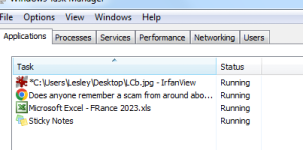
press CTL ALT DEL together and select the option task manager

you will get a list of files like this

see pic 2024-05-28 16_14_00-Windows Task Manager.png

you may see a file called europol or or similar of so click on it and select end task - that should kill it in the first instance

then insert the usb stick and install CC cleaner & malware bytes and run them

they may find the suspect proggy an kill it

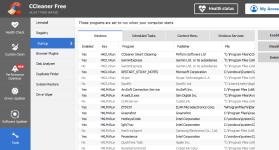
if not fire up CCc cleaner and use the tool menu to look for items in the startup folder

see pic


2024-05-28 16_19_51-CCleaner - FOR HOME USE ONLY.png


one of those may say uropol or similar if so highlight it and click delete

I seem to recall this was one of the early scams, not very sophisticated, and relied on peoples fear to do the work for them


did it look like this


fuzz.png
 
If the computer starts up OK then you should be able to retrieve the photo and save it onto a USB stick.

Keeping Photoshop might be a bit harder, but if you have the licence key then you should be able to find a legacy download

Then you can do a secure data wipe from the drive, scan the USB stick for viruses before copying the photo back and then download and install Photoshop. Alternatively you can use Photopea online free which is a Photoshop clone. It does 99% of what Photoshop does.

As for it being a 'big job', well, it's not really. You just tell it to reset the computer, make sure you select the data wipe option and leave it to do it's thing. Depending on the size of the drive and the amount of data that can take several hours, but you don't have to be stood over it while it does the wipe.
Perfick! Thank you both.
PS, Just seen Santa's post, I'll get digging into that as well.

:beerjug:
 
Santa makes a very good point which I didn't say out loud, but definitely don't let the infected computer anywhere near your network!

Keep it offline, don't connect it to your WiFi or any of your other computers and you'll be OK.
 
Go online on your own PC and download CC cleaner:

Download CCleaner | Clean, optimize & tune up your PC, free!

Download CCleaner for FREE. Clean your PC of temporary files, tracking cookies, browser junk and more! Get the latest version today.
www.ccleaner.com
www.ccleaner.com

save the exe file to a usb stick


View attachment 325731
Santa, You did mean that I should go for the free download, yes?

Yes, I'm pretty sure that was the one, I remember the policeman and the Union Jack. :thumb2
 
Oh dear. When I briefly switched the pc on before posting it came alive with the cooling fan or fans whirring away and with a soft light inside the tower. I switched it on again before starting on the fixes that you kindly provided... and the wretched thing won't come on, dead as a doornail. So I've had a look inside. I had a look for loose connectors and in the process have found some curious issues like for instance, that the connections from the speaker and the headphone connections (7 wires on individual plugs) on the front panel are all hanging loose by the probable correct connecting pins on the motherboard - a minor and probably irrelevant issue at the moment of course, another thing was that all six mounting screws holding the motherboard in place were vey loose, surely unintentional? A couple of other things too, all minor I suspect.

ANYWAY... I now would like to wiggle the connections with the thing switched on, so my question now is whether there's any mains voltage outside the power supply? There are quite a few items and connectors marked +5v and -5v but those are the only voltage markings I've seen so far. I'm reasonably confident that there's nothing these days like the in the CRT tv's of yesteryear, so is it reasonable to go prodding about with a suitable insulated prodding thing? No, I will not go prodding inside the power supply.

So, what say you?

PS I used to work on electronic telephone exchanges before retiring, so I choose to think that I'm not totally inexperienced. Over to you.

EDIT.... It isn't totally dead, the little green LED on the motherboard is on but no fan. Sorry.
 
Last edited:
I'm a bit of a luddite so I've no idea how to help you, but, I watched my brother pull the CPU from the motherboard on my old PC once, and just the static from him killed that computer stone dead! He always earths himself with a little wrist strap connected to the case these days?
 
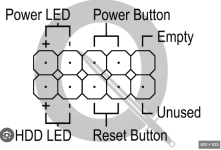
hang 5 and ill find the pinouts


Should be something like this

If you can let us know what make and model of the PC it will help

Oh and as to voltages


240V into the PSU

Unless everything has borked there should be nothing greater than +12V / -12V +5V / -5V coming out of the PSU

You can check with a multimeter

Ive really abused some early PC#s with voltages :D they survived

Continuity is what you will use the most TBH

the pi c below is generic it may be diffrent for your PC

front panel.png
 
Last edited:
UPDATE
Sorry to have let the issue hanging in mid air as it were, so here's what happened in the meantime.

First of all, my grateful thanks to you all for your time and interest. Thanks too for the wiring pinouts, santa, in the case of my power supply (PSU?) there are something like 20 to 25 wires coming out, a lot of which do end up in separate plugs with the pinouts you show. As time was getting short (I needed to print one item in particular) I said sod it and took it to the repair man, who said that since the thing had been standing idle for ten years or so that some capacitors might have blown, which turned out to be correct and also said that the motherboard was knackered anyway. He managed to get the files I wanted and I have them on a little memory stick: magic! He's digging deeper into the thing and hopes to recover some programs for me too.
Thank you all. :beerjug:


Back
Top Bottom