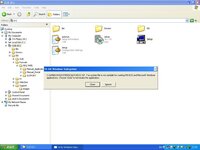
Error message when loading software

AndyT

Well-known member
UKGSer Subscriber
Joined
Jun 26, 2002
Messages
8,331
Reaction score
10
Location
Stuck in SE Asia.....Thank you Covid 19
I have just bougt myself a Sony Clie PDA with GPS cabability. Anyway I loaded the CD-Rom in and get the error message as per attached fiole. (Basically it says C:\Windows\System32\autoexec.nt. The system file is not suitable for running MS Dos or MicroSoft Windows applications. Choose close to terminate.)

This has also happened recently when I was trying to load something else - can't remember what it was.

Have I got some form of virus or corrupt file. The Software is designed to work on Windows XP which is what I an running.

Any help appreciated as I want to play with my new toy.

AndyT:(
 

Attachments

  • sony clie.jpg
    sony clie.jpg
    75.6 KB · Views: 93
Common problem. You most likely have a missing or corrupt file which is used when running 16 bit legacy programmes.

See this link & follow the instructions. You will need your original disk or copy the autoexec.nt; config.nt & command.com files from a working machine. You may be able to cheat & copy the files from the c:\windows\repair folder. Try this first.

http://support.microsoft.com/default.aspx?scid=kb;en-us;324767

hope this helps.

--

Simon
 
Sods LAw...

I can't finf my XP disk (I'm moving house and its all packed up somewhere). I have done a search on my hard disk and have all 3 of the recomended files including repaired files with the exception of the autoexec.nt file of which I only have 1. Would it be safe to just copy ths into the Windows/system32 file or do I definately need the disk (I'll have to empty the attic....but i'm sure its there somewhere.)

many thanks in advance.

Andy
 
Copy the autoexec.nt file from repair to system32 folder. If you haven't got it or it doesn't work let me know your e-mail address & I'll e-mail the requisite files to you.

--

regards
Simon


Back
Top Bottom