Europe 2015.20 update available to BMW Navigator V - Part 2 - Not enough space....

Thought I would see how hard this is.

Plugged my recently purchased (from this very forum) 660 into my pc, opened garmin express, clicked to register, clicked instal all to load software update and 2015.20 maps, went to watch telly and eat dinner, came back to see all done in less than two hours. Tells me the memory is 52% full.

Easy peasy lemon squeezy.
 
Excellent, Danny

You'll have doubtless noticed that this thread is about the Nav V, a different model to the 660, differing in its operating system to one degree or another.

However, all is not lost. You'll now have your 660 up and running, so you'll be able to offer full and precise help to stroller, who for some reason or another is struggling. For instance, I wonder if you would be as kind as to tell stroller:

1. Whether you are using a Mac or a PC

2. Whether you did or didn't have an SD card installed in your 660 device

3. Whether your mapsets on your computer and device now match

4. Whether the whole of Europe 2015 mapset now resides on your 660's internal memory, its SD card (if fitted) or on a mixture of both

5. Whether routes you have created on your newly updated computer and device are exporting, calculating and displaying properly on your device

6. Any other help you can offer

With your assistance he'll be up and running in no time, I don't doubt.
 
I have a 660 which took 12 hours to download the update to my Mac yesterday. I had the same problem re memory and downloaded to the Mac. The Mac still shows the 2014 version and that point I decided I'd had enough for one day.

In this day and age Garmin should be on top of these issues and again it just shows how poor their quality controls are! They are distributing software with problems and leaving it to the users to find solutions to their issues. These issues are exacerbated if using Mac computers and Garmin techs clearly do not fully understand what the Mac OS does to files when downloading as is hiding files and adding files that are not required..... So very frustrating and now back to the computer and see how it goes on the MacAir. I hope not another 12 fecking hours...!!


Sent from my iPhone using Tapatalk
 
There are two possible reasons:

(1) You have plotted a route on your computer that crosses over between the two sets of maps on your device. The two sets of maps on your device are, I think:

(a) Those detailed map tiles you installed

(b) The undetailed base map that sits beneath those map tiles you didn't install

If you install ALL the detailed map tiles, not just some, the problem may well go away.

(B) You have installed the full 2015 mapset onto your computer. However, it's quite possible that the old 2014 version is still there too; Garmin Express does not remove it by default. Check that you are not creating a route on your computer using the old maps, then sending it to a device with the new maps. That may solve your problem, too.


Report back, either way.


PS Why do you have an aversion to recalculation on import to your device? All it is trying to do is match one route, created on one set of maps, into a set of roads on another map.

The routes I plotted were in northern Spain, so are all covered by the detailed western Europe mapping I downloaded.
I have checked on both the Zumo & Basecamp and nether are showing 2014 mapping, so hopefully this is gone.
I think I will try re-loading the whole of Europe again, but possibly not until I get back from my spanish trip, and I am sure you are correct, I should allow the machine to re-calculate the routes.
Interestingly, I have just been out to check if the short local route I plotted worked OK, and it did, but the Zumo has lost its voice, and volume from my headset is very low compared to before the mapping update. Another issue to sort out!
 
Excellent, Danny

You'll have doubtless noticed that this thread is about the Nav V, a different model to the 660, differing in its operating system to one degree or another.

However, all is not lost. You'll now have your 660 up and running, so you'll be able to offer full and precise help to stroller, who for some reason or another is struggling. For instance, I wonder if you would be as kind as to tell stroller:

1. Whether you are using a Mac or a PC

2. Whether you did or didn't have an SD card installed in your 660 device

3. Whether your mapsets on your computer and device now match

4. Whether the whole of Europe 2015 mapset now resides on your 660's internal memory, its SD card (if fitted) or on a mixture of both

5. Whether routes you have created on your newly updated computer and device are exporting, calculating and displaying properly on your device

6. Any other help you can offer

With your assistance he'll be up and running in no time, I don't doubt.

Whoops, sorry.

PC Windows 7
4GB card installed
Maps same on pc as 660
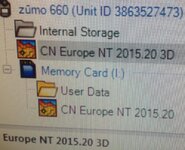
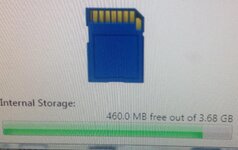
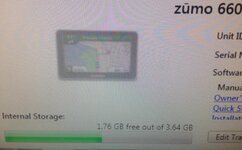
As pictures below, seems full maps installed on 660 in 3D and full maps 2D on card.
Haven't started playing with routes yet.
Does this mean, I can delete one map set from either card or 660 or do I need both?
 

Attachments

  • image.jpg
    image.jpg
    112.5 KB · Views: 281
  • image.jpg
    image.jpg
    60.8 KB · Views: 281
  • image.jpg
    image.jpg
    65 KB · Views: 283
Thank you for that.

It's interesting that Garmin Express has split the 3D maps to the device's internal memory and the other data to the card automatically, the total size of the full 2015 map download being bigger than the 4 gb SD card and / or the device's own internal memory solace. Garmin Express has also removed all the old maps too, which is what it's meant to do.

I would leave both sets of maps in place, split between the device's own memory and the SD card, just as you have it now. Whilst you can opt between a 2D and 3D view, it's possible that the two sets of map data share some common components; the removal of one might upset the other. They are not doing any harm as they are.

Providing your computer now has the 2015 map installed and you have chosen it from the drop down menu, there is no good reason why a freshly created route should not install itself and run quite normally. Obviously, a route held on your computer that was created in a previous map version may well require some conversion / recalculation if it is to display and run correctly on the device.
 
Update on the new 2015 maps on the Nav V....

I have now had the chance to run my updated Nav V on a motorcycle.

Two things:

1. I have the speed camera database and warnings turned off by default. The new map installation turned the warnings back on. The odd thing is that the option box was still unticked, so it should not have run. I simply chose 'save' again and all was well.

2. As usual, the device switches to its nighttime view when it senses that the bike has lit its instrument lights, say in a tunnel or where the natural ambient light is very low. This old nighttime view's background was very dark, almost black, rendering the screen almost useless. This appears to have stopped, at least in the Blackwall tunnel crossing I made. The new nighttime display is very clear.
 
Nav V and BC have fallen out

So I thought I'd managed to install the 2015 maps to both BC and the Nav V with only minor issues (compared to some on here) and all was well.
Then today I tried to connect the device to BC to send a short route across to it and that's where things took a turn for the worse :(
BC simply refused to read the maps on the Nav (of which there seemed to be two different ones in separate folders) and kept locking out with multiple errors showing on my Mac.
The device seemed to work fine, as did BC but they just wouldn't talk to each other.

So, following on from others on here, I stuck in a 16gb micro SD and then did another map download using express.

Bingo! After 25 mins all complete and everything working fine with no problems creating and sending a route to the device :)

It would seem the panacea to all the update woes is the humble SD càrd :thumb2
 
It would seem the panacea to all the update woes is the humble SD càrd :thumb2

It's the 2nd attempt at updating your maps that sorted it not fitting an SD card

Most of Garmin's software with various devices has these bugs, not even sure Garmin know why.
 
It's the 2nd attempt at updating your maps that sorted it not fitting an SD card

Most of Garmin's software with various devices has these bugs, not even sure Garmin know why.

I'd already done the second attempt last week (see post #5), and Express said I had 5% memory free on the device with all naps installed! It was effectively the third attempt that worked (SD May or may not have been incidental).

BC was showing two folders containing maps on the device whilst trying to read it and would then give up and show at least 20 separate error boxes saying it was unable to read different volumes. Now only one folder shows and it picks up the device map in under a minute :nenau

No idea what's the root cause of this, but now just happy to have a fully functional BC and Nav which speak to each other :thumb
 
Plugged mine in this afternoon, and it sailed through in about 25 minutes. A couple of times it said that it could synchronise, but I ignored that, and it carried on.:thumb

I turned the Nav on to make sure it had completed, and the maps are all there.:beerjug:
 
Hi Richard

Great post, thanks for all the time spent. It worked for me as per your instructions first time. I previously had a Nav iv (came with 90 Anniversary version) which froze during the last update. I returned it as not fit for purpose and the dealer replaced it with a Nav V, which did please me. As I was not keen to end up with similar problems I resigned myself to not updating at least until the winter but now all good.

thanks again

regards
Pete..
 
Reading this I was fully prepared for a fight with the software, as I don't have an SD card to hand.

However, I just updated the nav for the 2nd time in its existence - to the latest maps without issue.

In fact I now have more free space on the device than before! It used to say 54% Full - now its at 39% Full - strange.

Prior to the map update, I made sure I had the latest version of Garmin Express and all the firmware was up to date.
 
Just upgraded my nav v plugged it in went for a shower and bobs your uncle all done 2015.20 must be luck
 
Just upgraded my nav v plugged it in went for a shower and bobs your uncle all done 2015.20 must be luck

Same here (although I did not go for a shower!).

Made sure I had the latest software, had fitted a brand new 8 GB SD card (not sure if it is necessary but only cost about £3) and had previously down loaded 2015.20 to the computer.

Went into Garmin Express and choose option to download to devise only and all done in about 1 hour - no problems :D


Back
Top Bottom