
Excel HELP with a formula

  • Thread starter Thread starter TJ
  • Start date Start date

TJ

Which Way....??
UKGSer Subscriber
Joined
Apr 23, 2007
Messages
700
Reaction score
85
Location
North Yorkshire I believe..
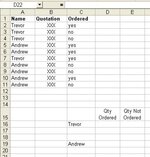
Can someone help me with a formula for excel as per my example.

What I would like to do is take data from various cells and have two sets of figures. The example I have given is data that I want to capture, these columns are among others in a spreadsheet.

I need to total up all the yes and No's for Trevor and Andrew and show them in cells D16 & E16 Trevor and the same D19&E19 for Andrew. I can then show these as a percentage ratio.

Any help muchly appreciated.

TJ
 

Attachments

  • Example.jpg
    Example.jpg
    29 KB · Views: 124
Can someone help me with a formula for excel as per my example.

What I would like to do is take data from various cells and have two sets of figures. The example I have given is data that I want to capture, these columns are among others in a spreadsheet.

I need to total up all the yes and No's for Trevor and Andrew and show them in cells D16 & E16 Trevor and the same D19&E19 for Andrew. I can then show these as a percentage ratio.

Any help muchly appreciated.

TJ

Try using the sumif function... Three questions where is the data where are the numbers what is the question... Should work fine... I used to teach this stuff... If you need more variables try vlookup
 
Pivot tables are your friend. VLOOKUP will only work on one criteria unless you CONCATENATE the name and yes/no value. I'll run an example off after dinner.

Dave
 
I think the problem with Sumif is there are 2 criteria neither of which are numeric.

Alternative approaches are to use Pivot tables, Sumproduct or one of the database functions.

As Dellis says: Pivot tables are probably ideal but something like =sumproduct(((a1:a11)=c16)*((b1:b11)="yes")) in cell D16 would work.

One general word of warning: You will need consistent spelling of names and yes and no to get correct results. If this is a big table, using data validation might be advisable (and ensure your range definitions cover all cells).
 
Last edited:
The attached shows the two methods I mentioned and also Paul method. As ever there are numerous ways to come to the same end result using Excel.

Off for a pint shortly but if you want any more help PM me.

Dave
 

Attachments

Many thanks Guys & Jim

Cheers

TJ


Try using the sumif function... Three questions where is the data where are the numbers what is the question... Should work fine... I used to teach this stuff... If you need more variables try vlookup

I think the problem with Sumif is there are 2 criteria neither of which are numeric.

Alternative approaches are to use Pivot tables, Sumproduct or one of the database functions.

As Dellis says: Pivot tables are probably ideal but something like =sumproduct(((a1:a11)=c16)*((b1:b11)="yes")) in cell D16 would work.

One general word of warning: You will need consistent spelling of names and yes and no to get correct results. If this is a big table, using data validation might be advisable (and ensure your range definitions cover all cells).

The attached shows the two methods I mentioned and also Paul method. As ever there are numerous ways to come to the same end result using Excel.

Off for a pint shortly but if you want any more help PM me.

Dave


Back
Top Bottom
