EzCan problem

Easy_Rider

Registered user
Joined
Dec 9, 2023
Messages
516
Reaction score
354
Location
Wales
The other day i found DRL were not working.
I loged into the ezcan to see that they had been turned off.
I turned them back on and they seemed to be working.
I went for a ride today with my wife. She has cameras on her bike.
When we got home i had a look at the video for another reason.
To find that my DRL were turning on and off when i was riding.
anyone got any thoughts or know of a problem like this.
My bike is a 2019 1250RT.

cheers Martin
 
Hi Martin

I would suggest checking section 5 in the user manual below:

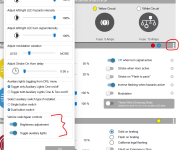
The message you received is when the aux lights are being turned off using handlebar controls, i.e. a long press for aux lights 1 and a triple click with aux lights 2. Usually, a new tank bag or something on the handlebar causes the full left turn to press the turn signal cancel button, and this in turn causes the aux lights to be disabled.

I'd suggest confirming that's what's happening, and if it is, either pay attention to what's causing that, or just disable this function in the aux lights' extra settings > vehicle switch gear controls.
1724770401731.png

Kind regards
 
Thank you for the reply.
What would cause them to go on/off when riding.
not touching the toggle switch or anything.
 
Here is a quick video of the DRL going on/off.
They are both on the same circuit with one lead going into two.
its strange how some time one light goes off as well as both lights.

 
Here is a quick video of the DRL going on/off.
They are both on the same circuit with one lead going into two.
its strange how some time one light goes off as well as both lights.

I was going to say potentially LED flicker is matching the frame rate of the camera (so in video it looks like they are flashing and this is not seen by the naked eye) but its not that.

If you indicate that side LED will go off (that is in the setup and can be switched off) so that is normal. However it seems when it comes back on they both go off briefly

Have you run the diagnostics in the software?? I think it can also be sent to Hex for them to look at

Also check connections are pushed fully in.

You can just try updating the software (new one out today)...default all your settings and then set it up again
 
I'm going to check all the wiring this weekend, and try the ezbus feature to tidy up the wiring.
One thought i had, i only have the DRL set to 20%, and i'm starting to wonder if the lights dont like it.
 
I'm going to check all the wiring this weekend, and try the ezbus feature to tidy up the wiring.
One thought i had, i only have the DRL set to 20%, and i'm starting to wonder if the lights dont like it.
Just for everyone's info here, the ezBUS functionality is not yet ready for generic additions, we have some in development. As for now, the ezBUS development is released for our first affiliate in the AdMore ezLINK, this allows the AdMore light to be installed on the white output with no requirement for additional outputs.

We are working on some additional affiliate lights that will be powered completely by the ezCAN, as well as the generic addons mentioned above, so stay tuned for release notes on that :-)

On the discussion at hand with your lights, what lights are these? Mentioned above about the frame rate and lights "flickering", the ezCAN uses PWM to dim lights (2-wire are dimmed on the 12V wire, while 3-wire receives the PWM signal from the switch wire). What we've found that most lights that use 3-wire dimming, do not work as expected when connected/configured as 2-wire lights. They aren't designed for that method of dimming and when PWM is applied to the 12V wire, the "switching" causes the flicker. One way to confirm this is the case is to ride with the lights are 50% +, I would expect that this flickering would not occur at higher intensities. Note as well (mentioned above), that this flicker is usually not perceivable by the naked eye.

You mentioned that when connecting to the software it states that the lights are off - this is not the behaviour shown in the video, as the lights go off briefly (I expect this to be flickering rather than turning off). For a sanity, turn the lights off while connected to the software as explained in section 5 of the user manual. The lights will turn off and the software will "grey out" the lights in the configuration software. If that's the same behaviour as your original statement above, that means they're being turned off accidentally. You can disable this functionality in the extra settings menu shown above.

Kind regards
 
The lights did turn off. it could of been me but i'm not sure.
After i turned them back on. We went for a ride.
When we got home i needed to look at the video on my wife bike.
This is when i saw that the lights were flickering on and off.
There are other clips showing this happening as well.
I have seen video clips of cars with LED's lights and the camera flicker is not the same.
I also have a Denali CanSmart as well, so will connect the lights on to that before i start messing with the wiring this weekend. Going out tomorrow on the bike so will see when we get home.
 
Ok, so i also have a Denali CanSmart. What i have done is daisy chain both the EzCan & CanSmart together. I unpluged the DRL from the EzCan and Pluged them into the CanSmart.
Every time i asked my wife if the lights were on, she said every time she checked her mirrors they were on. But again when i checked the video the lights kept going on and off.
So i think i need to go out when its dark and see if i can see for myself if they are going on and off.
Or if as has been said it could be the frame rate of the camera.
I am starting to think it is the frame rate as when watching the video, you can see the lights going off or on in a funny way from bottom to top and top to bottom. its near the end of the video you can see it clearly.

 
Ok, so i also have a Denali CanSmart. What i have done is daisy chain both the EzCan & CanSmart together. I unpluged the DRL from the EzCan and Pluged them into the CanSmart.
Every time i asked my wife if the lights were on, she said every time she checked her mirrors they were on. But again when i checked the video the lights kept going on and off.
So i think i need to go out when its dark and see if i can see for myself if they are going on and off.
Or if as has been said it could be the frame rate of the camera.
I am starting to think it is the frame rate as when watching the video, you can see the lights going off or on in a funny way from bottom to top and top to bottom. its near the end of the video you can see it clearly.

Hi There

With your wife's visual confirmation that it's on when she checked, I'm 100% sure that is just the camera frame rate vs the PWM switching the ezCAN does. If you want to do a sanity check, set your high beam on (for example in the road at your house where it won't blind anyone), and take a similar video. Because the PWM (pulse width modulation) switches the power on and off rapidly to reduce brightness, if the light is not on in the frame that the camera records, it will appear off, so with high beam on, there is no PWM and the light receives 100% power at all times, removing a "clash" of frame rate vs PWM.

Doing this at night will have the same result as the PWM or frame rate doesn't change.

Kind regards
 
Ok, so i also have a Denali CanSmart. What i have done is daisy chain both the EzCan & CanSmart together. I unpluged the DRL from the EzCan and Pluged them into the CanSmart.
Every time i asked my wife if the lights were on, she said every time she checked her mirrors they were on. But again when i checked the video the lights kept going on and off.
So i think i need to go out when its dark and see if i can see for myself if they are going on and off.
Or if as has been said it could be the frame rate of the camera.
I am starting to think it is the frame rate as when watching the video, you can see the lights going off or on in a funny way from bottom to top and top to bottom. its near the end of the video you can see it clearly.

After watching that video I think its the camera thats the problem


Back
Top Bottom