file can no longer be found

Deleted account 250722001

Registered user
Joined
Aug 2, 2019
Messages
1,052
Reaction score
415
but icon remains on desktop. I cannot delete them.
Tried windows up date- no good
Tried disk clean up - ditto
Now no idea- can any windows magicians out there offer a solution?
Thank you for your time
 
Go into explorer , right click the thumbnail / icon & select delete

Or go onto major geeks and download a file cleaner

(that way you dont get spam or junk/ransom ware )
 
Tks Santa
Did that one "Go into explorer , right click the thumbnail / icon & select delete"
I'll try the other
 
right click on icon
see properties and file location
go to explorer paste location in bar, minus file name and see if you get to a directory
delete directory. or if not and only the file is their, try changing the file extensions to something like.txt
delete?
 
Did that
No properties
No file format/ extension
Cannot change extension as pc cannot find file
No directory/ folder
Tried via cmd.exe but still no joy.
It's an annoyance which I may have to live with!
Tks for ideas
 
What, if anything, happens if you left click & hold over this icon & carry it to the recycle bin?
 
You may need a registry cleaner. I haven't used one since Windows 10 but used regularly on windows 7
 
Try this.

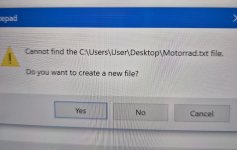
Right-click the shortcut and then press "edit in notepad". This should create a file, allowing you to delete the shortcut. If no joy try rebooting into 'Safe' mode and try again.
 
It creates a new file with the same name but the old shortcut icon remains.
Refreshing screen -still there.
Restart- still there
 
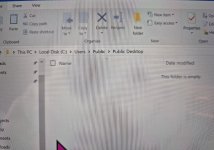
Using Explorer, have you looked in c:\users\public\desktop for the shortcut?

It may not be on your desktop, but the “all users” desktop
 
There was no 'all users' but I went trough every user - still nada-
Booted into safe mode. Looked all over- zip-nada-zilch
Getting same msgs as b4
Djeez- it was easier learning basecamp!
 
Last edited:
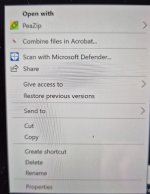
Are you saying you right click the shortcut you cannot compress it to a zip file?

My understanding, from talking to a buddy who is a wizz at finding solutions, is that this action should throw an error message saying that the shortcut is empty but thereafter it should just disappear from the desktop. He mentioned this works using 7-zip incidentally.


Back
Top Bottom