File database

andysdad

Well-known member
UKGSer Subscriber
Joined
Oct 21, 2004
Messages
2,207
Reaction score
398
Location
Northampton
I want to collect all my music folder and file names from Explorer and copy them into Excel.

E.g. Folder called "David Bowie - Heroes" then all the files within it, Track 1, Track 2 etc. The idea is to have one column in Excel as the Album name, then the track names as sub-columns/other columns across the row.

It's nt just for music file names, would be useful to generate a library listing that I could print for other files too.

Can anyone help, please?

Many thanks in advance,

A
 
Using DOS?

Here is a long-winded but free way. I am sure others will come up with a more effective way.

Open a cmd window (Start/Run/cmd/enter)

If not correct drive shown (e.g. C:\ displayed but files on D:\ drive) type drive letter colon (e.g. D:) and enter.

Navigate to required music folder (e.g. CD my music\david bowie\spaceman followed by enter) Note: if spaces in folder name you may need to enclose folder name in double quotes

Copy directory listing to a text file with a name/location of your choice. Type > followed by file name (e.g >d:\temp\db.txt) and enter

Open excel

Select open file and search for file (remember to select All Files in option box)

Open file. Select fixed width and Finish.

File should open with 5 columns. Your track listing will be in the 5th column.

Ignoring unncessary columns/rows, select the cells with the track names in and select copy.

Open new Excel File (or master file - see below), select a cell in the second column. Select Paste Special, select Transpose, OK.

Track listings should now be in columns in one row. Add Album Name in first column of row. Save this Excel file as your master listing file (which you can then use instead new file in instruction above).

As I say, very basic, but should get you started at no cost. :)
 
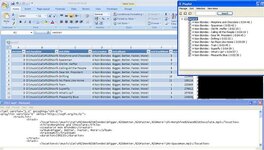
Not sure what you intend doing with the info once in Excel, but you might get some success looking at "XML" Playlists - XSPF format

e.g. using VLC Media Player (which can produce XSPF playlists) you can drag'n'drop folders of music then open the XSPF file with Excel, which, if a recent version, will have a good go at producing columns from the XML "formatting"
 

Attachments

  • Clipboard01.jpg
    Clipboard01.jpg
    78.4 KB · Views: 40
try opening a command window (start... cmd as above) and nagivate to the top level.
type:
dir /s >mylist.txt

This should put a full list of all files including subfolders into the file mylist.txt.
If you then open mylist.txt with excel, the wizzard should guide you through an import.


Back
Top Bottom