FYI if your PC says you cannot upgrade to Windows 11...

adventuredon

Well-known member
UKGSer Subscriber
Joined
May 13, 2010
Messages
7,437
Reaction score
854
Location
Wandsworth, London
I have just used this on mine. No Issues. Takes about an hour. Bypasses the hardware stipulations that Microsoft impose.


Hello Donovan Smith,

Thank you for getting in touch

To update to Windows 11 (Or to a new Windows 11 version), please refer to our dedicated Windows 11 page on our website, which also includes links to Windows 11 Extended Universal Installation, which allows you to install Windows 11 on any computer:
https://www.gcentre.co.uk/statement-on-windows-11/

Once the installer downloads, disconnect from the wifi and the internet and then run the installer,

It will also have a checkbox marked "Check for updates" Make sure this is not checked


As mentioned in our Windows 11 page, Windows is artificially limiting Windows 11 to laptops that are 3 years old with TPM 2.0 and Secure Boot built-in, in order to boost new computer sales. So even if someone were to walk into a Curry's PC World or Argos right now and shop around for brand new sealed boxed laptops, not everything that they encounter will be eligible for Windows 11, they'll need to be careful to pick and choose specific laptops that meet Microsoft's strict demands or simply just install Windows 11 Extended Universal Installation like most people are doing now.

Since Windows 11's release(over 2 years ago), we have been prepping, quote: "unsupported" laptops with Windows 11 without any issues whatsoever, all our customers who received laptops with Windows 11 have been doing just fine for months and years since their order. Because as mentioned in our Windows 11 statement on our website, these 'requirements' are more of a money-grab by Microsoft rather than an actual necessity. It's unfortunate that a lot of perfectly able laptops are currently being chucked-out because of this and contributing towards the ever-growing problem of e-waste.
 
I have just used this on mine. No Issues. Takes about an hour. Bypasses the hardware stipulations that Microsoft impose.


Hello Donovan Smith,

Thank you for getting in touch

To update to Windows 11 (Or to a new Windows 11 version), please refer to our dedicated Windows 11 page on our website, which also includes links to Windows 11 Extended Universal Installation, which allows you to install Windows 11 on any computer:
https://www.gcentre.co.uk/statement-on-windows-11/

Once the installer downloads, disconnect from the wifi and the internet and then run the installer,

It will also have a checkbox marked "Check for updates" Make sure this is not checked


As mentioned in our Windows 11 page, Windows is artificially limiting Windows 11 to laptops that are 3 years old with TPM 2.0 and Secure Boot built-in, in order to boost new computer sales. So even if someone were to walk into a Curry's PC World or Argos right now and shop around for brand new sealed boxed laptops, not everything that they encounter will be eligible for Windows 11, they'll need to be careful to pick and choose specific laptops that meet Microsoft's strict demands or simply just install Windows 11 Extended Universal Installation like most people are doing now.

Since Windows 11's release(over 2 years ago), we have been prepping, quote: "unsupported" laptops with Windows 11 without any issues whatsoever, all our customers who received laptops with Windows 11 have been doing just fine for months and years since their order. Because as mentioned in our Windows 11 statement on our website, these 'requirements' are more of a money-grab by Microsoft rather than an actual necessity. It's unfortunate that a lot of perfectly able laptops are currently being chucked-out because of this and contributing towards the ever-growing problem of e-waste.
If you a computer savvy, then go into the BIOS and switch TPM on. This will vary according to the chipset (AMD Intel) etc.

I did this and the upgrade to Windoze 11 went smoothly
 
This is very helpful lads.....


So do I need to buy a copy of Windows 11??

Or will the update be free?


(serious question..... I'm a complete numpty with this stuff)

I'd really rather not buy a new laptop.

Xiaomi M14U
 
If you a computer savvy, then go into the BIOS and switch TPM on. This will vary according to the chipset (AMD Intel) etc.

I did this and the upgrade to Windoze 11 went smoothly
not all computers have this option. It's a hardware trick..but didn't work for me. My laptop didn't accept my changes , hence my software intervention.
 
Might be worth waiting for a pro’s opinion (where’s @sparkplug ?) but if your computer is “artificially” limited from getting W11, it’s probably so old that it’s not getting regular updates and in that case, you’re open to hardware hacking.

I guess MS do not want W11 machines being hacked, so they don’t want to give out free upgrades which give them a bad rap.

There ain’t no free lunch.
 
I updated my motherboard just last week on a 2018 pc after getting the windows 10 end of days message and a quick check with the OEM
Two hours later, all good and now running windows 11.
Typical MS scam like everyone else in life.
They want you to buy new. Have no interest in supporting ‘legacy’
All the money is in selling new shit.

Could be why I ride a 2011 GSA still ! 🤣
 
This isn't really my field of expertise @SBD but I suspect it's just Microsoft being Microsoft (i.e. incompetent) rather than them trying to force you to buy new.

Installing and updating Windows has always been a ball ache. The last brand new laptop with it's pre-installed 'ready to go' Windows install I bought (two years ago) took me a full three hours to turn on, set up a user, connect it to WiFi, adjust a couple of security settings. THREE HOURS!

Same task on a linux or Mac based computer would have taken minutes - let's be generous and say15 minutes tops.

"Windows is installing updates, again", "Windows decided that the security settings you changed were not to its liking, so it silently changed them back", Windows is installing updates, again" "Windows noticed you changed the security settings again, sorry, you'll have to dick about in the registry if you want to stop me changing them back like I just did", "windows is installing updates..."

A hateful experience that gave me flashbacks to the late 90's and 'that paperclip'....
 
I’m no MS fan, but I have to say that my W11 experience was painless. And most of what we do at work actually works. Our IT manager is very keen that all our pcs & laptops are well within their renewal cycle, so there are driver updates & security patches being applied regularly, and he is very keen that everyone does the necessary restarts to ensure the updates are in place. And we generally renew on a 4 year cycle.

I’m not at all happy with the sharepoint/cloud thing. Knowing where your data is physically located, and backing it up yourself, with offsite copies seems to me to be secure (though it has risks) but once it’s in someone else’s computer…. I’m so old fashioned.

And the fekkin’ paperclip, and “desktop cleanup”…. But IIRC they were wrapped into XP which was solid and reliable, unlike W7.

unfortunately Windows is the de facto default for business software. Other options (and widows emulators) are available, at a price, and with less choice.
 
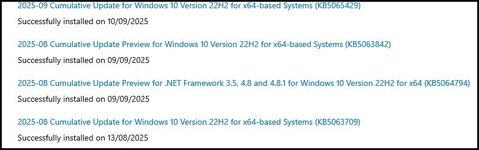
Microsoft has also run out Extended Security updates which are free for home users of Windows 10 home edition or Pro a edition. you need these updates.

1757750257443.jpg

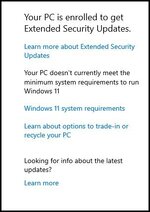
Once installed go to Windows Update in settings and the option to have the ESU's should appear. Then follow the wizard to install them.

you have to be logged on to your MS account as Administrator to get them but you can go back to a local account after you have finished. After its done this panel will appear in Win Updates. The ESU programme lasts until 13/10/2026.

1757750518656.jpg

A wee vid about the steps necessary.

 
  • Like
Reactions: SBD
"windows is installing updates..."
You can avoid that by setting the update to “weekly”… updates are downloaded but installed at a time to suit me; and then they only take minutes to complete.
Depends on who or where you trawl the net, I guess. But, I’m satisfied it serves me OK.
Spam remains my bugbear, but I doubt that is Windows fault; my belief is that it is linked to a “BookingDOTcon” hack.
 
By coincidence I’d been looking to buy a new desktop PC online just before I read this. Keen to put that off a while longer, I downloaded the file this morning and followed the instructions, but it was terminal for my old computer!

So, do I go Apple or HP (as they pay my pension)

20250913_095903611_iOS.jpeg
 
By coincidence I’d been looking to buy a new desktop PC online just before I read this. Keen to put that off a while longer, I downloaded the file this morning and followed the instructions, but it was terminal for my old computer!

So, do I go Apple or HP (as they pay my pension)

View attachment 443354
You'd probably get away with a new HD.......but we all like new toys :D
 
You can avoid that by setting the update to “weekly”… updates are downloaded but installed at a time to suit me; and then they only take minutes to complete.
Depends on who or where you trawl the net, I guess. But, I’m satisfied it serves me OK.
Spam remains my bugbear, but I doubt that is Windows fault; my belief is that it is linked to a “BookingDOTcon” hack.
Yup - but on a new laptop I would always want to apply all the patches and all the security updates before I stared using it or transferring data to it.

It was that far behind that doing that took three hours. It clearly needed doing!
 
I'd be sticking linux on it!
I run this old laptop (2012 toshiba with 8gb ram but only an b950 intel processor) dual boot with W10 and Linux Mint "Mate" edition 22.2 "Zara". I'd move over completely to Linux but I run Basecamp on this machine and it still does some things better than MRA and won't run on Linux. Before ESU's run out I'll create a VM in linux and run Win10 and Basecamp on that isolated from the internet. I have another 2019 Huawei laptop running Win 11 but prefer this one?? I built a desktop PC in 2020 and it runs Affinity Photo and DXO labs PureRaw5. Neither of which have Linux equivalents that match their capabilities. It also runs Davinci Resolve which has a linux variant but this only works without a faff on Rocky Linux 8.x. I do have Linux Mint "Cinnamon" edition on a separate hard drive on that machine. So I'd love to move completely to linux but for some of the application software I use I'm stuck with Windows at the moment.

But it is becoming increasingly intrusive.......and there are far too many privacy issues that have to be switched off after every update. Also the last couple of updates broke my home network drive mapping on this Windows10 machine for some reason??
 
I've historically been OS agnostic and have pretty much always had some variation of OSX (actually I still have some ancient Macs on OS9!) Windows and linux running on various things.

I've noticed myself doing a lot more with Linux these days and (other than my work laptop) I only have one aging Windows laptop that very occasionally gets dragged out if I want do do something with pivot tables.

Other than that, I really have no other use case that requires it. I also went down the Affinity Suite route after Adobe went to a subscription model - I've been very happy with it overall but find it frustrating that there's nothing that will vectorise a bitmapped image yet.... I'm sure it will come at some point!

Windows is increasingly intrusive as you say, and increasingly frustrating to use IMO. As a consequence I've realised that I've drifted further and further away from it.


Other than that, I really have no other use case that requires it. I also went down the Affinity Suite route after Adobe went to a subscription model - I've been very happy with it overall but find it frustrating that there's nothing that will vectorise a bitmapped image yet....
CorelDraw ?
 
Coo..

That takes me back to 1997 :D

There's a ton of stuff that does it, I meant that there's (frustratingly) nothing in the Affinity suite that does it and I'm a bit surprised as it's hardly a 'cutting edge' feature....


Back
Top Bottom