Garmin refuses to import a route

Orinoco

Well-known member
UKGSer Subscriber
Joined
Jun 1, 2010
Messages
2,026
Reaction score
612
Location
The Bride Valley
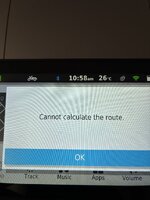
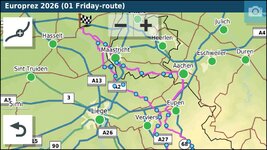
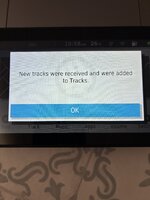
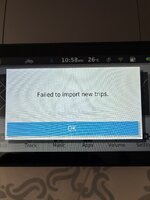
A friend has sent routes for two tours around Belgium Limburg, I can open the files in Myroute-app and export them using Garmin Drive from my phone, but my XT refuses to import the files. Could someone else give this a go please, so that I can narrow down what the problem is. The XT does seem to have imported the track, but claims it is 4 times the length it was in Myroute-app!

Help appreciated - gpx file attached
IMG_7644.jpeg IMG_7645.jpeg IMG_7646.jpeg
 

Attachments

A friend has sent routes for two tours around Belgium Limburg, I can open the files in Myroute-app and export them using Garmin Drive from my phone, but my XT refuses to import the files. Could someone else give this a go please, so that I can narrow down what the problem is. The XT does seem to have imported the track, but claims it is 4 times the length it was in Myroute-app!

Help appreciated - gpx file attached
View attachment 506172 View attachment 506173 View attachment 506174
just exported both as gpx 1.2 to my XT both routes loaded ok. Forget that, my XT just threw a wobbly with the 02 route, 01 loaded ok, so there must be an issue with the 02
 
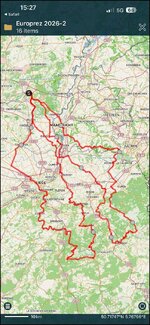
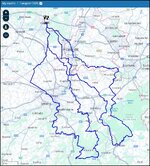
I am at work today, I can though open the route in MyRoute and can see it's a route of 140 miles. The odd thing perhaps, is that opening the same file in Pocket Earth Pro, resulted in a very different picture, much longer.

Edit: Aha, I see why. There are two routes in the one file. I wonder what you have sent to your XT and what it is the device trying to open?
 
Last edited:
The issue may be that there are two routes on the one file. The attached download OK to my Zumo
Thanks, Gave that a go and still no joy, so I guess there must be something with the Garmin and/or iPhone settings, I'll do a rest and see what happens. Thanks again.

Edit - this is turning in to a right mare, reset XT back to new, deleted and reinstalled Drive on phone... still no joy... arghh
 
Last edited:
I’d maybe take a care that you are not trying to import two routes at once.

You mentioned that the XT showed a track that is miles longer than the route. I (possibly) saw pretty much the same when I imported your file into Pocket Earth Pro:

IMG_8816.jpg

That’s 450 km but in reality it’s the two routes conjoined. One route is roughly 230 km and the other 220 km.
 
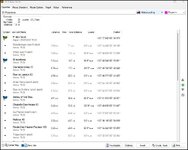
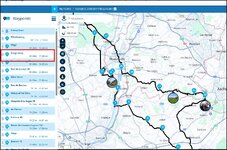
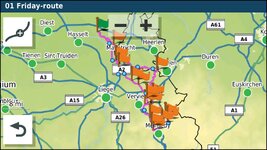
Both came over OK for me but the routes were created in basecamp and the flags/Viapoints in Basecamp did not come over to Myroute as Hand via points.

1779720668373.jpg

1779720979168.jpg


If that's important to you you my want to change the relevant teardrops to hands before reimporting to the garmin to make those waypoints announced. Both the routes and the tracks imported fine into my XT.
 
I've just created a short 'test' route in MRA, car mode, sent to Garmin Drive and successfully imported into XT.

The issue seems to be the route as the XT has imported the tracks using GPX1.1. I'll have a go a creating the route fresh from the tracks and see what happens, a bit weird though... well it's Garmin :rolleyes:

This will probably be what pushes me over the edge to try one of the Chinese CarPlay units or use an old phone with MRA and give up on Garmin.

Will have to put this on hold for a while, grandson coming to stay for a few days...
 
When exporting, don’t you get an option whether to export:

A. A route

B. A track

C. Both

It’s been a while since I exported anything to my XT, so I’m guessing a bit.
 
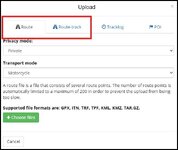
When importing into MRA for a file like that with routes and tracks import twice Import the route then go to the route track tab and import the same file (it just ignores the route bit...)

1779721332686.jpg

You end up with this Two routes and the route track for BOTH days.


1779721251356.jpg
 
This is the Track for both days that was embedded in the file. This is a PITA as if you want to display the track under the route it would get a bit confusing. EAsier if the routes and tracks are split into individual days.

1779721548811.jpg
 
I imported the routes into MyRoute and exported them to the XT as GPX 1.1 both came over fine. The Via/Flag waypoints appearing as shaping points is the only issue.
 
In both cases the Basecamp file imported into MRA and sent to the XT via Drive makes the Via points into shaping points.

1779722670797.jpg

1779722730142.jpg
 
Same file imported via Basecamp. as you can see the Via(Flag) points are retained.

1779723515585.jpg

1779723555389.jpg
 
Hi Orinoco, re not calculating the routes. A few potential issues to eliminate.

1.Has your XT any avoidances enabled like for example Motorways that would stop the route from calculating? The only one I have enabled in mine is "Offroad" and all calculated OK
2.Does your XT know where it is i.e are you getting a decent GPS signal in the location you are trying to load the files?
3.Are you trying to load them from a potentially corrupted SD card or are you using the Drive app?, MRA connector or some other means of getting the file into the device. Try loading the files with the sd card removed to see if that enables calculation
4.Have you another map enabled on the device?

Just a few thoughts about things that can make an XT misbehave.


Back
Top Bottom