Garmin Zumo 660 Virgin

Baza 07

Active member
UKGSer Subscriber
Joined
Aug 29, 2020
Messages
386
Reaction score
53
Location
Wirral Merseyside
Hi all this could be the first of a thousand Qs,
as the title says first time bike Satnav owner,so here goes, starting with in my car Satnav I type in where I want to go, and off it goes, but when doing the same the Satnav says “NoData” and the Q is ,
Does everything you do on the bike Satnav have to be done through a PC,plus should restore it back to factory settings and then try again,Cheers Baza
 
Hi all this could be the first of a thousand Qs,
as the title says first time bike Satnav owner,so here goes, starting with in my car Satnav I type in where I want to go, and off it goes, but when doing the same the Satnav says “NoData” and the Q is ,
Does everything you do on the bike Satnav have to be done through a PC,plus should restore it back to factory settings and then try again,Cheers Baza
I’m guessing you have bought this second hand? The previous owner may well have deleted everything from it. If this is the case you will need to update the mapping. My 660 has lifetime updates, yours may too. If not you will need to buy the maps.
Basecamp is the routing, mapping system Garmin use, it’s very easy to use and routes can be shared with other Garmin users. I’ve had my 660 over 10 years now it has not let me down yet.
 
Start with the simplest things;

A. Are the maps installed?

B. If so, which maps are they?

C. Are the maps active?

This is on a different device but it’s near enough the same for a 660:


Tell us what you see, please.
 
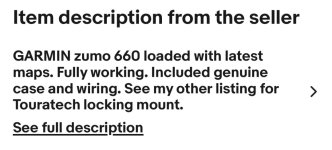
Wapping I couldn’t find anything on mine from your link but here’s a SS of the sale,hope this helps thanks for your reply mate👍
 

Attachments

  • IMG_1590.jpeg
    IMG_1590.jpeg
    72.9 KB · Views: 28
Wapping I couldn’t find anything on mine from your link but here’s a SS of the sale,hope this helps thanks for your reply mate👍

What some unknown bod puts into their sale advert is of little real relevance.

Either the maps are there and active or they are not.

Let’s try it another way. Turn the 660 on and get it to display the map screen, with the little cursor showing where you are standing. Now zoom in. Can you see all the little roads around you displayed? Yes? Good. No, bad.

Now drag the map to say, London and zoom in. Can you see all the little roads and their names? Yes, good. No, bad.

Now repeat the same operation, dragging to say, Edinburgh, Belfast, Paris, Stockholm, Lisbon and Rome. Can you see all the little roads for those cities, too? Yes? Great. If no, possibly not so great, depending on other parameters.

Await your words,
 
Last edited:
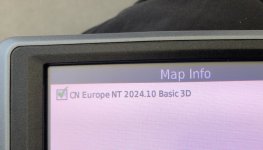
Just found this

Aha, that probably only confirms in part at least, that you should never trust an advert, simply on face value alone.

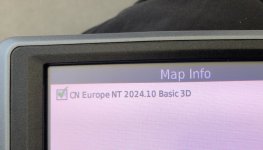
I strongly suspect that you only have the base map, which you can confirm one way or the other by zooming in and out as described in post #6. The device cannot route you on just its base map.

From memory, the 660 is not capable of holding the latest maps on anything but an SD card. I suspect that there is either no SD card or, if there is one, it is not active or somehow it’s corrupted.
 
Adding to Richards bit
IMHO anything Garmin is best done on a Windows PC-
Knowing nothing about apple computers I stand be corrected-I am aware of many apple workarounds but also of a bucket load of issues generating from that so, as I said IMHO, stick to windows to save a LOT of pain!

The links below are for Windows 10 downloads
In sequential order:
1-You'll need to download Garmin Express and install it
2-You will need to download Basecamp and install it
3-ONLY AFTER you have done (1) and (2) THEN connect your zumo to the PC,
4-Ensure you are connected to the internet on your PC THEN start Garmin Express which should find your zumo.

IF and there is an 'if' the previous owner has de-registered his/her unit, you will be able to register it- and 🤞should be able to re-download maps-
There maybe a Garmin glitch here if they allow - or not - another owner to do so
If not then you will not be able to register the unit and will need contact seller to ask him to do so.

Then begin the process of learning a lot! Bonne chance
p.s don't panic if, for whatever reason, you cannot get ahold of shitty navigator maps as OSM maps are not only free, but mostly updated weekly (as against Garmins' yearly...) and they more detailed too.

p.m me if you get stuck
 
Last edited:
What some unknown bod puts into their sale advert is of little real relevance.

Either the maps are there and active or they are not.

Let’s try it another way. Turn the 660 on and get it to display the map screen, with the little cursor showing where you are standing. Now zoom in. Can you see all the little roads around you displayed? Yes? Good. No, bad.

Now drag the map to say, London and zoom in. Can you see all the little roads and their names? Yes, good. No, bad.

Now repeat the same operation, dragging to say, Edinburgh, Belfast, Paris, Stockholm, Lisbon and Rome. Can you see all the little roads for those cities, too? Yes? Great. If no, possibly not so great, depending on other parameters.

Await your words,
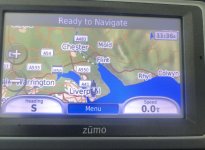
How’s this scrolling in and out 🤔
 

Attachments

  • IMG_1592.jpeg
    IMG_1592.jpeg
    152.4 KB · Views: 21
Should I restore and start again 🤔🤔
Thanks for all your help so far to you and Yarkto 👍

Post #9 looks very much like the basic base map.

Resetting will probably not summon up a map that is not present, but by all means try as it costs nothing.

Me? I’d be contacting the seller to tell them that the device does not seem to have its ‘latest maps’ installed, or if they are you can’t see or find them.

The alternative is to:

Buy a virgin SD card (say 16 gb), install it. Register the device with Garmin and then, install them yourself.
 
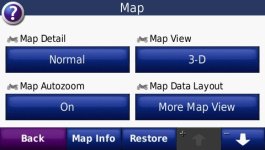
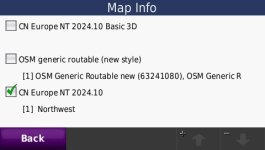
To find if you have maps installed go to Tools>settings>map. Map info is at the bottom of the screen.

580.jpg

These are my installed maps. This is an old BMW Nav IV unit which is a BMW badged 660. Ignore the unchecked maps.

587.jpg
 

Attachments

  • IMG_1591.jpeg
    IMG_1591.jpeg
    110.6 KB · Views: 17
That is just the basemap. You need to register the device with Garmin and download the map ticked above to the device. This will only be possible if the unit was purchased with Lifetime Maps. If not Garmin will be looking for a map purchase. I wouldn't bother with a Garmin 660 it came to the UK market in 2009-2010 so while it is a good unit its likely to be "sundowned" with regards to map updates shortly. This leaves the option of loading Open Street Maps on the device which as a beginner would not be ideal.
 
This leaves the option of loading Open Street Maps on the device which as a beginner would not be ideal.
Eh?:nenau ...:blast

Don't be put off as it is really easy to do - get in touch should you wish! ( after picking up the kids :green gri!!)
Read #8, last paragraph.
I'll also walk you through getting as many OSM maps as you wish-
 
A quick update fella's,restored Satnav earlier,bought SD Card 32g,downloaded Garmin Express,and Basecamp,
Registered with Express,now its loading maps and where 2 hours 34mins left to go ,,,,catch you laters
Thanks for all your help ,,,,Baza
 
There you go.

Do though point out to the seller that his advertisement was, at best, misleading.
 
A quick update fella's,restored Satnav earlier,bought SD Card 32g,downloaded Garmin Express,and Basecamp,
Registered with Express,now its loading maps and where 2 hours 34mins left to go ,,,,catch you laters
Thanks for all your help ,,,,Baza
Good stuff 😊
 
Update ☹️
Express got to 1 hour something to go and through its hand in, a notice came up saying my PC Drive didn’t have enough room for the download 🤬😳🤯 no idea what that means 🤦‍♂️
What’s that got to do with my HD,
Anyway is it possible for Express to only load maps of the UK as I won’t be needing them abroad 🤔
Also how d’you do a “Hard Restore” and completely wipe the Satnav clean, I’ve tried holding the screen down, chasing the black dot,recalibrated, the deleted all data, but there’s stuff still on the bugga
I think that’ll do for now as my “Ed Urts”
Cheers Baza


Back
Top Bottom