HELP!! Base camp camp see's the S card but not the files, are mac files different?

Deleted account 190419001

Registered user
Joined
Dec 16, 2015
Messages
409
Reaction score
0
Hello,

I have just purchased a Nav 5 from this parish, it has an SD card and european maps. If if use the Nav 5 I can see all the roads that I need (pyrenees), however basecamp only see's the global map and major roads

Base camp does see the SD card, but believes it to be empty. When I use explorer to view the SD card I see folders such as "Garmin" which has the file gmapsupp.img file - which I assume is the map.

However, there is a "._Id.txt" file which has odd characters but also the words "Mac os x"

Does this mean the Nav 5 was previously connected to a mac and therefore base camp on windows wont read the file?

I am not a techie nor a computer guru, so please be gentle!

Thanks :)
 
I do not have mine to hand but.....

I do not think you have the maps on the SD card as IIRC they are called something different but will have the lates release number which is something like 117 ??

I would not worry too much about the Mac tet file but if i were you I would re format the card there is a screen shot of how to do it on another thread but aldso on the garmin FAQs but in short use FAT 32 and thenm give the card a name so it isnt just "Unknown" or "No name"

Then you should be able to do the updates using Garmin Express ( I assume you have the lifetime maps with the device)

If this fails then by making sure you have the latest maps in Basecamp you can use Mapinstall


Plenty of threads of late about NAV 5 and SD Cards
 
Thanks Redrick,

to be honest I've only just got the Nav 5, didnt ask about the lifetime maps update and presumably there will be a password or something required. I've emailed the UKGSer that I bought it off to ask the questions I should have asked in the first place.

I don't want to reformat anything in case I lose the maps from the Nav 5 as the tour starts on Tuesday, I've looked at the directory on the unit as well as the nav 5 and cant find any file that looks like its the map. :(

I did say I'm a newbiw to all this :)
 
The fact that you can look at in the directory is a good start

I strongly suspect that you are without the detailed maps you will need for "abroad"

Just to be certain

On the Nav 5 look in settings at the installed maps and you will see what is actually on the unit regardless of SD card
 
you have purchased the unit with the maps on it, and then downloaded basecamp and installed it to your mac/pc, and have not installed any maps to your mac/pc is this correct, if so you will need to either download the maps to your mac/pc from garmin using express, or install the maps by taking the maps from your nav using basecamp. post back with details.
 
Thanks Redrick,

to be honest I've only just got the Nav 5, didnt ask about the lifetime maps update and presumably there will be a password or something required. I've emailed the UKGSer that I bought it off to ask the questions I should have asked in the first place.

I don't want to reformat anything in case I lose the maps from the Nav 5 as the tour starts on Tuesday, I've looked at the directory on the unit as well as the nav 5 and cant find any file that looks like its the map. :(

I did say I'm a newbiw to all this :)

Previous owner needs to deregister the device & you need to register it in your name for map updates.
 
Previous owner needs to deregister the device & you need to register it in your name for map updates.

I dont think thats the case

from garmins site


Support
Frequently Asked Questions

« Get additional answers from Garmin
Can I transfer my downloadable content or purchases if I sell or give my automotive device away?

Email this Answer
Print this Answer

10/19/2015

If you decide to delete your registered automotive device and give it to another individual or privately sell it, consider that most of the purchases you made for that device are not transferable.

Below is a list of downloadable content or purchases that can be used if still loaded to the device, but cannot be accessed in the myGarmin account of the new owner:

Supplemental Map Download
Red Light and Speed Camera Subscriptions
FM Traffic Subscriptions

If one of the above is already loaded to a device when it is received, the product can be used but no updates can be accessed from myGarmin without purchasing a new item, subscription, or service.

Because map updates (including the nuMaps Lifetime subscription) no longer require registration, they may still be accessed if the device is sold or given away.

Lifetime updates can be accessed outside of myGarmin by connecting the device to a computer and downloading and installing Garmin Express.
 
I bought the Nav V from here with the European map already installed it is:-

CNEurope NT 2016.10

works fine on the device.

I then installed base camp, basecamp can see the SD card and there are some POI's on it.

I cant get Basecamp to find the map so just have the global map available (which doesnt have many of the roads I want)

Garmin express doesn't see the SD card

Have tried every combination I can think of, and Redrick called my to try and help (very kind) the map I think is on the SD card has the file name gmapsupp.img and is about 3.0 GB

Thats about as much as I know.

I have copied the file from the SD card and am going to try buying a new SD card, formatting it as instructed and see if that works....
 
I dont think thats the case

from garmins site


Support
Frequently Asked Questions

« Get additional answers from Garmin
Can I transfer my downloadable content or purchases if I sell or give my automotive device away?

Email this Answer
Print this Answer

10/19/2015

If you decide to delete your registered automotive device and give it to another individual or privately sell it, consider that most of the purchases you made for that device are not transferable.

Below is a list of downloadable content or purchases that can be used if still loaded to the device, but cannot be accessed in the myGarmin account of the new owner:

Supplemental Map Download
Red Light and Speed Camera Subscriptions
FM Traffic Subscriptions

If one of the above is already loaded to a device when it is received, the product can be used but no updates can be accessed from myGarmin without purchasing a new item, subscription, or service.

Because map updates (including the nuMaps Lifetime subscription) no longer require registration, they may still be accessed if the device is sold or given away.

Lifetime updates can be accessed outside of myGarmin by connecting the device to a computer and downloading and installing Garmin Express.

I think you're wrong, and my experience is that if you deregister and the new owner registers the LT maps are transferable.
 
You may think I am wrong but the above was copied from garmin so faq page, the last two paragraphs clearly state no longer require registration. And you will find this has been confirmed else where on this very forum as I recall
 
I bought the Nav V from here with the European map already installed it is:-

CNEurope NT 2016.10

works fine on the device.

I then installed base camp, basecamp can see the SD card and there are some POI's on it.

I cant get Basecamp to find the map so just have the global map available (which doesnt have many of the roads I want)

Garmin express doesn't see the SD card

Have tried every combination I can think of, and Redrick called my to try and help (very kind) the map I think is on the SD card has the file name gmapsupp.img and is about 3.0 GB

Thats about as much as I know.

I have copied the file from the SD card and am going to try buying a new SD card, formatting it as instructed and see if that works....

i doubt your sd card is at fault, you say you can use it and see the map on the nav. a couple of questions, are you running a pc if so what o/s, or are you running a mac, what have you got installed on it from garmin, basecamp, map source, express, mapinstal, poi loader, web updater, do you have all, none or one. has the unit got lifetime updates,

please reply with answers.

Ps the gmapsupp.img that you can see on the card will be the map.
 
From this very forum someone who spoke to garmin and got the answer via email so just maybe when you buy a unit with LM it is most definately transferable without de registering, now if you purchased the maps a while ago as a seperate add on after the purchase of the nav you would have then needed to de register it, as the map is with your account and not the unit, but as above i was refering to units purchased with LM.

link to thread.
http://www.ukgser.com/forums/showthread.php/391160-Garmin-Lifetime-Maps

and the link to garmins web site that states the very same. not a copy and paste.

https://support.garmin.com/support/...caseId={faefc030-14c6-11de-76c5-000000000000}

maybe there are others on here who would care to confirm this.

:beerjug::beerjug:
 
i doubt your sd card is at fault, you say you can use it and see the map on the nav. a couple of questions, are you running a pc if so what o/s, or are you running a mac, what have you got installed on it from garmin, basecamp, map source, express, mapinstal, poi loader, web updater, do you have all, none or one. has the unit got lifetime updates,

please reply with answers.

Ps the gmapsupp.img that you can see on the card will be the map.

I have basecamp, garmin express that's all. The pc runs Windows 7

I've bought a new SD card to see if garmin express will see it, then I'll try copying the map file onto the new card and see it that allows base camp to see the map.

It's a right palaver!

As I said previously the device works just fine, I can use the route planner app by finding waypoints on google maps and manually searching for then on the Nav V, it's just a long winded way of doing it. That said I'm running out if time as I leave Tuesday morning!
 
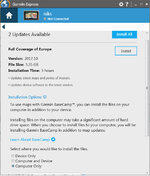
If the unit has the lifetime maps but you have no maps installed in basecamp you will need to download them using express, plug the unit in let it sync to the pc, open express and it should tell you if an update is available, if it is your screen should look like the example below select instalation options, then select instal to computer only, dont worry that it can not see the card at the moment just lets try and get it on the pc. report back with what issue you have when trying this
 

Attachments

  • 11-09-2016 14-54-04.jpg
    11-09-2016 14-54-04.jpg
    84.4 KB · Views: 57


Back
Top Bottom