
Help req. Please MRA.

MAR.600

Active member
UKGSer Subscriber
Joined
Jun 9, 2012
Messages
270
Reaction score
61
Location
GLASGOW
Hi
Done the route on MRA , uploaded onto my xt. By Bluetooth Garmin Drive.
Uploaded fine no issues track/route 1.1.
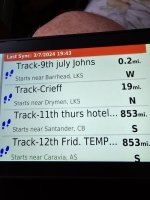
Going onto the xt go to track the mileage is 853.
20240703_194350.jpg
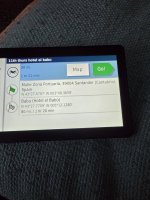
Going onto trip planner the mileage is 81 miles . That is correct.
20240703_195846.jpg
20240703_194422.jpg
Looking at the track is directing myself from my house. ?
Why ?
Will this correct itself when I come off the ferry ? To the correct track. .
I like put the track on first then the route on top.
Thanks again guys for help I receive in this forum in fantastic.
When it comes to gadgets 🙄
 
To try to help you best, can you share with us the route / track file that is displaying as 853 miles, please. Embed it into this thread, just as you have done in your posts in the travel section.

My guess is that, when you are displaying the track on your device, you are somehow asking it to take you from your house to the start of the route and then along the track to the track’s end. In other words, the track is actually 81 miles long but from your house to the track’s start point is an additional 772 miles.

Question: Why are you loading the routes AND the tracks? Most people just use one or the other. If you are happy that the routes are correct and that you’ll know how to use your XT when you arrive in Spain, then you’ll never need the tracks at all.
 
Last edited:
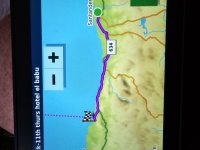
My uneducated guess is that both are right, the clue being the dotted line on the computer image, 853 includes the milage from where you are planning the route.
 
To try to help you best, can you share with us the route / track file that is displaying as 853 miles, please. Embed it into this thread, just as you have done in your posts in the travel section.

My guess is that, when you are displaying the track on your device, you are somehow asking it to take you from your house to the start of the route and then along the track to the track’s end. In other words, the track is actually 81 miles long but from your house to the track’s start point is an additional 772 miles.

Question: Why are you loading the routes AND the tracks? Most people just use one or the other. If you are happy that the routes are correct and that you’ll know how to use your XT when you arrive in Spain, then you’ll never need the tracks at all.
View '11th thurs hotel el babu' in MyRoute-app!
 
Hi
Done the route on MRA , uploaded onto my xt. By Bluetooth Garmin Drive.
Uploaded fine no issues track/route 1.1.
Going onto the xt go to track the mileage is 853.
View attachment 333137
Going onto trip planner the mileage is 81 miles . That is correct.
View attachment 333138
View attachment 333139
Looking at the track is directing myself from my house. ?
Why ?
Will this correct itself when I come off the ferry ? To the correct track. .
I like put the track on first then the route on top.
Thanks again guys for help I receive in this forum in fantastic.
When it comes to gadgets 🙄
Because the GPS is planning the route from your house as well as taking in the tracks you've added

When you arrive it will change the distance
 
Because the GPS is planning the route from your house as well as taking in the tracks you've added

When you arrive it will change the distance
Thanks all tracks I have loaded up.
All are high 800 + miles.
Kinda thought it may correct itself.
Never know just looking for second opinion.
🍻🍻
 
View '11th thurs hotel el babu'…..

Thanks.

There is certainly nothing wrong with the simple A to B route, so that saves that possible concern.

Tip one: MyRoute recommends placing a shaping point every five kilometres (three miles) as it helps to pin the route onto the roads. The other advantage is that (in version 1.1) the shaping points appear on the XT as little blue dots, which is sometimes a comfort when making sure that the route has imported into the device correctly. It’s the method I use.

As your route is predominantly motorway, A to B, this recommendation is not so important. But, it’s viewed as best practice even so, particularly on long or complex routes.

Tip two: If you know where you’ll be at the start of any route, you are often best advised not to start creating the route from there. But, instead start it a bit along the road you’ll be taking. Why? Three reasons:

1. Your GPS will know exactly where you are when you turn it on, it does not need to be told.

2. If you make the first point a bit away, it gives the device a point to aim for, from where the route will run automatically thereafter, with no intervention from you. When you turn on the device and load the route, the device will list the points and ask you which one you want to go to. Simply, in my example attached, ask it to take you to ‘START’, the route will run itself normally thereafter, with no more intervention from you.

3. You made your first point inside the port area itself. That is perhaps risky. Why? It often happens that port officials change road layouts. If you do not start from that point, the device might well keep on sending you back to pass through it, which might be impossible for you to do.

I have taken the liberty of brushing-up your route, so you can see what I mean.

 
Last edited:
Thanks.

There is certainly nothing wrong with the simple A to B route, so that saves that possible concern.

Tip one: MyRoute recommends placing a shaping point every five kilometres (three miles) as it helps to pin the route onto the roads. The other advantage is that (in version 1.1) the shaping points appear on the XT as little blue dots, which is sometimes a comfort when making sure that the route has imported into the device correctly. It’s the method I use.

Tip two: If you know where you’ll be at the start of any route, you are often best advised not to start creating the route from there. But, instead start it a bit along the road you’ll be taking. Why? Three reasons:

1. Your GPS will know exactly where you are when you turn it on, it does not need to be told.

2. If you make the first point a bit away, it gives the device a point to aim for, from where the route will run automatically thereafter, with no intervention from you. When you turn on the device it will list the points and ask you which one you want to go to. Simply, in my example attached, ask it to take you to ‘START’.

3. You made your first point inside the port area itself. That is perhaps risky. Why? It often happens that port officials change road layouts. If you do not start from that point, the device might well keep on sending you back to pass through it, which might be impossible for you to do.

I have taken the liberty of brushing-up your route, so you can see what I mean.

Thanks Richard
For all the pointers .
Is it best to set the xt device to don't recalculate. ?
Much appreciated for your time in helping out.
Cheers
Martin
 
Recalculation is a double edged sword.

If you are someone who simply asks the device (or the original route creation software) “Take me from A to B”, then recalculating is fine. Why? You had no hand in creating the original route, as the device or software did it all for you. Why not let the device recalculate, safe in the knowledge that, no matter where you deviate to, the device will always take you to your final destination.

If though you create your own routes, it’s logical to assume that the route goes along the roads you want to ride. You do not want the device to recalculate the route, as odd - or even bad -things can or might happen. How odd or how bad often depends on a lot of factors, too many to go into here.

Me? I create my own routes. I set my recalculation option to prompted, yes or no. That way I get a flash-up warning that I have gone off route and I (not a dumb, but really very clever, device) can chose whether to recalculate or not. Most often I say no, as I can generally work my own way back to the magenta line, safe in the knowledge that the route itself is unaltered. If though I am at say the end of the day and have I somehow overshot my hotel in a big town, I might well say, yes.

My advice….. Modern devices are pretty much like powerful PC’s. What makes sense to one person (and the way they use the device) makes no sense at all to someone else. That is before we even start to mix in preference settings and, in some cases, maps and / or how the route was originally created. Use whatever method works for you. The XT is a powerful GPS device but not without its quirks, by the end of your trip, you’ll know best how to use it ‘your way’.

Enjoy your holiday. If you get stuck, this section (or Travel) will always do its best to help you out.


PS Here’s a hopefully useful post and thread on the ‘Expand’ function and how to use it.

 
Last edited:


Back
Top Bottom
