Help required backimng up a pst file

AndyT

Well-known member
UKGSer Subscriber
Joined
Jun 26, 2002
Messages
8,331
Reaction score
10
Location
Stuck in SE Asia.....Thank you Covid 19
I'm having a few issues with my pc one of which is MS Outlook. When I open it up it always fails to load properly and I have to close it using Task manager. Then when I open ity up I get the otion to start it in 'Safe' mode and when I do this I can use it perfectly however I want to unload it and reload it again to try and get rid of this bug. Before I do that though I want to back up my PST files so I can point outlook to them once I have reloaded it however when I try to copy the file to an external drive I get the error message:

'Cannot copy Outlook - The process cannot access the file because another process has locked a portion of the file'.

The file is also 510MB in size which seems quite large!!!

Any ideas how I can get around this. I'm thinking that the process that has the file locked maybe the 'safe mode' or is it possible corrup or infected etc...!! I have a fully paid up copy of Eset Nod 32 running and Anti Malware bytes and the pick up nothing.

Any help apprecieted.

Many thanks

AndyT:thumby:
 
Reboot pc. This makes sure the file is not locked.

Browse to either Xp= c:\documents and settings\username\application data\microsoft\outlook
Or win7/vista = c:\users\username\app data\local\microsoft\outlook

Copy the file outlook.pst to your desktop.

Search for scanpst.exe or browse for in in c:\program files\microsoft office\14\

Run scanpst.exe and select the outlook.pst you stored to your desktop. It will fix broken indexes. Copy the fixed version from your desktop back to the original location. Max file size for .pst is 2GB if office 2003 or earlier and 4GB for office 2007 and later.

Si. Shameless plug: www.ldsit.co.uk
 
Just tried that without success :-(

I forgot to mention in my first note that I can't see the pst file in file manager (or explorer as its called now). When I go into Outlook/tools/Account settings/datafiles I can see the file path but can't see it in explorer. I can click on the button called 'open folder' and I get a new window pops up with a few files including the said pst file but it won't let me copy it. I can't copy it with outlook colsed as I cant see it in explorer if that makes sense!!

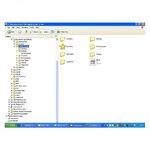
The first pic is my C;\drive and as you can see there is no folder there under "documents & Settings/Andrew Turner/Local settings etc..."

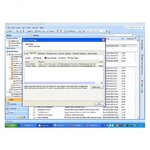
The 2nd pic is when I go to Otlook, tools/accounts etc...

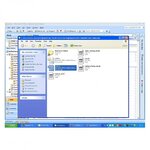
The 3rd pic is when I have clicked on the 'open folder' button....

Any idea how I can get to see the PST file in Exporer without outlook running??


AndyT:thumby:
 

Attachments

  • pst screen dump.jpg
    pst screen dump.jpg
    53.6 KB · Views: 81
  • pst screen dump2.jpg
    pst screen dump2.jpg
    105.5 KB · Views: 79
  • pst screen dump3.jpg
    pst screen dump3.jpg
    83 KB · Views: 79
The reason you can't se the folder is because it is hidden.
In Control Panel
Click on Appearance and Personalization
Click on Folder Options
Go to the tab View
Tick “Hidden files and folders: Show all files and folders”
Untick “Hide protected operating system files (Recommended)”
Click “Apply” and then “OK”.

You should now see the 'hidden' folders, drill down to the folder where your .pst file is and copy it. Obviously you can't do this with Outlook running.
 
Thats the one, I'm on Windows XP so found it in the Control panel folders option and have copied it to my portable drive. Now to unistall Outlook and reinstall. Better check I have th discs first :D

Thanks for your help guys.

AndyT:thumb
 
Well I managed to save the PST files on my portable drive. Where will I find the address book? I think once I've saved them I'm going to format the C:\drive as my PC is playing up big time. Can't open up firefox at the moment as it says cant find XCOM or similar. Having to use this laptop which tales me ages type.....:(

Thanks again

AndyT:thumb
 
I think Outlook address book is a *.pab file, stick that in search and see what comes back.


Back
Top Bottom