Help with BIOS settings

Andy B

Well-known member
UKGSer Subscriber
Joined
Apr 6, 2006
Messages
2,573
Reaction score
55
Location
Lea & Perrins country
Okay - my credentials! I know enough about PC's to build them, but what normally flumuxes me is software and operating system issues!:nenau

My problem is; I had a chip fan pack up on me recently. Quick trip to Maplin to buy a replacement and job done!:thumb2 The PC is relatively modern - about 2 years old with an 2.22 GHz AMD Dual core processor. I'm running Windows XP

However, on booting up (before Windows kicks in) I now get the message: ***Warning: Your Computer CHIP Fan or speed is too low ***. Underneath it says 'You can disable this warning message in SETUP'.

I am not confident enough to start messing with BIOS settings without being sure what I'm doing. Firstly, should I be disabling it? Secondly, despite having had a quick look round the BIOS I can't find anywhere that would allow me to disable it or reset it.

Can anyone help please?:bow
 
Have you looked under Advanced setting? have you also plugged the new CPU
fan into the correct socket??? 3wire fan, yes!!!
 
Good point - I'll check. I seem to recall there were two power take-offs on the motherboard. I could have accidentially have put it back in the wrong on.
 
Andy,

Be careful if you delve into the bios as some changes made in here can render your PC useless, if you can, back up the settings before you make any alterations.
 
Don't worry - this isn't a major problem

Firstly, you have to know that there are normally two fans on the motherboard, the main one is for the CPU (called the CPU fan - odd that?!), there is also another one, but not always, that protects the Chip set (sometimes known as the northbridge/southbridge), however, some motherboards (often labelled Deluxe models with the Asus range) use a heatsink only. Typically, the motherboard will still have a temperature sensor for this chipset, and a fan power connection. I believe that this error is just saying that it cannot detect a fan on the chipset (and not the cpu), and it is equally possible you don't have one. There is an option in the bios to disable this warning (it does say that in the error message).

It would be perfectly safe to go into the bios, and look for the setting (normally like Disable warning on chipset). Try not to modify the other memory or CPU timing features, that may cause problems (as mentioned in the other posts). Change it, and then save&exit from the bios.

If you do have a chipset fan (look on your motherboard for another fan), is it moving. These are notoriously poor, and do often fail, if so, nip over to Maplin's and buy a replacement (for not a lot of money), or upgrade to a heatsink if necessary (look on www.scan.co.uk for chipset cooling options). Typically, the system will hang/crash after the system has been up for a while if there is a cooling problem.

However, the AMD CPUs are quite clever, and can detect whether a heatsink is attached to the CPU, and what speed the fan is running, if it doesn't have a good connection, the system will not even get to the boot menu, and normally beep in a continuous high-low-high-low alarm, this is also true if you physically stop the fan from spinning.
 
Dan,

That's really good advice - thanks. The fan that packed up and which I replaced sits on top of a large heatsink, which in turn sits on top of the main processor. I don't recall another fan apart from on the graphics card. I'll check and report back on Monday.:thumb
 
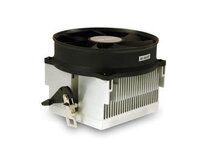
This is what I have on top of the processor:

Yep, thats a CPU fan. I expect you will probably have a heatsink on your chipset. As I said, go into the Bios and disable alerting, or just press F1 to continue.

Modern motherboards have really good thermal protection, and will power themselves off if things get too hot.

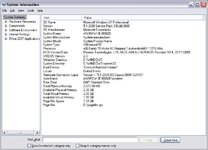
If you make a note of what motherboard you have, it shouldn't be too hard to download the manual and give you better instructions.

Have a nice weekend.
 
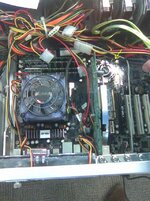
Dan, you were right. There is another fan on the motherboard and it isn't working (yellow circle and arrow). I'll need to organise a replacement.

Also, the BIOS spec attached too.
 

Attachments

  • untitled2.JPG
    untitled2.JPG
    120.3 KB · Views: 83
  • untitled.JPG
    untitled.JPG
    69.5 KB · Views: 84
Dan,

I ordered the fan yesterday.Someone else told me that it might be a motherboard out job! As I can get into my tower from boh sides, I'm hoping I might be able to cheat! I haven't ever needed to take the other side of the case off before so we'll see!

Thanks for your offer of help.
 
This last post made me laugh, if you can access the underside of your motherboard without taking it out, I'd be impressed. They are always screwed into the chassis/case on a metal plate, you will be able to access the underside of the plate, but not the motherboard.

Once practiced, it is only 5 mins to remove, usually the tightest point is easing the board out of the flimsy template (where the external ports - speakers, network, usb ports are). Make sure you don't force the board, as its more likely to be a missed screw.

good luck.
 
Yes - after I'd said it I thought that would be the case!

Fan's arrived so rather than rush it I'm going to bring the PC home from the office at the weekend and take it slow!


Back
Top Bottom