I have successfully used a Zumo 550 for the last few years but the hole in the dash of my new RT LC has seduced me into shelling out on the latest gizmo, the BMW Navigator 5.
Why do they have to make the menus different?
I've loaded some routes from my computer and eventually found them not under "Routes" but under "Apps/Tracks"!!!!
So I just tried to construct a route (or apptrack..) on the unit itself.
It used to be
Where to/Routes/New Route/Add points/then umm Finish/Map or Go. I could do that
Now it's Apps/Trip Planner/New Trip/Select Start Location/Where I am Now/Select/+/then a familiar choice of places. I can do that too.
But what next?
I have a starting point -"where I am" and a destination (from History) and I'm done!
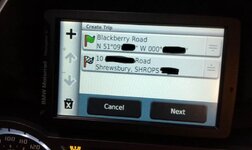
now have a look at the screen shot please
So now I can
+ add a new point - I don't want to
X Delete it - don't want to
Cancel -don't want to
Next -stupid thing offers me a list of places/address/favourites/history etc
NOW I just want to FINISH or GO or Execute or View Map but that option is not available
Bright ideas please, I'm sure it's simple if you know
Thank you Dave
Why do they have to make the menus different?
I've loaded some routes from my computer and eventually found them not under "Routes" but under "Apps/Tracks"!!!!
So I just tried to construct a route (or apptrack..) on the unit itself.
It used to be
Where to/Routes/New Route/Add points/then umm Finish/Map or Go. I could do that
Now it's Apps/Trip Planner/New Trip/Select Start Location/Where I am Now/Select/+/then a familiar choice of places. I can do that too.
But what next?
I have a starting point -"where I am" and a destination (from History) and I'm done!
now have a look at the screen shot please
So now I can
+ add a new point - I don't want to
X Delete it - don't want to
Cancel -don't want to
Next -stupid thing offers me a list of places/address/favourites/history etc
NOW I just want to FINISH or GO or Execute or View Map but that option is not available
Bright ideas please, I'm sure it's simple if you know
Thank you Dave