Hertfordshire Wombat Hunt - Sunday 19 March 2006

I wish i'd got the TKC's on and come with you guys now. Looks like the 1150 were OK in all the mud.

 
What a difference a week makes!

Last week it was so thick with mud and clay, there would have been no way of getting a GS through. Today, all the mud had turned rock hard and it was pretty easy-peasy!

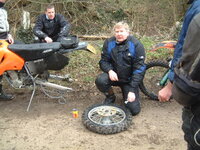
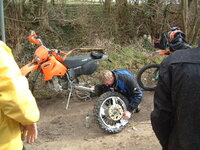
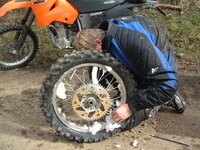
However, the day wasn't entirely without incident! No names to protect the guilty, but the 'Ford-Meister' dropped his mount the first time the water got more than 2" deep; one GS, one G/S and one KTM drowned in Standon ford and another KTM rider was hors de combat with a terminal puncture. click on this thumbnail to see the masterclass in how not to mend a flat!

Click thumbnail


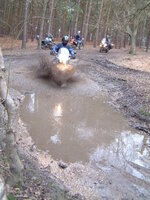
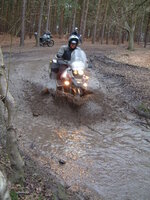
Furneux Pelham ford was a good 6" shallower than last week, but still gave some good results:


Click thumbnails

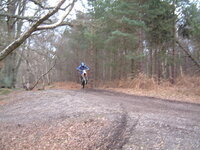
And here's one of the last lanes of the day:


Click thumbnails


That elusive wombat has still not been found - another hunt beckons!!

Thanks to all the guys who took part - it was a great day's ride!

Greg
 
Thanks Gregg and co for organising a great day out :thumb

My toes seem to resemble something that got very wet :rolleyes:

Fords..... I hate blo0dy Fords... :spitfire :D

See you on the next one, Will post some piccies tomorrow.

Got to dash.... 12 hr night shift beckons :(

Jon :beerjug:

ps.... I know how to pump out the water now :dabone
 
Yep, a great day out, despite my early dunk in the river they call a road :eek: . Just got out of a very hot bath to get some feeling back into the old bones. Cheers for organising this one Greg. It was a good'un :thumb

Also it was good to meet some new faces today. I hope Blues and two's gets his bike sorted. He knows what I mean. ;)

KTM Dave, glad you got back ok.
 
Great day out Greg, so was the piss-taking :thumb Shame I decided not to bring the HP2 :rolleyes:
 

Attachments

  • DSCF0304.JPG
    DSCF0304.JPG
    62.5 KB · Views: 108
Cheers Geg..a good day out :beerjug:

Nice to see the Big beasties doing what they're meant to :D

Look forwards to the next one :thumb
 
Fantastic day :thumb :thumb Thanks to Greg for organising it.

Just got out of a hot bath and settling down to a couple of beers before the Lamb casserole comes out of the oven.

Ahhh Perfect day :D :D
 
Great day out out Greg thanks for all your efforts cant wait till the next one .
:ukgser :bounce1 :bounce1 :bounce1 :bounce1 :bounce1
Cheers
Rob
 
Tracks/Waypoints

I can't remember who wanted the Waypoints/Tracks - PM me your email address if you want the Mapsource file.
 
Hi Clive,

That was me :D

I did try and save my route but when I got home the option was not highlighted on the Quest.

If I was to just go out for a ride and wanted to save the route, What do I need to do as it doesn't make it clear in the manual :nenau

Jon :beerjug:
 
blues n twos said:
If I was to just go out for a ride and wanted to save the route, What do I need to do as it doesn't make it clear in the manual :nenau

Jon :beerjug:


Upload the tracks to your PC in mapsource, then select 'tracks' from the page that slides across from the left and you'll see a list of tracks associated with the dates and trimes they were made.........highlight one and select 'view on map' to see it or right click on it, cut it and paste it into a 'new' map from the menu then you can save it as a stand alone track.

To convert it back into a route rather than a track, you'll need to zoom in on it and add w/p's along it then save that as a route.

Hope that makes sense ??
 
Thanks for the reply's chaps,

Gregg... I have a message from Mapsource that says " the file cannot be read because it uses a subsequent file version.This program can read MPS files as well as GDB files version 1.0 and below" :nenau

Fanum... I hate to sound stupid :rolleyes: I am stumped at the first hurdle, "tracks" what are these?

Apologies for being a GPS virgin, I have read and reread the manual and just when I think that it all makes sense and try and perform one of the functions.... I fall again at the first hurdle :o

Jon :(
 
John...there's a difference between tracks and routes....

A track is where you've been....a route is where you're planning to go...tracks are like a breeadcrumb trail and routes are made up from waypoints you programme in or a calculated route between points......

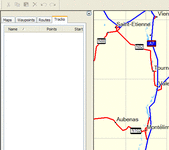
When you plug in your GPS and select 'upload', it'll give you four things you can upload.......tracks, routes, w/p's and maps.......if you just select 'tracks', it'll grab those from your GPSunit and then if you look to the right hand window of the screen in mapsource, you'll see the four things you could have uplaoded to look at as above.
 

Attachments

  • tracks.gif
    tracks.gif
    16.6 KB · Views: 61


Back
Top Bottom