
Hiding waypoints in Mapsource display

Achim

Registered user
Joined
Mar 8, 2008
Messages
255
Reaction score
0
Location
Bangor, County Down
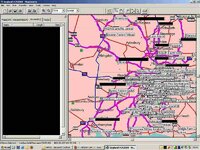
I've got a lot of waypoints in the south-east now. As a result the Mapsource display of the region has become very cluttered and I can't see my routes for the waypoints.

How can I hide the waypoint labels so I can actually see my routes? Garmin Product Support haven't been able to help, the search function here brings up nothing, nor does Google, so I'm wondering whether anyone's come up with a solution to this conundrum.

Many thanks,
Achim
 

Attachments

  • Mapsource Screen Shot.jpg
    Mapsource Screen Shot.jpg
    132.9 KB · Views: 619
Wondering why you keep your POIs in one file?

I assume most here have their POIs in grouped GPX or GDB files that they can load as needed and when planning a route work on a blank map with no custom POIs at all.

If you need to use any in your route then cut and paste just the ones you need from a separate instance of Mapsource.

That's the way I work anyway.

I must have thousands of POIs in separate files that would just flood the map and probably bring Mapsource to its knees.
 
Tried edit - preferences - waypoint and then asked for it to only show symbol?

That makes sense, but when I modify Mapsource accordingly, nothing changes on my display?!? Tried saving the file, closing Mapsource, starting it again, opening the map file again: no change.

Bumpkin's suggestion of separate waypoint files isn't ideal, however, as it means I'd have to transfer waypoint files when swapping between car and bike.

I'd also have to decide before venturing out on the bike where I want to go and load up maps, waypoints, and routes accordingly, only because Mapsource doesn't allow switching off the display of waypoints.

I change my mind - a lot :) ...

Achim
 
Bumpkin's suggestion of separate waypoint files isn't ideal, however, as it means I'd have to transfer waypoint files when swapping between car and bike.

I'd also have to decide before venturing out on the bike where I want to go and load up maps, waypoints, and routes accordingly, only because Mapsource doesn't allow switching off the display of waypoints.
Not sure what GPSR you have but I have most of my POIs on my GPS (Loaded using Garmin POI Loader), I just don't have them loaded in Mapsource when route planning. Any POIs that I do upload with routes which are already on the unit don't seem to get duplicated on the GPS.

If you're using a 2610 or Quest that will only take 500 custom POIs then I might see some issue, otherwise you can literally have thousands on the GPS.
 
That makes sense, but when I modify Mapsource accordingly, nothing changes on my display?!? Tried saving the file, closing Mapsource, starting it again, opening the map file again: no change.
Select the Waypoints tab in the left pane of Mapsource, select any one of the waypoints and press CTRL+A at the same time to select them all. Now right click and select 'Waypoint Properties' from the resulting menu. Within the Waypoint Properties dialogue set 'Display' to 'Symbol' and click OK. You might need to click the map for the waypoint names to disappear.
 
Select the Waypoints tab in the left pane of Mapsource, select any one of the waypoints and press CTRL+A at the same time to select them all. Now right click and select 'Waypoint Properties' from the resulting menu. Within the Waypoint Properties dialogue set 'Display' to 'Symbol' and click OK. You might need to click the map for the waypoint names to disappear.


:clap That works for me - many thanks. I can't put in zillions of waypoints into my Quest so this makes Mapsource housekeeping a lot easier.

What a great community!

Achim
 
Tried displaying the names again on the PC?

Playing around, if I make a new waypoint the name's displayed, but still can't get the others back. On Mapsource 6.14.1 btw with CN EU 2009.
 
I can't put in zillions of waypoints into my Quest
Ah. That makes what you say more relevant. Though ISTR (I still have my Quest in reserve should my 2720 fail) that the 500 permitted custom POIs/Waypoints aren't overwritten, like the mapping tiles, so you can have your core set on the GPS and load extras alongside these as you need 'em.

Plenty of ways to skin a cat though, if what you do works for you then pray carry on.
 
Update from Garmin

I received the following reply from Garmin:

"Thank you for your email. When you add a Waypoint into MapSource you can select a category from the Waypoint Properties menu. Please select a category from the list by putting a tick in the box and click OK. From the box on the left of the screen select the Waypoints tab and click on the drop down arrow next to Show Waypoints in category. Select No Category and the Waypoints you have added to a category will be removed from the map."

This clears up the display quite a bit but it's not perfect. This is my response to Garmin:

"I am left with the waypoints created using the Waypoint Tool to work out a new route. These waypoints do not appear in the "Waypoint" tab on the LHS so they do not disappear when using the "No Categories" option in the drop-down menu. Hence there is no way of hiding them. Right-clicking on such a waypoint for its properties brings up a table that does not include a category which could be amended.

I suppose the problem could most easily be solved if the Show Waypoints in Category menu had a "Hide all waypoints" option. Maybe that's something that could be added to a new version of Mapsource?
"

I'll keep you posted. In the interim my display actually allows me to see my routes instead of having them covered by waypoint labels :).

Achim
 
I read some stuff about these route-waypoints in the past.

There were addressed as PONI's, Points of NO Interest. They are only used to set out a route, to force the route to go over a specific road.

It is an annoyance to have these routepoints on the map, but it is even more annoyance that 'Jane' (we call her 'Truus' in The Netherlands) cries out you are nearing such a point of NO interest at all.

There is a tool that removes these routepoints (flags) for you, so Jane will only speek when allowed.

I sure hope that Garmin will sort this out in the next release of Mapsource.


Back
Top Bottom