
How difficult is Windows 8

rodsharp

Registered user
Joined
Oct 18, 2003
Messages
584
Reaction score
0
Location
witney,england
Ok so let me start by declaring I am a numpty when it comes to computers but I need to get a new one. I only use very basic stuff, web browsing, emails, shopping,and a few letters pictures etc. I have been using Vista since it first came out and although I understand its crap I seem to manage ok.
I dont need a rocket ship but a dual core CPU, about 4GB Ram and 500GB hard drive. I can only find Windows 8 in the high street shops but am put off by all the reports I read.

How hard is it for a numpty ? I have seen a registered Microsoft restorer (Microdream) selling refurbished desktops with Windows 7 and wonder whether this would be my best choice as I have no preference between desktop or laptop.
Opinions greatly appreciated.
 
Thanks, That was quick . Maybe Windows 7 for a couple of years until they sort themselves out may be the best route for me.
 
Just be aware that when it is released, Windows 9 will be almost identical to Windows 8 in it's appearance. Despite all the press nonsense, Windows 8 is not a bad OS just different from previous releases and journalists don't like change, it confuses them. Once you get used to the nuances of W8 it is fine.
 
Windows 8.1 is a great OS, easy to work with, fast and reliable. You can just set it to boot to desktop and never go near the Metro start menu if you want to. Windows 9 is probably Windows 8.2 as it's scheduled for a 2015 release.

Microsoft tried to do something a bit more radical with 8 and for some it works, for others it does not, if they had churned out the same style OS as Windows 7, then they would have been slated again. The catalyst for a lot of Windows 8 development is when it's taken up by industry, and 8.1 is starting to gain momentum. I've done 3 large UK / European organizations this year, migrating them from Windows 7 to Windows 8.1.

Like Malvern Beemer says, it's just "different".
 
Dont get confused with the operating system and the user interface, the operating system underneath win 8 is quite good, probably better than win7, however the user interface is dire, its ok on a touch screen but on a mouse driven computer it is a complete dogs breakfast. It dosent know what it wants to be one minute you have the "duplo" start up screen and the next the traditional desktop. With out question all of the start screen "apps" are cutdown poor relation programs available elsewhere on the computer, for instance the "internet" app does not even share common bookmarks with internet explorer, however all is not bad there are a number of third party programs to my mind http://www.classicshell.net/ this is the best but there are others, you can set it up any way you like and never have to see the start screen or childs "duplo" version of windows ever again, its like using a computer with a proper operating system.
 
If you are using 8.1 (and you really should be by now :) ) You can just right click on the taskbar, go to properties, click the "navigation" tab and then put a checkbox in the "When I sign in blah blah blah" in the screenshot
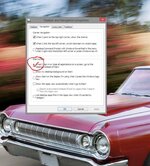
No more metro, unless you want it.
 

Attachments

  • desktop.jpg
    desktop.jpg
    99.4 KB · Views: 360
I'm convinced that the world would have much better personal computer operating systems by now, if Microsuck had never existed. :blast
 
I've been using 8.1 for about a week now, it came installed on my new 'Netbook' thingy.. and though it was a complete pain at first, I'm now getting the hang of it.

I use it exactly the same as I used Windows 7, not bothering too much with the touch screen and the tiles, (though they do work well).
 
Have a vivobook with windows 8 upgraded to 8.1 removed all unnecessary tiles and faffed with it since early December. Works well when de cluttered:rolleyes:

Also so far works with mapsource and base camp. Tis a asus vivobook with 11.6 touch screen .:thumby:

Had my old dell xps 12 out today, twice as heavy. Problem now is :blast:blast keep trying to use screen.:)
 
I had pre release beta Windows 8 and then went to Windows 8, no issues whatsoever on my ancient Vaio. Went onto 8.1 as soon as it was launched and again there have been no issues.
Love Windows8 even without a touch screen. Start up is super fast and love Flipboard and some other apps. Takes a little while too sort tiles and screen but it all works fine!
 
For my sins I'm Chair of Governors at our local school and was amazed to see how many machines - especially staff laptops - are running W95 :eek:
 
I've been suffering for a couple of months.

If I want to connect to a wireless network. I click the up arrow (is that the system tray), select the wireless icon, a menu appears on the right. I select the network then as O move the mouse to click 'connect' the menu dissapears....wtf is all that about?
 
I started this thread a few months ago Couldnt get windows 7 so had to go with 8. Have to say no problem at all . It does what I want which admittedly isnt very much and easy enough.
 
I've been suffering for a couple of months.

If I want to connect to a wireless network. I click the up arrow (is that the system tray), select the wireless icon, a menu appears on the right. I select the network then as O move the mouse to click 'connect' the menu dissapears....wtf is all that about?
Try moving the pointer to top or bottom right of screen so the 5 "jewel" Icons appear on the right, select the bottom "settings" jewel and then try setting the wireless connection from there!


Back
Top Bottom
