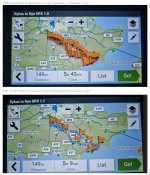
How export versions 1, 1.1 and 1.2 display differently on a Garmin device

Wapping

Well-known member
Moderator
Joined
Oct 21, 2005
Messages
90,829
Reaction score
15,589
Location
Wapping, London
I have stolen this from the very good MyRoute forum.


IMG_5349.jpegIMG_5350.jpeg

Comment:

The lower screen shot possibly explains why some users (those who allow recalculation) suffer when they go off route.

It is mildly interesting that the same Garmin device, displaying the same route but in different transfer modes, displays a slightly different mileage and, sometimes, a very different estimated time.

Certainly, version 1, is too cluttered.
 
Last edited:
So which import mode would you Richard suggest being the best transfer option?

1.0 definitely to busy…
 
I get on all right with version 1.2 but I have recalculate turned off. If I go ‘off route’ I just navigate myself back on as best I can. This sometimes leads to a bit of buggeration, when I think to myself “I’ll pick up the route again at that junction” only to discover that the route I want to rejoin is up on bridge or has some barrier to it, like ‘No right turn’ but that is quite rare. I grew up with maps and hand written routes, so I am used to being wrong footed abroad, by foreigners and their mischievous ways.

As I understand it, version 1.2 transfers as a track not as a route per-se. This explains why the shaping points do not come across. The device then converts the track into a route. In version 1.1 I think it transfers as a route, along with the shaping points.

As I have used many of the Garmin devices, I still like the little blue dots of version 1.1. They give me some sort of comfort that the route I see displayed on my GPS device is what (to all intents and purposes) I created myself. Not having them in 1.2 is probably meaningless in that regard but it somehow unsettles me, even though I know it is unnecessary. I do though always try to check things before I leave home, trying to make sure what I created matches what I see on the screen. Sorting things out then and there is a lot easier than sorting it out on the roadside.

Some people moan about 1.2 and others about 1.1. The former because of possible recalculation problems, latter because the device might change the route displayed between the individual blue shaping points. If though you have enough shaping points, correctly and accurately positioned, this should not be a significant problem in version 1.1. There again, some people just like to moan!

 
Last edited:
It has been a while since I’ve transfers a route to my XT from MRA. As such I can not recall which version I have used before.
However, can knot say I have had any issues in the past.
 
1.1 does what I want, so I’ll stick with that

But 3 pics get the message across so much more succinctly than any number of words
 
1.1 does what I want, so I’ll stick with that

But 3 pics get the message across so much more succinctly than any number of words

Thank you. It is very much horses for courses. Rather like the P (personal) of PC’s and spreadsheets, what makes sense for one person, might not work for another.

I can remember when MapSource used to display hundreds of flags, one for each shaping point. When I created the 100 Michelin routes from their book (what a pity they dropped that publication) some of the more twiddly routes were littered with the blue flags.
 
Just as a slight aside. MyRoute recommends a shaping point roughly every five km (three miles) in order to ‘fix’ routes on transfer. For Garmin users, it also recommends using HERE maps, as they match the maps used by Garmin. It’s two recommendations I try to stick to.
 
Just as a slight aside. MyRoute recommends a shaping point roughly every five km (three miles) in order to ‘fix’ routes on transfer. For Garmin users, it also recommends using HERE maps, as they match the maps used by Garmin. It’s two recommendations I try to stick to.
Good to know for a novice user like myself. Thank you.
 
I tend to use GPX 1.1 so that I can see the shaping points....also it makes it easier to see whats happening if the route doesn't turn out exactly as you'd expected. I have recalculation set as prompted and do use it every once and a while.
 
i use 1.1 as given above - it's a track with the way points. Which means i can follow it as a track only or convert it to a route.

I've never had any issues creating a route this way or when transferred to the Garmin either (both a 396 & the XT). It also works with the 'start to finish, or finish to start' options when converting to a route too (on the XT). Great option for when wanting to use the same route to/from a destination.
 
I tend to use GPX 1.1 so that I can see the shaping points....also it makes it easier to see whats happening if the route doesn't turn out exactly as you'd expected. I have recalculation set as prompted and do use it every once and a while.

To be more truthful, I too have it set to prompted. Most often I say ‘No’.

Following on from this thread, I might well switch to using 1.1 if only for the comforting nappy of the blue dots. If nothing else, it will look the same as my old Garmin devices.
 
Whilst I like the comfort of the little blue dots of the shaping points, displayed in export version 1.1, here’s an example of where it can lead to differences.

This is part of a 160 mile A to B route passing through Hesdin in NE France.

IMG_4697.jpeg

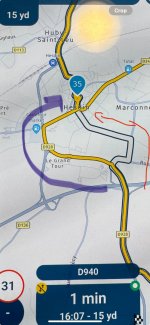
The route I created in MyRoute is the yellow line, curving around to the west of the town. This I exported in version 1.1 to my XT, which reproduced it correctly. I also exported it into the MyRoute travel app, which created the white line,

They differ. OK it’s not life threatening by any means but, had it of been important that you follow curved yellow line to the west, you’d have missed whatever was that was important.

That said, it was the only glitch in 160 miles. I’d not have noticed if I hadn’t of been running my XT and the MyRpute app simultaneously.

On my XT, I can see the blue dot of a shaping point, before the deviation. Had I of placed one on the curve to the west, then no doubt the MyRoute Navigation app route would have matched up.
 
Last edited:
Just as a slight aside. MyRoute recommends a shaping point roughly every five km (three miles) in order to ‘fix’ routes on transfer. For Garmin users, it also recommends using HERE maps, as they match the maps used by Garmin. It’s two recommendations I try to stick to.
That’s interesting, I thought it was important to stick to the HERE routing, but other maps could be used for planning
 
You can use whatever maps (paper or electronic) you like for planning ie. for working out where to go.

For route creation for use on a Garmin device, MyRoute recommends using HERE as the base, simply as that is the same map set as Garmin use.

You can use say, Michelin or Open Street maps as the base, too. The downside is that the position of the roads might not match. What that means is that when you put a shaping point on the D123 in a Michelin base, the point might be appearing on a different road (or off in a field) when it is transferred into the Garmin device.

The device will then, without fail, render up a route which takes you through that point. To use an extreme example, if the position of the road differs between the two maps by just a few millimetres, the point might be on the other carriageway of a motorway or on the wrong exit of a roundabout, leading to further complications and frustrations thereafter. In short, always check everything as best you can, irrespective of the source, the maps used and anything else.
 
Last edited:
Very interesting to see in the 3 photos, so you can see whats happening.

It does look like 1.1 is the best option for most users.


Back
Top Bottom