She tells me she's changed nothing 
It’s been working perfectly since March this year.
The only things that HAS changed is that we changed from PAYG 1G broadband to 8G 2 weeks ago – been working perfectly before and after. Can’t see how that would affect anything – then again, I know nuffin’ about the intricacies of these things.
She turned the pc on, the screen on, the speakers on and the modem/router on.
It's a Netgear DG834PN on PlusNet.
I've tried (and am as I type) using the modem that came with the original PlusNet broadband & it works fine.
We upgraded as we wanted a more secure connection & wireless when we use a laptop down there
Tried a hard reset - I can see the router, I can log on to the router, but it don't see t'interweb........
Tried using the Netgear site for any hints, tips & help, but at a bit of a loss now. Tried "spoofing" the MAC address, but it says go log onto the router, go to Basic Settings>Router MAC Address, but whilst I can see the MAC Address I can't work out how to change it.
Does LCP Down and CHAP authentication failed mean anything to anyone? In luddite terms please………
Sat, 2000-01-01 00:00:28 - Initialize LCP.
Sat, 2000-01-01 00:00:28 - LCP is allowed to come up.
Sat, 2000-01-01 00:01:27 - Initialize LCP.
Sat, 2000-01-01 00:01:27 - LCP is allowed to come up.
Sat, 2000-01-01 00:01:30 - CHAP authentication failed
Sat, 2000-01-01 00:01:30 - LCP down.
Sat, 2000-01-01 00:01:37 - Administrator login successful - IP:192.168.0.2
Sat, 2000-01-01 00:01:56 - Initialize LCP.
Sat, 2000-01-01 00:01:57 - LCP is allowed to come up.
Sat, 2000-01-01 00:02:00 - CHAP authentication failed
Sat, 2000-01-01 00:02:00 - LCP down.
Sat, 2000-01-01 00:02:56 - Initialize LCP.
Sat, 2000-01-01 00:02:57 - LCP is allowed to come up.
Sat, 2000-01-01 00:03:00 - CHAP authentication failed
Sat, 2000-01-01 00:03:00 - LCP down.
Do modem/routers die?
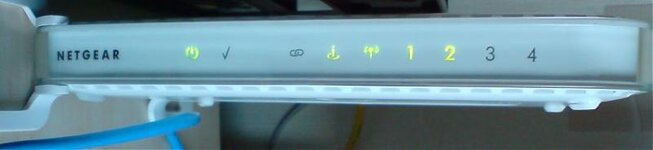
Piccy of it all turned on etc, if that helps.............
It’s been working perfectly since March this year.
The only things that HAS changed is that we changed from PAYG 1G broadband to 8G 2 weeks ago – been working perfectly before and after. Can’t see how that would affect anything – then again, I know nuffin’ about the intricacies of these things.
She turned the pc on, the screen on, the speakers on and the modem/router on.
It's a Netgear DG834PN on PlusNet.
I've tried (and am as I type) using the modem that came with the original PlusNet broadband & it works fine.
We upgraded as we wanted a more secure connection & wireless when we use a laptop down there
Tried a hard reset - I can see the router, I can log on to the router, but it don't see t'interweb........
Tried using the Netgear site for any hints, tips & help, but at a bit of a loss now. Tried "spoofing" the MAC address, but it says go log onto the router, go to Basic Settings>Router MAC Address, but whilst I can see the MAC Address I can't work out how to change it.
Does LCP Down and CHAP authentication failed mean anything to anyone? In luddite terms please………
Sat, 2000-01-01 00:00:28 - Initialize LCP.
Sat, 2000-01-01 00:00:28 - LCP is allowed to come up.
Sat, 2000-01-01 00:01:27 - Initialize LCP.
Sat, 2000-01-01 00:01:27 - LCP is allowed to come up.
Sat, 2000-01-01 00:01:30 - CHAP authentication failed
Sat, 2000-01-01 00:01:30 - LCP down.
Sat, 2000-01-01 00:01:37 - Administrator login successful - IP:192.168.0.2
Sat, 2000-01-01 00:01:56 - Initialize LCP.
Sat, 2000-01-01 00:01:57 - LCP is allowed to come up.
Sat, 2000-01-01 00:02:00 - CHAP authentication failed
Sat, 2000-01-01 00:02:00 - LCP down.
Sat, 2000-01-01 00:02:56 - Initialize LCP.
Sat, 2000-01-01 00:02:57 - LCP is allowed to come up.
Sat, 2000-01-01 00:03:00 - CHAP authentication failed
Sat, 2000-01-01 00:03:00 - LCP down.
Do modem/routers die?
Piccy of it all turned on etc, if that helps.............