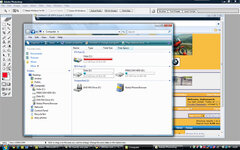
Deleted account 211025001 Registered user Joined Feb 3, 2005 Messages 8 Reaction score 10 Jan 25, 2009 #1 I'm a bit confused (not hard!). It's saying that Vista C: is pretty much full. D: is my external drive, so what is Data E: and why does it have so much room on it Andres Attachments Untitled-1.jpg 94.9 KB · Views: 90
I'm a bit confused (not hard!). It's saying that Vista C: is pretty much full. D: is my external drive, so what is Data E: and why does it have so much room on it Andres
Invicta Moto Registered user Joined Mar 7, 2003 Messages 2,788 Reaction score 0 Location Hythe, Kent & Islington N1 Jan 25, 2009 #2 The E drive looks like a partition on the hard drive. You have loaded all your shit on the C drive and left the E: drive nice and empty. It is common practice to use the C drive for operating system software and other drives for your applications. I have C, D and E drives and D is a small drive with some recovery crap on it. I didn't set it up that way, the company's TSG did. Like you I am too lazy/unthinking to change software installs to E: from C: and my drive is about 75% full and E: about 2%!
The E drive looks like a partition on the hard drive. You have loaded all your shit on the C drive and left the E: drive nice and empty. It is common practice to use the C drive for operating system software and other drives for your applications. I have C, D and E drives and D is a small drive with some recovery crap on it. I didn't set it up that way, the company's TSG did. Like you I am too lazy/unthinking to change software installs to E: from C: and my drive is about 75% full and E: about 2%!
peterh Registered user Joined Feb 23, 2005 Messages 427 Reaction score 1 Location Bath Jan 25, 2009 #3 Looks like the OEM created a partition for a backup of the original install.
Deleted account 211025001 Registered user Joined Feb 3, 2005 Messages 8 Reaction score 10 Jan 25, 2009 #4 Ah ha.................yes that does seem to make sense, thanks Is there anything I can do to move stuff around to free up C: a bit (do I need to?) and if so can it be explained in words of one syllable? Andres
Ah ha.................yes that does seem to make sense, thanks Is there anything I can do to move stuff around to free up C: a bit (do I need to?) and if so can it be explained in words of one syllable? Andres
Clive Well-known member UKGSer Subscriber Joined Apr 30, 2004 Messages 4,575 Reaction score 0 Location Reading, England Jan 25, 2009 #5 Outtomunch said: Ah ha.................yes that does seem to make sense, thanks Is there anything I can do to move stuff around to free up C: a bit (do I need to?) and if so can it be explained in words of one syllable? Click to expand... How much of the 55GB is your "personal folder" stuff? You can change your folders to (e.g.) the D:\Users\Andres\Documents
Outtomunch said: Ah ha.................yes that does seem to make sense, thanks Is there anything I can do to move stuff around to free up C: a bit (do I need to?) and if so can it be explained in words of one syllable? Click to expand... How much of the 55GB is your "personal folder" stuff? You can change your folders to (e.g.) the D:\Users\Andres\Documents
Deleted account 211025001 Registered user Joined Feb 3, 2005 Messages 8 Reaction score 10 Jan 25, 2009 #6 Clive said: How much of the 55GB is your "personal folder" stuff? You can change your folders to (e.g.) the D:\Users\Andres\Documents Click to expand... Pretty much all of it (piccies and music), I don't have an awful lot of software clogging up my drive. Cheers for the link, I'm defragging at the mo. but will give that a go once it's done Andres
Clive said: How much of the 55GB is your "personal folder" stuff? You can change your folders to (e.g.) the D:\Users\Andres\Documents Click to expand... Pretty much all of it (piccies and music), I don't have an awful lot of software clogging up my drive. Cheers for the link, I'm defragging at the mo. but will give that a go once it's done Andres
Dickieboy Registered user Joined Sep 7, 2005 Messages 7,416 Reaction score 1 Location Trapped Jan 25, 2009 #7 Andre might be a good idea to back your photos and music up on your external drive as well
Deleted account 211025001 Registered user Joined Feb 3, 2005 Messages 8 Reaction score 10 Jan 25, 2009 #8 Dickieboy said: Andre might be a good idea to back your photos and music up on your external drive as well Click to expand... Good point Andres
Dickieboy said: Andre might be a good idea to back your photos and music up on your external drive as well Click to expand... Good point Andres