Keyboard mixup in XP

(RIP) willstatt

Lost
UKGSer Subscriber
Joined
Jun 28, 2002
Messages
2,444
Reaction score
1
Location
derbys
After installing WinXP pro on my new hard disk, all is ok except the @ symbol is now on the " (shifted 2 ke and the " symbol is where the @ should be


How do I get it back to normal?

Will
 
Where's the £ and # keys, mucked up as well?
You've probably set it to American Keyboard when you have a british one.

set it back in the control panel
 
On your takbar, on the bottom right side there are a bunch of icons. To the left of them you may have 2 letters "US" or "EN" for example. This is your country setup. Right click > settings and change to EN for English.
 
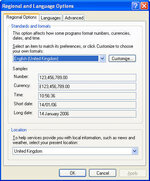
As above you need to select United Kingdom in all the relevant boxes in the "Regional and Language Options". When you open this applet in Control Panel you will initially see this window.

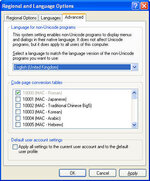
Select "United Kingdom" for your Languages. Then select the Advanced tab, as in this one you can apply the language you have just selected to all accounts and more importantly to every new user that you introduce to the computer.

You do this by ticking the box near the bottom of the Advanced page and clicking "Apply"
 

Attachments

  • Regional+Language Options.jpg
    Regional+Language Options.jpg
    55.6 KB · Views: 52
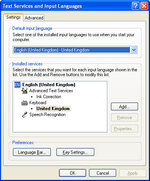
And then finally if you are using Office 2003, then you may have some conflicting language setting in the alternative input page here. If there are references to US then remove them and ensure they all refer to UK English!!
 

Attachments

  • Text Services and Input Languages.jpg
    Text Services and Input Languages.jpg
    54.4 KB · Views: 53


Back
Top Bottom