Mac keyboard ... help!

Micky

Never knowingly understood
UKGSer Subscriber
Joined
Nov 13, 2005
Messages
25,305
Reaction score
6,090
Location
South Yorkshire
Treat myself to the new 21.5" iMac t'other week... getting along fine :thumb

Done a search as best I can ... honest :augie

But then I'm a total numpty :nenau

Played about and experimented in 'word' :type

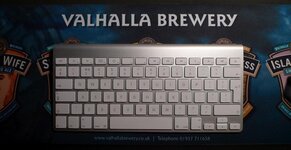
Picture of keyboard below ...

Do I have access to numlocks? The ability to put umlauts and other precision stuff in to a document.

Like with my old PC ctrl+148 would give me the umlaut 'o' , that's an o with two small dots above!

:bow:bow:bow
:beerjug:
 

Attachments

  • Mac keyboard.jpg
    Mac keyboard.jpg
    70.5 KB · Views: 129
To create an umlaut on a Mac you press the Option(alt) and the 'U' key together, release them and then press the required vowel key to produce ä ë ö ü Ä Ë Ö ü. Or you can click on the international option in the top tool bar of the Mac (not word) and choose 'show character viewer' from there you can choose and insert many characters and symbols. For this option you have to make sure that in System Preferences you go to language and text and tick the show character viewer box.
 
Last edited:
To create an umlaut on a Mac you press the Option(alt) and the 'U' key together, release them and then press the required vowel key to produce ä ë ö ü Ä Ë Ö ü. Or you can click on the international option in the top tool bar of the Mac (not word) and choose 'show character viewer' from there you can choose and insert many characters and symbols. For this option you have to make sure that in System Preferences you go to language and text and tick the show character viewer box.

Eee by gum lad you're a bloody hero ... I'll try that out :thumb

Thanks to you too PG :thumb

Will report back later :)
:beerjug:
 
Nah... doesn't work :nenau

I can import symbols in to the text here ... under 'special characters' with Safari browser ... like ☂ but not umlauts or foreign 'characters'

But any shortcuts I use in Word Doc doesn't work here :nenau

:beerjug:
 
ü ï ö ä

Works for me - an I have the exact same keyboard :nenau

edit - used lotse's instructions
 
OK ... ö Ö Ü ß ü

D'ya mean like that guys?

Mit freundlichen Grüßen :thumb
:beerjug:
 
most things you are likely to need are in the Character Viewer here,

1KyT


somewhere :)

1KyP


Back
Top Bottom