Mapsource route errors

Phil Clarke

Registered user
Joined
Jul 6, 2005
Messages
738
Reaction score
0
Location
Fife, Scotland
Often when I drag in two waypoints on mapsource it seems to have a funny idea of what constitutes a quick route using mainly highways. It will divert you off a motorway, follow some short but convoluted route on back roads and then back on to the motorway. You can edit the route to stop this but its a pain and I'm worried that mapsource on my quest will do the same and navigate me onto some obscure backroad.
Any thoughts appreciated...
 
Can you attach a Mapsource file so I can see an example of what's happened please?
 
Have you in the preferences options and routing:

1 - Got the slider at the minor roads (IIRC) end of the scale?
2 - Customised the problem bit of motorway in the "avoidances"?
 
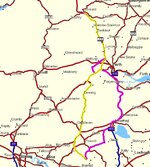
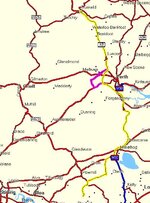
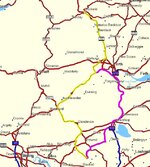
I've set the preferences to faster route and the slider right over to major highways. See the example below. Zoom in on Perth and you'll notice the route deviates of the Perth bypass (big dual carriageway) and off to the west. Its not even a shorter route...
 

Attachments

if i have highway slider right over to Highway, i get the same deviation + more besides. i put it in the middle & it chooses the right route.

odd.
 
if i have highway slider right over to Highway, i get the same deviation + more besides. i put it in the middle & it chooses the right route.

odd.

Same here. One click to the right of middle, and it's fine. 2 or more to the right, and I get serious deviation.

Are you using 6.13.5 ?
 
I duplicated your route then re-calculated it using my routing preferences and it removed the "B" road detour as per the picture below. If your preferences are set the same as mine i can't understand why it should choose an alternate route?

ScreenShot043.jpg
 
Moving the slider one click to the left made no difference. Two clicks to the left (preferring minor roads) gave a new route but still didn't choose your deviation around Perth??
 

Attachments

  • ScreenShot044.jpg
    ScreenShot044.jpg
    96.3 KB · Views: 100
2 clicks right........
 

Attachments

  • ScreenShot045.jpg
    ScreenShot045.jpg
    95.8 KB · Views: 99
You can edit the route to stop this but its a pain and I'm worried that mapsource on my quest will do the same and navigate me onto some obscure backroad.

I think you'll find that the problem will re-occur on the Quest if you go off route, and the unit recalculates it it might, or might not, come up with the same as the PC. So, whatever sorts out the PC, I'd check that you have it set up the same way to prevent hair pulling exercises.
 
I've just updated to 6.13.5 but it makes no difference. Some minor software hiccup I suspect. Its not a huge problem as I mainly plot my own routes as a matter of course but its nice to know if I just want to blindly follow the sat nav it doesn't lead me a dance. I'll try fiddling with the slider control until I get a result
thanks for the time and effort folks!
 
I duplicated your route then re-calculated it using my routing preferences and it removed the "B" road detour as per the picture below. If your preferences are set the same as mine i can't understand why it should choose an alternate route

Are the driving speeds the same as well as they can have an influence on the route selection??
Dave
 
Had a play with 6.13.5. And the scenic route is taken at two or more clicks from "highways". I think it's all to do with the road attributes where it goes around Perth. My calculations make the the attribute of 19 mph, not bad for Scottish roads!
 

Attachments

Could the differences you are all getting be down to different versions of CS/CN?
 
Could the differences you are all getting be down to different versions of CS/CN?

Tried "my" routes in CN NT9

2.3 miles and 6:58
6.9 miles and 9:09

CN V9

2.3 miles and 6:58 No change where the route goes
6.9 miles and 8:46 :confused: No change where the route goes :confused:


Back
Top Bottom