Mapsource sending me all over the place

  • Thread starter Thread starter walkon40
  • Start date Start date

walkon40

Guest
I've just tried plotting a route from Glos to Derbyshire, initially going up the M'way (M50/M5/M42), but my mapsource programme - instead of accepting the waypoints I'm setting to just go up the m'way, takes me all over the place :mad: . I've tried switching the autorouting on and off in the settings, told the programme NOT to avoid highways, etc., told it to go the fastest route ...

Anyone any ideas???

Martin
 
Check what speeds are entered into each category of roads......If for example you have lowered the speed of a motorway at some point and raised the speed expected on a 'b' road, it'll route you down the 'b's a lot more.

:)
 
Can you put a saved copy

of the file somwhere we can get to it to try?

Have you checked your "Try to avoid" options?
 
If you are plotting along the motorway, have you zoomed in enough to make sure you are plotting the correct carriageway? If you choose the one going in the opposite direction Mapsource will produce a very tortuous route by going up and down the motorway to go through the plot points.
 
Your waypoints are all off the route, as metro says zoom in more to get them on the actual road you want to be on :)
 

Attachments

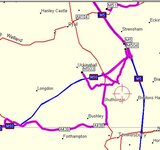
  • screenshot013.jpg
    screenshot013.jpg
    37 KB · Views: 218
..and looking at the file it seems to be a mixture of the above and that some of the waypoints are just 'off' the motorway - eg your start point is a small road just next to the M50, not the motorway itself.
 
Method

Just looked at yours...

Your waypoints are "off mark" .. sending you all over the place..

You need to be more careful when plotting WP's .. try zooming in or showing more detail... insert your WP... then choose it after making a new route... rather than using that "plotting" icon !!
 
kinell walkon40 - What have you done ? :eek: As you said, it is sending you all over the place, but it seems to me that you are over-complicating it. Why mark 22 waypoints, when you only really need 2, ie the start point and end point. Let Mapsource do the rest, and work out the route for you. Unless you have to or want to use a certain road, I personally would not click on them - let the computer do the work. Eg 2 accurately marked waypoints 1 called "Home" the other say "Shipton Hotel", highlight both, right click, press "Select Route Using Selected Waypoints" and voila - job done.

I have just had a stab at creating a route from the file you attached, and it worked fine, by just using the first and last given waypoints - giving a route length of 47.5 miles. By the way I assume you didn't attach a file with all the waypoints in, as your last waypoint is nowhere near Derbyshire. Try zooming in as much as possible when creating a waypoint - to make sure that it's accurate, eg your last waypoint in your attached file was approx 60' north of the Eastbound carriageway of the M42 & I doubt you really intended to stop there.

A friendly word of warning when routing via dual carriageways or motorways, as Metro mentioned - make sure you zoom in so that you can see both lanes - in effect they are 2 separate one way roads then mark the one you want. If you don't zoom in enough and just click on say the M42, you could easily click on the wrong carriageway, which would give you daft routes. Just don't ask how I know. :blush
 
I agree with EJ, but if you DO want to do it your way, via lots of waypoints, make sure the waypoints are actually on the road you intend by holding the pointer over the road and seeing that it is actually selecting the M40 (say) rather than a small adjacent road.
To avoid selecting the wrong carriageway, you could select junctions rather than 'straights'.
 
sorted ! I didn't have the map details activated, thereby waypoints all over the place. Thanks for your help:beerjug:

Martin
 
sorted ! I didn't have the map details activated, thereby waypoints all over the place. Thanks for your help

... that's at least what I thought. I went from home via the M50 (still o.k. here) onto the M5 and then trouble began - the GPS tried to send me via the A38, never showed the turning off onto the M42, finally got back onto the M42, etc.

:confused:

One thing that strikes me is that once I swith the GPS on, it tells me that the calculated route (haven't even selected one at this stage) is not covered by the map, and it asks me to recalculate??? I'm running Mapsource 6.3 on my pc, and assume that this software can automatically communicate with my Gps V???


thanks

Martin
 
walkon40 said:
... that's at least what I thought. I went from home via the M50 (still o.k. here) onto the M5 and then trouble began - the GPS tried to send me via the A38, never showed the turning off onto the M42, finally got back onto the M42, etc.

:confused:

One thing that strikes me is that once I swith the GPS on, it tells me that the calculated route (haven't even selected one at this stage) is not covered by the map, and it asks me to recalculate??? I'm running Mapsource 6.3 on my pc, and assume that this software can automatically communicate with my Gps V???


thanks

Martin

Sounds like you've a differant set of maps loaded in the GPS to those that your using in Mapsource to calculate the route.

Try re-loading all the maps onto the GPS again :)
 
If you are being told that the area is not covered, it sounds like you have not loaded the maps for that area from PC to GPS and are running on the base map only.


Back
Top Bottom