'Memory Card Full'

Mutley

Registered user
Joined
Oct 10, 2005
Messages
12,696
Reaction score
0
Location
A crazy melon farm
I have a 16GB card in my Panasonic Lumix which has performed faultlessly for years. This year I temporarily used it to store some music files and now it will only hold 7 pictures before saying it is full.

I have deleted all the files on it and even re-formatted the drive once.

There is nothing on the card that I can see yet it also only registers as having just over 14GB of space.

:confused:
 
Have you formatted it in the camera, and on the computer..?

Hang on, doesn't a formatted 16Gb card actually show only 14.7Gb of free space..?
 
Yes, formatted it in both

:nenau

I've used 'SD Format' to recover an old SD card, I've also used the make bootable drive part of the Ubuntu install and even the format function on my cheap 'dogcam/starcom' type recorder.

Try this...

http://panasonic.jp/support/global/cs/sd/download/index.html

Or any other SD device with a format function, if you still stuck post it to me and I'll try in the camera recorder as it's sorted a few 'dud' cards. Should only cost a stamp to sort it! :thumb2
 
When you format it in the PC did you get an option of how to Format it?
SD cards are typically formatted as FAT16, SDHC cards as FAT32, SDXC cards as exFAT.

Just a thought :nenau
 
I've used 'SD Format' to recover an old SD card, I've also used the make bootable drive part of the Ubuntu install and even the format function on my cheap 'dogcam/starcom' type recorder.

Try this...

http://panasonic.jp/support/global/cs/sd/download/index.html

Thanks Andrew, tried that but it hasn't worked :(


Or any other SD device with a format function, if you still stuck post it to me and I'll try in the camera recorder as it's sorted a few 'dud' cards. Should only cost a stamp to sort it! :thumb2

It doesn't appear to be a format issue, I think the change of use has changed the setup of the card somehow :confused:
 
Number of questions, some may be silly but...

Does a format in the PC or camera actually show 14.9gb free space afterwards?

The card may be formatted as FAT16 where maximum volume size is 2 or 4GB <----

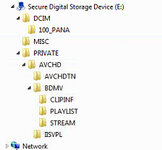
Do you have a directory structure similar to the screenshot showing my Panasonic TZ10 card

When the card is showing 'full' what does a right-click properties show for your card's file systems type and Used/Free space?

Only other thing I can think of is... You haven't partitioned the Card have you?

hope this may help point you in the right direction
 

Attachments

  • TeamViewer.jpg
    TeamViewer.jpg
    48.4 KB · Views: 164
I would guess at a partitioned drive and you are looking the 14gb that had the music on, and when you put it in the camera the camera is seeing the remaining space to put pictures on, now if your storing files in their maximums file size that might be the problem.
Does the software on the camera show how much space you have available?

Oh and just in case, because I have done it on my lumix, your not tring to save all pictures to the internal drive in the camera are you, as that might cause the problem, check it sees the card and the full size of the card and is set to save to the memory card. I know that on mine there is a setting on the wheel switch, when you select it shows a message saying all files will be save to the internal memory once the message has gone it dont show it again.

just some ideas.
 
That will teach me to read it properly. When I look at My Computer and select 'Properties' forthe SD card it only has 14.1MB of space, not 14.1GB :blast

Where have the other 15+ GB gone then? :confused:

As said, I've formatted it on the computer, in the camera and using the Panasonic formatting tool. The file system just says FAT :nenau

I have no idea what a partitioned drive is :duno
 
That will teach me to read it properly. When I look at My Computer and select 'Properties' forthe SD card it only has 14.1MB of space, not 14.1GB :blast

Where have the other 15+ GB gone then? :confused:

As said, I've formatted it on the computer, in the camera and using the Panasonic formatting tool. The file system just says FAT :nenau

I have no idea what a partitioned drive is :duno


14.1mb total space or 14.1mb free space? What does the card properties say about the card? It says more than FAT and 14.1mb

What OS is your PC?
How many drives can you see on your PC?
Do you now how to use the disk administrator to see if there is unpartitioned space on the card (assuming disk admin can see the card)?

Do you have another SD card your PC and/or camera is formatting correctly?
If so what does the properties for that card say about file system? FAT? exFAT?, FAT32?

75% of PC related issues end up being the keyboard chair interface so don't give up on the card yet
 
I'm running Windows XP

The card shows 14.1MB of Free Space with no files on it as I have deleted everything visible.

In My Computer I can see:
  • 31/2 " Floppy (A:)
  • DVD Drive (D:)
  • DVD Drive (F:)
  • Local Disk (C:) - for programmes
  • Dump (E:) - for file storage
  • Removable Disk (I:) - the SD card

I have used disk administrator to view the card and it shows up. It says the layout is 'Partition' but then it says that of all the drives. It says the Type is 'Basic' and the File System is 'FAT'. The Status is 'Healthy' the Capacity is 14MB of which 14MB are free (100%). Fault Tolerance is 'No' and Overhead is 0%. I have no idea what that means :D

I bought another 8GB card on holiday and that says it's file system is FAT32. It works fine, as does another 2GB card I have.

Happy to accept that I have done something stupid either to the camera (which seems unlikely as I can use it with other cards) or to the card (which seems more likely as I loaded it up with music files once and it has failed to work since). :aidan
 
Format the card as FAT32, wonder if the camera has internal memory that it is using because it can't read the card.


Back
Top Bottom