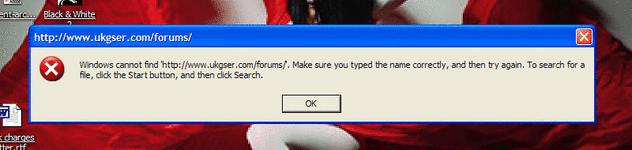
Minor firefox shortcut irritation...any ideas???

Fanum

Toubab
Joined
Apr 26, 2003
Messages
48,939
Reaction score
7
Location
Secure unit 2
I've got a shortcut or two on my desktop to here.....they're misbehaving though and I can't see why :nenau

the URL in the link is http://www.ukgser.com/forums/ which is correct......but when clicked, I get an error message as below......yet a second later Firefox launches correctly and displays the correct page with exactly the same URL :nenau

whats that all about then??? :confused:
 

Attachments

  • error.gif
    error.gif
    43.5 KB · Views: 103
It may be just a trick of the light, but isn't there a space after ukgser and the fullstop ?

Nope......it's all correct.
I did make sure by cutting and pasting it from the address bar again to make sure, but it's the same.

My wallpaper revolves...I've got two dozen dozen or so pics that change every 15 mins...the one in that screeny is this;
 

Attachments

  • 506.jpg
    506.jpg
    42.6 KB · Views: 80
I was getting it with advrider too. I couldnt work out what was happening but it seems to have stopped on my computer. I was wondering if was something to do with the slash on the end. I never put that on the shortcuts but it seemed to have appeared. But all seems ok now. I just tried a hosrtcut I dont think I had used for a bit and that worked ok whereas a while back a number were doing it. Puzzling.
 
Nope......it's all correct.
I did make sure by cutting and pasting it from the address bar again to make sure, but it's the same.

My wallpaper revolves...I've got two dozen dozen or so pics that change every 15 mins...the one in that screeny is this;


Nice chest:augie
 
That young lady's going to get a nasty chill on her chest if she's not careful. :augie

naaa..look closely, she's wearing a body suit thing.
great pic though isn't it :)


Anyway, the shortcut problem has fixed itself......i didn't do anything, change anything ....it just works now without the popup error message :nenau

Bizarre!


Back
Top Bottom