Missing Eastings ?

Taff

Well-known member
UKGSer Subscriber
Joined
Feb 21, 2004
Messages
7,351
Reaction score
6
Location
South West Wales
Ok - Captain Cluts here. I am having problems marking a waypoint using co-ordinates. I have been given the co-ordinates N51 29.381 E8 03.553 but when I use Ctrl + T to mark it as a waypoint, I get a message like "Incorrect or Missing Eastings". :confused: I am confident that the co-ordinates are accurate, so what am I doing wrong ?
 
way point

In mapsource try edit new waypoint l put in N51 29.381 E8 03.533
and got road over pond Nr MOHNESTRASSE

Mitch
 
That would be bang on Mitch. The co-ordinates are for the Mohne dam in Germany - one of the dams blown up by the Dambusters in WW2.

Greg, I had tried your suggestion before I posted this thread, but no joy. I may try editing an existing waypoint later, to see if that works - unless someones got a better suggestion in the meantime. ;)
 
This is a latitude/longitude in degrees, minutes and decimal minutes.

Do you have your unit set to hDDD MM.MMM ?

Eastings normally refer to a UTM based grid position.

If you prefer UTM, then change to the format you have been given for the waypoint, enter it, then change back to your preferred position format and the unit will convert it for you.
 
EJ
I assume you are using Mapsource.

I copied and pasted the co-ordinates (N51 29.381 E8 03.533)
into Mapsource CTRL+T (and also obtained MOHNESTRASSE) so it works without the leading zeroes.

I suspect you have the grid set incorrectly.

In Mapsource make sure you have your preferences set correctly:

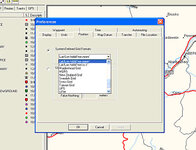
Go to >edit>preferences>position>grid>

Make sure in the grid box you have: Lat/Long hdddºmm.mmm‘
 
Right then - problem solved at last. Thanks again to everyone who sorted it for me (and to Dennis for the practical demo). As my good deed for the day, I thought I would print the screen to show how it was done - just in case this thread crops up on a "search". :rolleyes:

Easy really - when you know how. Edit - Preferences - Position - System Defined Grid Formats - choose the format you want / need from the drop down menu - Apply - OK. Most of my other waypoints were saved as OS Grid Refs, but by changing the preferences, the format of all waypoints can be changed at will, without having to re-enter them.
 

Attachments

  • screen.jpg
    screen.jpg
    46.7 KB · Views: 47


Back
Top Bottom