Moving files from a PC to a Mac

Deleted account 211025001

Registered user
Joined
Feb 3, 2005
Messages
8
Reaction score
10
I've finally taken the plunge and bought myslef a Mac.

Some stuff has been great from the off and some stuff has driven me nuts but, I'm getting there :)

Last week I set about moving my files (music, photos etc) from my PC to the Mac.
I used 'Migration Assistant' and 26 hours later :eek: the job was done.

I can't now find any files on the Mac :confused:
I've used Finder, searched for file names that should be there and file types.
I've told iTunes to scan for media.......and all have returned zilch, nada.

There would seem to be only two possible answers; I'm a complete numpty or no files made it over to the Mac (but then whart was it doing for all thoase hours?).


Any ideas please?

Andres
 
I can't help you at all I'm afraid Andres but just to say I'm now subscribed to this thread and will be following with interest.

I went from Windows to Apple last year but got John Lewis to do the migration exercise for me although never did manage to get all my old emails copied across.

With hindsight I would have done it all myself and also suspect I may have the odd item still on the Windows machine which I'll suddenly miss one day.

Good luck and all that.
 
Has the mac hdd filled up at all? Sounds like no files were actually transferred.

I've never migrated from a PC, but 26 hours sounds ludicrous. Generally about 4 or so, mac to mac.
 
Good point about the photo files. They should be in the iPhoto library, which iirc is in Pictures. It's a format that can only be read by iPhoto or Aperture.
 
I've put this evening aside to have a proper go at it as I've not had a chance to spend more than 30 mins or so up until now..............the drive would seem to be fairly full and seems to have lots of music and photos on it when I had a quick look.

When you've transfered files between Macs Cookie, did you use a cable or wifi? I used wifi which I guess is slower but, yeah, it struck me at the time that it was taking ages - I don't have THAT much music on my computer - it was however telling me what it was copying as it progressed which would seem to mean it was copying over ok?

Andres
 
if you saw the transfer taking place and the drive's filling up, then i guess it must be there somewhere. i've used firewire cable to transfer on a few occasions. not sure that's an option now, but it will be much quicker than wi-fi.

music should be in Music>iTunes>iTunes Music. and itunes should see it all under Library. it's a normal file structure, unlike photos.
 
Don't know if it's any help.

2 things

1 - you can't find photos in Finder as they are buried in IPhoto it's the same with ITunes. However this is not a problem as you can copy and paste them out if you want them for a specific use. You have to open IPhoto and find them in the various " events" which are folders in PC speak.

2 - I took photos and music directly from a PC formatted USB drive by plugging the PC formatted USB drive into the MAC and opening two finder windows on the Mac and then dragged the music files and photos to directories on the Mac using the two finder windows.

Hope this helps if not

There are loads of help videos on YouTube.

For me I would never go back to a PC
 
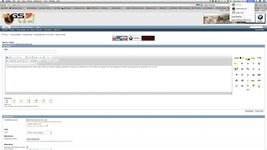
I went through this very process a few months back. When you use the Migration Assistant it creates a new identity so I had to ditch the original one I had created and transfer everything over to where the new one was. If you go to the top right corner where your account name is, hover the mouse over it. Is there more than one account there? If so, I'd bet that all your files are in the new account. IIRC you must have created a password for that new account. Just click on it and enter the password (or maybe the one for your current account?) and you should then flip into the new one. Then click Finder to see if the files are there.

Screenshot of what I mean below.

Did you buy the One2One package when you bought the Mac? If so, use it! Get yourself down to your local store for as many lessons as you can. These machines are dynamite but unless you get some help everything will take you twice as long until you've cracked it. I'd been using Windows for 20 years. You aren't going to pick up that level of experience overnight so a few lessons from your local store really is VERY worthwhile. Best £59.99 I've spent in ages.
 

Attachments

  • Screen Shot 2014-01-14 at 11.17.20.jpg
    Screen Shot 2014-01-14 at 11.17.20.jpg
    112 KB · Views: 129
i think AndyB has very likely cracked it :)

migration is best done before even using the new mac, then the identity created is the only one.

when i sell a mac, i always restore to "as new" otherwise there will always be two users.
 
Andy B,
How do you do a screenshot on an imac?
It's easy on an ipad or iPhone but couldn't do it on my imac
Ian

Grab doesn't always work - especially if you are using your browser in full screen mode (as I do).

The easiest way is to hold down cmd (⌘) and shift (⇧) together and then press '4'. If you just want a shot of part of the screen then it's cmd and shift again followed by '3'. This will change your mouse arrow to cross-hairs and you can then just drag them over the portion of the screen you want to copy and when you let go it will create the screenshot.:thumb2
 
Cheers Andy but I don't seem to have a '2nd identity' - no identity info on the top bar at all?

Had a look in settings and there only seems to be me listed and 'guest'.


Only music in the iTunes library folder is the CD I bunged on there last night (oh, and the stuff I've bough off iTunes in the past).

I'll keep trying but I'm beginning to think there's nothing there.........

Andres
 
Okay - well that's really flummoxed me! :nenau The amount of time it took to do the migration makes me think it's there somewhere. Mine didn't take that long but frankly it will depend how much info you are transfering. I did mine with a cable - or two actually. One from the Mac to my Router and then another from the Router to the Windows PC. I also disconnected it from the internet whilst doing it. If the migration had failed I think it would have told you so.
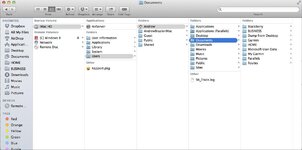
What does this view look like on your Mac? Double-click on the hard drive icon on your desktop and work your way through. You can see what users there are and in my case you can see all the documents are under iMac HD/Users/Andrew/Documents. If there are any other users, highlight them to see if it shows you any documents elsewhere.

If you can't find anything I think the only conclusion you can draw is that the migration didn't work.
 

Attachments

  • Screen Shot 2014-01-14 at 21.06.36.jpg
    Screen Shot 2014-01-14 at 21.06.36.jpg
    69.2 KB · Views: 69


Back
Top Bottom