MR app on an iPad - How do I get map to stay flat

dicktheleg

Pestie to the Nobility
UKGSer Subscriber
Joined
May 6, 2004
Messages
3,630
Reaction score
956
Location
Worcestershire, England
When I zoom out on the OSM map it goes into some wierd perspective, how can I just keep it as a flat map?

Thanks
Rich.

========

I have edited the title and posts within the thread, deleting some.

Richard
 
Last edited by a moderator:
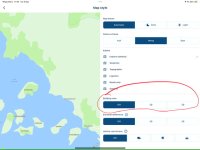
If you use the Route planner via the App on the Ipad (Which gives more functionality particularly in route editing) you have the choice of 2d or 3d maps.

IMG_0272[1].jpg

If you pick the 3d option the map tilts by about 20 degrees if you move around the map using two fingers. If you use one it will stay at whatever tilt you set. You can tilt the welcome screen and it pings back to flat after a few seconds.
IMG_0276[1].jpg

The app on the Ipad is now the way to go for route planning it allows you to do things with your finger (Like put a waypoint into an existing route) that are otherwise difficult without a mouse and keyboard. Not sure this helps. Just guessing :D
 
I think you might well have hit on the answer. Thank you.

I don’t use the app on my iPad, but I might well now start.
 
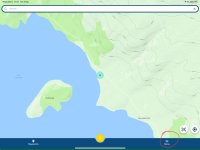
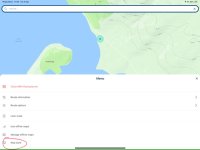
In case you (or anyone else) can’t find the setting:

IMG_6041.jpeg


IMG_6042.jpeg


IMG_6043.jpeg
 
Last edited:


Back
Top Bottom