


Now we are at the end, it’s a good time to remind everyone and myself:
A, Check that any and all way or shaping points are well positioned. On the road, not in a field or lake, not at junctions and on the correct road or carriageway. Into this list, I would include not placing one on top of or underneath bridges. Why the latter? It is only because the dumb device can sometimes read the point as being on the road above or on the road beneath. This can lead to calculation / recalculation problems. Just avoid it if you can. It is particularly important to check the position of additional points, generated by MyRoute’s expand feature. They can certainly be a bit wayward. Drag the point or use the ‘move’ button.
This advice comes from MyRoute’s ability to convert a track into a route (something it is better at with some tracks than others *) but it applies just as well to creating your own bespoke routes and / or using MyRoute’s ‘expand’ tool:
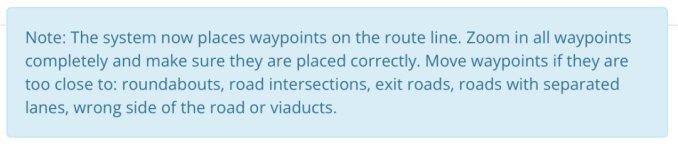
B. Check and then check again. This relates as much to the original route as to the version that displays on transfer to your device. Five minutes spent now, in the comfort of home, might well save a lot of swearing later.
Zoom in a bit.
i. If the route takes an odd detour, it can be because it has cut a corner, taking a stupid side road, instead of going 100 yards further to the much more sensible T-junction. Force the route to use the T-junction by dropping in a well placed shaping point.
ii. If the route doubles back on itself, look to see why. Have you dropped a point on the wrong carriageway or on the wrong exit of a roundabout?
iii. Remember what side of the road you drive on. Why? Sometimes the algorithm will throw in a direction of travel that requires you to turn off (sometimes across the flow of traffic) and then rejoin further along, again across the flow of traffic. Going across the flow of traffic means giving way, which slows you down. Better sometimes to sacrifice that manoeuvre and stay on the road you are on, with no giving way and no manoeuvres.
iv. Sometimes though the routing algorithm is cleverer than you are. The odd detour or seemingly illogical routing might be because the road you think you want to take is either closed to through traffic or is one way only. That is why the ‘stupid’ software is taking you the way it has. Have a look in Streetview, it sometimes holds the answer. Or try amending the route manually. If MyRoute keeps refusing to route you where you want to go, there is usually a very good reason for it.
C. Take a paper map with you. No matter how basic it is, this will not change, unless it dissolves in a rainstorm or blows away in a hurricane. When you have thrown your GPS device into a river in frustration or dropped your phone, smashing its screen, the paper map will be your best friend. They are very cheap, weigh next to nothing and take up very little space. People died to create maps. They did it for a reason. Remember that and them before you discard the idea. If you have no cause to look at it when you are away…. Great! If you do…. Great, too.
D. Always check any routes you receive from a third party, irrespective of how good or clever they might be. They are not always perfect. Not least the routes are sometimes created from their tracks. If they made a mistake on their ride, the mistake will be recorded in their track, unless they corrected it. If they didn’t correct it, their mistake will be carried through into your route. Do you really want to end up turning around, just as they did or end up at their front door?
* That’s a comment that can be applied to BaseCamp, MapSource and assorted other conversion apps. Conversion from a track to a route is not always 100% perfect.
A, Check that any and all way or shaping points are well positioned. On the road, not in a field or lake, not at junctions and on the correct road or carriageway. Into this list, I would include not placing one on top of or underneath bridges. Why the latter? It is only because the dumb device can sometimes read the point as being on the road above or on the road beneath. This can lead to calculation / recalculation problems. Just avoid it if you can. It is particularly important to check the position of additional points, generated by MyRoute’s expand feature. They can certainly be a bit wayward. Drag the point or use the ‘move’ button.
This advice comes from MyRoute’s ability to convert a track into a route (something it is better at with some tracks than others *) but it applies just as well to creating your own bespoke routes and / or using MyRoute’s ‘expand’ tool:
B. Check and then check again. This relates as much to the original route as to the version that displays on transfer to your device. Five minutes spent now, in the comfort of home, might well save a lot of swearing later.
Zoom in a bit.
i. If the route takes an odd detour, it can be because it has cut a corner, taking a stupid side road, instead of going 100 yards further to the much more sensible T-junction. Force the route to use the T-junction by dropping in a well placed shaping point.
ii. If the route doubles back on itself, look to see why. Have you dropped a point on the wrong carriageway or on the wrong exit of a roundabout?
iii. Remember what side of the road you drive on. Why? Sometimes the algorithm will throw in a direction of travel that requires you to turn off (sometimes across the flow of traffic) and then rejoin further along, again across the flow of traffic. Going across the flow of traffic means giving way, which slows you down. Better sometimes to sacrifice that manoeuvre and stay on the road you are on, with no giving way and no manoeuvres.
iv. Sometimes though the routing algorithm is cleverer than you are. The odd detour or seemingly illogical routing might be because the road you think you want to take is either closed to through traffic or is one way only. That is why the ‘stupid’ software is taking you the way it has. Have a look in Streetview, it sometimes holds the answer. Or try amending the route manually. If MyRoute keeps refusing to route you where you want to go, there is usually a very good reason for it.
C. Take a paper map with you. No matter how basic it is, this will not change, unless it dissolves in a rainstorm or blows away in a hurricane. When you have thrown your GPS device into a river in frustration or dropped your phone, smashing its screen, the paper map will be your best friend. They are very cheap, weigh next to nothing and take up very little space. People died to create maps. They did it for a reason. Remember that and them before you discard the idea. If you have no cause to look at it when you are away…. Great! If you do…. Great, too.
D. Always check any routes you receive from a third party, irrespective of how good or clever they might be. They are not always perfect. Not least the routes are sometimes created from their tracks. If they made a mistake on their ride, the mistake will be recorded in their track, unless they corrected it. If they didn’t correct it, their mistake will be carried through into your route. Do you really want to end up turning around, just as they did or end up at their front door?
* That’s a comment that can be applied to BaseCamp, MapSource and assorted other conversion apps. Conversion from a track to a route is not always 100% perfect.
Last edited:


 The most important bit of advice given for any biker trying to create their own route.


