Music on a Zumo

Aidan1150

Nice but unfortunate husband.
Moderator
Moderator
Joined
Nov 17, 2004
Messages
14,841
Reaction score
2,799
Location
South Armagh, Ireland
Will a Zumo recognise and play .wma files or do they all have to be saved as .mp3?

If they do have to be .mp3 files, where can a get a good, free converter?

TIA
 
Will a Zumo recognise and play .wma files or do they all have to be saved as .mp3?

If they do have to be .mp3 files, where can a get a good, free converter?

TIA

Must be MP3... Your Windows media player on your PC will convert .wma to MP3

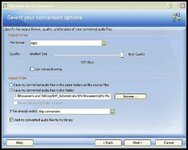
Right click on a .wma song track.....click "convert audio format"...set the file format to MP3......choose output folder to put converted songs into. Best to create an output folder first for saving your MP3 into.

Audio Convertor.jpg
 
I was led to believe that it was possible to convert music saved on your PC on iTunes/iPod to Mp3 using iTunes itself... but I'll be buggered if I cant work out how :confused:
 
To convert my itunes protected songs to mp3 i use software called "noteburner" it basically puts a "virtual" drive on your pc. Select this burner when choosing to burn cd in itunes and the songs all get copied to a folder on your pc as mp3's. After that you can do whatever you want with them.

Another tip is to use freeware "mp3gain" and normalise all the songs say they all play at the same volume. You'd be surprised at the db variation when you analyse the songs.

Biker
 
I was led to believe that it was possible to convert music saved on your PC on iTunes/iPod to Mp3 using iTunes itself... but I'll be buggered if I cant work out how :confused:

Post 8 of this thread has what you're after...
 
would this be the same for a beemer zumo 550,

how do you move music to the zumo,

do you have to have a sd card inside the zumo, how many tracks can you upload to the unit.

thanks
 
Must be MP3... Your Windows media player on your PC will convert .wma to MP3

Right click on a .wma song track.....click "convert audio format"...set the file format to MP3......choose output folder to put converted songs into. Best to create an output folder first for saving your MP3 into.

View attachment 109476


any idea how you do this with vista, can not find the convertor option,

thanks
 
any idea how you do this with vista, can not find the convertor option,

thanks

I have vista and as in my other posts regarding music on the zumo I use noteburner to convert my music files to mp3, i then use mp3 gain to normalise them.

I remove my sd card from the zumo and use a card reader to transfer my mp3's to the sd card. The zumo can use cards up to 4gb, anything bigger and it wont see the tracks (something to do with when the zumo came out the largest card was 4gb) i think???

Another tip is to have 1 folder on the card named mp3 and then within that set up a folder for each album or playlist, the zumo will boot quicker that way.

Read my other post here and lots of zumo info here

Biker

 
I have vista and as in my other posts regarding music on the zumo I use noteburner to convert my music files to mp3, i then use mp3 gain to normalise them.

I remove my sd card from the zumo and use a card reader to transfer my mp3's to the sd card. The zumo can use cards up to 4gb, anything bigger and it wont see the tracks (something to do with when the zumo came out the largest card was 4gb) i think???

Another tip is to have 1 folder on the card named mp3 and then within that set up a folder for each album or playlist, the zumo will boot quicker that way.

Read my other post here and lots of zumo info here

Biker

thanks i also have vista, i moved files to the sd card, but not seen till i realised they are in wma file, i think, and could not see a convertor,

will try the option you suggest.


Back
Top Bottom