My Routes and tracks - missing from Android version of the app

Berin

Well-known member
UKGSer Subscriber
Joined
May 29, 2006
Messages
8,054
Reaction score
3,971
Location
South Oxfordshire
So all is good on my IOS version of the app, but the phone I want to use on the bike is an Android. I've disabled devices to allow use of the Android phone, updated the app, but I get this weird behaviour trying to access my routes and tracks:

Opening the Android app I get this screen - same as iOS.
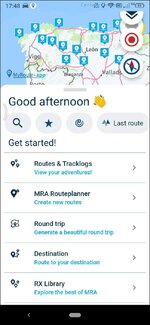
1787677439982.jpg

Opening the routes and track log menu's, however, instead of taking me to the routes and track log pages, take me to a map page - that's it. No option t do anything else. A bug?
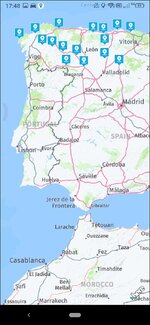

1787677416966.jpg
 
Last edited by a moderator:
So all is good on my IOS version of the app, but the phone I want to use on the bike is an Android. I've disabled devices to allow use of the Android phone, updated the app, but I get this weird behaviour trying to access my routes and tracks:

Opening the Android app I get this screen - same as iOS.

View attachment 533159

Opening the routes and track log menu's, however, instead of taking me to the routes and track log pages, take me to a map page - that's it. No option t do anything else. A bug?


View attachment 533157
What happens if you press the little back chevron bottom left?
 
What level of account do you have? I think there is limits on how many devices you can use the navigator on... You might have to remove the iPhone temporarily from your MRA account to get access on the android one.
 
Why does nobody ever think of asking the people who make the App?

They have a customer support team they train to be experts on the product, who spend all day working with the product and solving problems with the product, and if they get stuck have an escalation path to the people who write the code for the product. but no....

....First stop is the tossers here!
 
What level of account do you have? I think there is limits on how many devices you can use the navigator on... You might have to remove the iPhone temporarily from your MRA account to get access on the android one.

I was guessing the same, but the OP tells us:

I've disabled devices to allow use of the Android phone…..
 
I run the app on two phones a Motorola G62 running Android 13 and a Motorola Edge 40 Neo Running Android 15. I've tried to initiate that behaviour on both phones but if I Initiate POI's on the app and open it again I get this.

1787822732085.jpg

I was wondering if the version of Android on your phone is <10. I think I read somewhere that there was likely to be compatibility issues with earlier versions?
 
What level of account do you have? I think there is limits on how many devices you can use the navigator on... You might have to remove the iPhone temporarily from your MRA account to get access on the android one.
I have a full lifetime Gold and lifetime navigator, but you still only get 2 devices so I logged out of my iPad, leaving the iPhone and the Android phone. I do think it's do with this somehow, though.
I've raised a ticket (2 days ago) with no response so far
 
Why does nobody ever think of asking the people who make the App?

They have a customer support team they train to be experts on the product, who spend all day working with the product and solving problems with the product, and if they get stuck have an escalation path to the people who write the code for the product. but no....

....First stop is the tossers here!
I did. They haven't replied. Smart arse.
 
I run the app on two phones a Motorola G62 running Android 13 and a Motorola Edge 40 Neo Running Android 15. I've tried to initiate that behaviour on both phones but if I Initiate POI's on the app and open it again I get this.

View attachment 533585

I was wondering if the version of Android on your phone is <10. I think I read somewhere that there was likely to be compatibility issues with earlier versions?
Aha. It's Android 9. I wonder if that's it
 
I tried the same thing on my Samsung android phone and mines working.

I know that doesn't help... other than its just you 🤣

im on Android 16
 
That's the issue, Android older than 14 is not fully supported. However, prompted by that I found something on the forum, and have a fix;

Homepage on the app>map layers
>Map Style, scroll down to Advanced
>Change Native View mode to Virtual Display and Surface - whatever they are

And now it works, or at least seems to.

I'm reluctant to use my main phone as a nave device so I think I'll either find a cheaper iPhone or maybe a new Ulefone, since that gives me Locus maps and some other stuff that doesn't run on IOS.

As always thanks for your help, especially Mzokk
 
Answer for Android
Buy GPX viewer
Put your gpx files in there
Easy peasy
And as for myroot :D....
 
That's the issue, Android older than 14 is not fully supported. However, prompted by that I found something on the forum, and have a fix;

Homepage on the app>map layers
>Map Style, scroll down to Advanced
>Change Native View mode to Virtual Display and Surface - whatever they are

And now it works, or at least seems to.

I'm reluctant to use my main phone as a nave device so I think I'll either find a cheaper iPhone or maybe a new Ulefone, since that gives me Locus maps and some other stuff that doesn't run on IOS.

As always thanks for your help, especially Mzokk
A friend uses an Ulefone rugged phone of some description for navigation. He didn't pay a lot for it certainly <£150 but it runs Android 15 has a bright 6.5 inch screen and is built like a house brick (and weights about the same). It has such a massive battery he doesn't even have power running to it. It's mounted in a Ram Quickgrip XL (and just about fits its so thick!) He has run it since last April without issue, so far, including a couple of drops when he's been fumbling about trying put it on the mount with gloves on.
 
That's the issue, Android older than 14 is not fully supported. However, prompted by that I found something on the forum, and have a fix;

Homepage on the app>map layers
>Map Style, scroll down to Advanced
>Change Native View mode to Virtual Display and Surface - whatever they are

And now it works, or at least seems to.

I'm reluctant to use my main phone as a nave device so I think I'll either find a cheaper iPhone or maybe a new Ulefone, since that gives me Locus maps and some other stuff that doesn't run on IOS.

As always thanks for your help, especially Mzokk
That is useful to know. (y) This option does not show on may Android 15 phone but does on the one I connect for navigation which is Android 13. So if it throws a hissy fit at least I'll know where to look to try and sort it.

 
Answer for Android
Buy GPX viewer
Put your gpx files in there
Easy peasy
And as for myroot :D....
I've got GPX viewer, but it wouldn't have helped in this case as I couldn't see any of the stored routes. But sorted now, though it did take me down a wormhole looking for a basecamp replacement.

Twonav
 
I think a current version Ulefone is still around £150 or so, but as with all the Chinese stuff there's 10,000 models and it's hard understand the difference
 
I did. They haven't replied. Smart arse.
Bloody hell, they used to be brilliant with support, would of expected a response in under 24 hours....

...Or maybe it is my super duper life Gold membership from supporting them at crowdfunding stage means they bother to reply to me?
 
Bloody hell, they used to be brilliant with support, would of expected a response in under 24 hours....

...Or maybe it is my super duper life Gold membership from supporting them at crowdfunding stage means they bother to reply to me?
If you’d have been arsed to read any of this instead of just pointessly sniping you’d have seen I have the same gold life membership.


Back
Top Bottom