Nav V Routes recalculating :(

DJ GSA

Registered user
Joined
Mar 7, 2011
Messages
768
Reaction score
0
Location
West Midlands
I spent a couple of hours painstakingly plotting an exact route into the NavV

Now when I want to run that route its gets recalculated to something else

How do I stop it doing that and get it to navigate the route I have drawn exactly ?
 
Do you make the route in Basecamp?
If yes
When finished
Make the route into a track
Import the route and track
Into V
Convert track to route
Now you have a route exactly how you wanted it.
(This only works if you have 2 way points,
Start and finish.
All other way points wil be deleted in the track

If you want a waypoint in the middle of the route i.e. lunch stop
Just make 2 routes
1 Start 》lunch
2 lunch 》 Finnish
And use track method above

Also turn recalculation off

Verstuurd vanaf mijn SM-N910F met Tapatalk
 
Transfer the track to your satnav and set it to show on map, color black. You will then have both route for spoken directions and if you get off route for any reason, a track to get back to.

Unless you insert some intermediate waypoints into the route you made after you have converted the track to a route (which at this point has just a start and finish), then if the satnav is set in recalculate mode, any departure from the route will lead to creation of a new route that may differ considerably from the original (you will still have the visible track though and thus can navigate simply by following the line of you wish). If I want spoken directions, I usually add a dozen or so intermediate points and name them with sequential numbers (01, 02 etc). This way they get sorted properly in the Basecamp list and you can drag them wholesale across to the route information panel and drop them after the start of the route.
 
I never use Basecamp anymore as it's a pain in the arse so I use https://www.myrouteapp.com instead. I find the key is making quite a few waypoints so it makes it hard for the GPS to recalculate especially if you skip a waypoint.

I also find that the route differs a little once the GPX file is imported in the the Nav V. This is why I use extra waypoints sometimes.
 
Tracks are useful to have in Basecamp as you can then send them to people who don't have or use Basecamp, or who have Tomtoms etc. and they will still have exactly the same information as you. Of course, what they do thereafter to screw it up depends on how knowledgeable/ignorant they are.
 
Read this
http://www.ukgser.com/forums/showthread.php/396216-Basecamp-and-Nav-5-My-way

All this track nonsense just takes time and messing about that seems unnecessary


I agree completely, most recalculating issues are down to the device preferences differing from those used to plot the route. Via points and waypoints do need to be placed correctly so so as to force any device to follow the desired route but this is not at all hard to achieve.

I think I have as much experience as anybody of transferring routes to various devices. I had 60 plus routes available (almost all circular) and often found myself transferring several of those routes to 5 or 6 different devices every day during the season. I soon found that if I set the device preferences myself before downloading the route remained as planned.

John
 
Tracks are useful to have in Basecamp as you can then send them to people who don't have or use Basecamp, or who have Tomtoms etc. and they will still have exactly the same information as you. Of course, what they do thereafter to screw it up depends on how knowledgeable/ignorant they are.

yep that is one of the uses for tracks but then again it is as easy to convert from GPX to whatever format required e.g. tom tom then send or share
 
Sat navs and route planners only use your start and finish points and make up the rest themselves. You have to put plenty of way points in to force the route go where you want. Put your way points on the road just after the towns you want to travel through and not in the town itself, thay way the route will take you round any bypasses etc and not through the town centre.
The easiest and most intuitive route planner (in my and many friends opinion) is Tyre to travel as it uses Google maps. You enter your start and finish let it plot the route, then drag it to where you want it to go, then fill in enough way points so your satnav has no option but to follow. You can send the route to Garmin or TomTom it doesn't matter, or to your friends.
All route planners seem confusing untill you've had a bit of practice, it seems to me that Tyre takes the least. Most of us just want to simply plot a route bung it in the satnav and go. Base camp wants to make me tear what remaining hair I have, out. Life is too short.
 
I spent a couple of hours painstakingly plotting an exact route into the NavV

Now when I want to run that route its gets recalculated to something else

How do I stop it doing that and get it to navigate the route I have drawn exactly ?

When in Basecamp click "Ctrl o" this takes you into options in the left hand side click device transfer tick the check box "always match the route to the map on the device"

Also use more via points this gives the device better accuracy of your intended route if it does recalculate.
Read from post #36 on his link http://www.ukgser.com/forums/showthread.php/394565-Aaaarrrrgggghhhh!!!!!/page3 to give an understanding of the way the device calculates.
Garmin 590 and Nav v are basically the same.
 
Sat navs and route planners only use your start and finish points and make up the rest themselves. You have to put plenty of way points in to force the route go where you want. Put your way points on the road just after the towns you want to travel through and not in the town itself, thay way the route will take you round any bypasses etc and not through the town centre.
The easiest and most intuitive route planner (in my and many friends opinion) is Tyre to travel as it uses Google maps. You enter your start and finish let it plot the route, then drag it to where you want it to go, then fill in enough way points so your satnav has no option but to follow. You can send the route to Garmin or TomTom it doesn't matter, or to your friends.
All route planners seem confusing untill you've had a bit of practice, it seems to me that Tyre takes the least. Most of us just want to simply plot a route bung it in the satnav and go. Base camp wants to make me tear what remaining hair I have, out. Life is too short.


They will just use start end end points if that is all you put in. If you use waypoints the device will try to use them, the downside being it often insists you go there. By using via points the device will route you as intended but will not insist you turn round because you missed a waypoint. I use Mapsource which is a easy as Tyre for plotting a route. Make a start and end point and let Mapsource create a basic route, you can then drag the route to your desired roads and this will create via points as you go. Using Tyre and then transferring to your Garmin means that you are using two, often different, maps and therefore could introduce anomalies

I agree about Basecamp, far too complex for most peoples needs. I have used it and I keep it updated but whilst Mapsource does all I need the time required to learn Basecamp could be better spent riding the bike.

John
 
When in Basecamp click "Ctrl o" this takes you into options in the left hand side click device transfer tick the check box "always match the route to the map on the device"

Also use more via points this gives the device better accuracy of your intended route if it does recalculate.
Read from post #36 on his link http://www.ukgser.com/forums/showthread.php/394565-Aaaarrrrgggghhhh!!!!!/page3 to give an understanding of the way the device calculates.
Garmin 590 and Nav v are basically the same.

Our cheap Garmin in the car routes in exactly the same way as the Nav V or for that matter my 390. Garmin no longer make Sat Navs with routing designed for motorcyclists, we just have to make do with the one size fits all approach to suit car drivers.

John
 
I intend having a proper look at this when I have time. I'm just back from France & my biker mate plotted the routes in advance on BC & sent them to me as GPX files. I uploaded them to my BC then xferred them to my Nav V. Despite checking that the settings were the same on both devices & that the routes were identical on the trip planner on the respective devices, as soon as we were en route the 2 devices took completely different roads virtually immediately, without fail, every day.
 
I intend having a proper look at this when I have time. I'm just back from France & my biker mate plotted the routes in advance on BC & sent them to me as GPX files. I uploaded them to my BC then xferred them to my Nav V. Despite checking that the settings were the same on both devices & that the routes were identical on the trip planner on the respective devices, as soon as we were en route the 2 devices took completely different roads virtually immediately, without fail, every day.


One useful check is to recalculate the route you have been sent on your own version of Basecamp. I have done this with routes sent out by my local riders group. Often the recalculated route differs, sometimes considerably. What I have found in this case was that the via points were badly placed leaving the individual device to decide on the route at various points. Adding a few extra via points solved the problem.

Twice I have been sent circular routes with only the start/finish as a waypoints with via points along the route. If you try to use such route the device will recalculate you back to the start/finish if you deviate at all from the route.

Another point is that the devices appear to learn your average speed on different types of road. I have downloaded a route to several devices, al follow exactly the route intended and show the same total distance but all show different times for the same route. This is a possible cause of differences in routing, if on device thinks one road is faster than another it may in the absence of a waypoint or via point decide to take a different route to that intended. This certainly happened with one of the routes I was sent. The intention was to meet at a well known biker cafe and then some interesting twisty roads into the hills. Because there were no via points to tell it otherwise when I re calculated it on Basecamp the route changed to use the handy dual carriageway that bypassed the twisties.

I hope this is helpful

John
 
Last edited:
Hi All, thanks for the great advice and tips. I will try those later. I never had this problem with my Z660, it behaved quite nicely and did exactly what I asked it to.
I thought I was a bit of a whizz with the Nav V but its finding new ways to frustrate me every time.

Sat navs and route planners only use your start and finish points and make up the rest themselves. You have to put plenty of way points in to force the route go where you want. Put your way points on the road just after the towns you want to travel through and not in the town itself, thay way the route will take you round any bypasses etc and not through the town centre.
The easiest and most intuitive route planner (in my and many friends opinion) is Tyre to travel as it uses Google maps. You enter your start and finish let it plot the route, then drag it to where you want it to go, then fill in enough way points so your satnav has no option but to follow. You can send the route to Garmin or TomTom it doesn't matter, or to your friends.
All route planners seem confusing untill you've had a bit of practice, it seems to me that Tyre takes the least. Most of us just want to simply plot a route bung it in the satnav and go. Base camp wants to make me tear what remaining hair I have, out. Life is too short.

The problem is when I pick the route I want. It asks me "Select Next Destination", what ever I select in recalculates the route to that point instead of navigating the route I have already defined. What I want it to do is to take me round the route I have defined. If I look at the "Map" the route is exactly as I wanted it. But I can't seem to be able to ride/drive that route.

Do you make the route in Basecamp?

Also turn recalculation off

Verstuurd vanaf mijn SM-N910F met Tapatalk

Yes I used Basecamp. Also Google Maps, Bing Maps, GPS Visualiser, Furkot, and Tyre.
I can't find any option to turn recalculation off ? :(

I never use Basecamp anymore as it's a pain in the arse so I use https://www.myrouteapp.com instead. I find the key is making quite a few waypoints so it makes it hard for the GPS to recalculate especially if you skip a waypoint.

I also find that the route differs a little once the GPX file is imported in the the Nav V. This is why I use extra waypoints sometimes.

I get the same issue whether I use MyRouteApp, GPS Visualizer or Google maps. The map looks correct on the application,and also looks fine when transferred to the Nav V (KML, GPX GDB, CSV). But then I can't drive it cos the Nav V recalculates it when I ask it to go somewhere. I have lots of way points on the route and the NavV asked me which one I want and then calculates its own routes to that point and not the route I have planned.

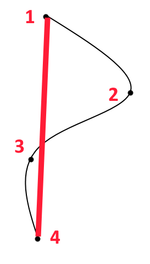
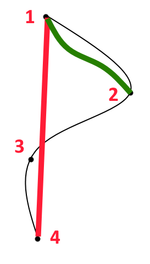
For example (see image). I have a route (in black) with 4 way points. When I transfer to the NavV I can see the route as expected. Using the Trip Planner I select the route and it says "Select Next Destination" and presents all 4 way points. If I select "4" I get the route recalculated (shown in Red). If I select "2" then I get the route (shown in Green). All I want to do is drive/ride the route shown in Black.

 

Attachments

  • Untitled.png
    Untitled.png
    10.2 KB · Views: 832
  • Untitled.png
    Untitled.png
    11.9 KB · Views: 838
The problem is when I pick the route I want. It asks me "Select Next Destination", what ever I select in recalculates the route to that point instead of navigating the route I have already defined. What I want it to do is to take me round the route I have defined. If I look at the "Map" the route is exactly as I wanted it. But I can't seem to be able to ride/drive that route.

I thought I was a bit of a whizz with the Nav V but its finding new ways to frustrate me every day.

This sounds like you may not have enough via points to make up the route. Or it could be an issue with the units preferences,how are they set can I ask? The device will always try to do what you have told it by selecting different preferences. If like me you select "fastest time" the device will use what it thinks is the fastest route to your first destination. Usually on the bike I select avoid motorways so I only have to place via points at certain points along the route in the knowledge that my device won't re calculate using a motorway even if this is the fastest option.

I have to say that this whole thing about having to select a "next destination" is a step backwards. You have planned a route, the bloody thing should just get on with it. Once on a route I ignore the next destination stuff if I stop, just carry on and it works fine. How you are supposed to know which is the next via point from the list is beyond me. OK on familiar territory but then I don't really need a Sat Nav in that situation. Useless in a foreign country.

John
 
Hi All, thanks for the great advice and tips. I will try those later. I never had this problem with my Z660, it behaved quite nicely and did exactly what I asked it to.
I thought I was a bit of a whizz with the Nav V but its finding new ways to frustrate me every time.


The problem is when I pick the route I want. It asks me "Select Next Destination", what ever I select in recalculates the route to that point instead of navigating the route I have already defined. What I want it to do is to take me round the route I have defined. If I look at the "Map" the route is exactly as I wanted it. But I can't seem to be able to ride/drive that route.


Yes I used Basecamp. Also Google Maps, Bing Maps, GPS Visualiser, Furkot, and Tyre.
I can't find any option to turn recalculation off ? :(


I get the same issue whether I use MyRouteApp, GPS Visualizer or Google maps. The map looks correct on the application,and also looks fine when transferred to the Nav V (KML, GPX GDB, CSV). But then I can't drive it cos the Nav V recalculates it when I ask it to go somewhere. I have lots of way points on the route and the NavV asked me which one I want and then calculates its own routes to that point and not the route I have planned.

For example (see image). I have a route (in black) with 4 way points. When I transfer to the NavV I can see the route as expected. Using the Trip Planner I select the route and it says "Select Next Destination" and presents all 4 way points. If I select "4" I get the route recalculated (shown in Red). If I select "2" then I get the route (shown in Green). All I want to do is drive/ride the route shown in Black.

You haven't put in enough shaping points or waypoints on your route in Basecamp and because of this your device is routing the fastest way between points 1 & 2.
if you put another point or maybe even two between 1 & 2 the device will have greater accuracy of replicating your desired route.

You haven't indicated the distance between 1 & 2 or 3 to 4this may help.
 
Apologies if I've missed something or going over old ground here - new to the forum and all that :blagblah

Is your NavV set to motorcycle or car i.e. is it showing a car or bike at the top of the screen?

I've got a 590 and I had similar problems when I first got it: I'd create a route in Basecamp, upload it onto the 590, set it to go and it would take me on a completely different route.

I spoke to a mate who was in the know and he told me the 'motorbike' setting almost always takes a different route and that changing to 'car' setting overcomes this. I've been doing this ever since on my 590 and never had an issue and don't have to worry about other settings.

I picked up a new 1200GSA last week but not had a chance to try the NavV yet, so no idea if this motorbike/car setting thing is an issue with this model.

Like I say, this could be going over old ground and not helpful at all. Hope it is but if it isn't, thanks for reading anyway :augie
 
Apologies if I've missed something or going over old ground here - new to the forum and all that :blagblah

Is your NavV set to motorcycle or car i.e. is it showing a car or bike at the top of the screen?

I've got a 590 and I had similar problems when I first got it: I'd create a route in Basecamp, upload it onto the 590, set it to go and it would take me on a completely different route.

I spoke to a mate who was in the know and he told me the 'motorbike' setting almost always takes a different route and that changing to 'car' setting overcomes this. I've been doing this ever since on my 590 and never had an issue and don't have to worry about other settings.

I picked up a new 1200GSA last week but not had a chance to try the NavV yet, so no idea if this motorbike/car setting thing is an issue with this model.

Like I say, this could be going over old ground and not helpful at all. Hope it is but if it isn't, thanks for reading anyway :augie

Read post #4 and the linki within it

If you are creating a route in basecamp the car or bike settings matter for nothing as long as they are replicated in both computer and device and that goes for all Garmin Nav units as far as i know
 
Read post #4 and the linki within it

If you are creating a route in basecamp the car or bike settings matter for nothing as long as they are replicated in both computer and device and that goes for all Garmin Nav units as far as i know

That is my understanding too The motorcycle or car settings are just that, things that the user sets up. When Basecamp first appeared the default motorcycle settings were rubbish. Useful though when route planning on the PC to be able to use different settings for car or bike use. In the car I just want to get there, on the bike I want to enjoy the getting there.

John


Back
Top Bottom