New internal hard drive not recognised

ianb

Member
UKGSer Subscriber
Joined
May 13, 2004
Messages
76
Reaction score
1
Location
Devon, England
Hi - Just installed a new Seagate SATA hard drive into a Dell Dimension running XP Pro. I enabled the drive in the setup menu but the drive doesn't appear under My Computer.

The drive is listed in Device Manager, but it says there are no drivers installed.

When I 'scan for hardware changes' the Found New hardware message pops up followed by the 'Cannot Install this Hardware' message.

Tried Google but it throws up so many possible answers I'm not sure which way to turn!

Any advice out there? Cheers - Ian
 
Hard drive

Had this same problem many years ago, if you go to seagates web page do a search for this problem and l think there is a program you can download and run.

Mitch
 
I enabled the drive in the setup menu but the drive doesn't appear under My Computer.

Which model of Dimension? - Have you been to the Dell support site for your model and downloaded/installed Matrix Storage Manager?
 
Dimension 5150

I downloaded the following from the Dell site - now residing at C:\dell\Drivers\R126083 ia mcdl_win.dll; NoDoze.exe and Version.txt. Running the Maxtor Doze Disable Utility it comes back with Complete - No errors.

The title in the txt file reads:

Title : Serial ATA:Maxtor 6V080E0, 80GB, SATA, 3.0Gb, 6V160E0, 160GB, SATA, 3.0Gb, 7V250F0, 250GB, SATA, 3.0Gb Utility

which doesn't mention the 500GB drive that I have.

Ian
 
PC doesn't meet the minimum spec ...

... to install the Matrix Storage Manager!

Even more confused now - does that mean the drive is no good for my m/c?

Ian
 
check

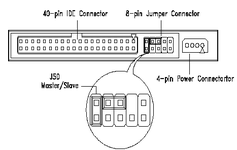
the jumper settings on the back of the drive. There is a little connector which needs to be in a certain position depending on whether the drive is a master or slave drive. It is normally close to the main ribbon connection and the positions are explained on the body of the drive.
 

Attachments

  • jumper.gif
    jumper.gif
    4.1 KB · Views: 3,436
the jumper settings on the back of the drive. There is a little connector which needs to be in a certain position depending on whether the drive is a master or slave drive. It is normally close to the main ribbon connection and the positions are explained on the body of the drive.

That does not apply to SATA drives


Back
Top Bottom