New to GPS, with a trip imminent. Gulp!

I'm trying to build a route from home to work. Where there is say, a section of A3 to follow, it goes all around the houses. Even if it's just a few seconds, without any junctions, it comes up with a weird route. I tried putting it in fastest route/ car, but it still keeps doing it :blast

Any suggestions?

are you using mapsource or basecamp?
if mapsource go to edit preferences and check where the slider is that indicates your preference for major roads or minor roads (its hidden in the "route" folder heading)
recalculate and it should re route you along the roads you wish to use, (the slider will need to placed more towards "big roads end!)
there will be equivalent in base camp I expect
 
Check your route preferences on the device and make sure you know what's checked (ticked) and what isn't.

You'll have choices that you can tick like avoid motorways / dual carriage ways, avoid toll roads etc.

Also, if you're planning a route on a computer and then sending it to device, be careful when choosing a way point, and zoom in to it to make sure you haven't accidentally put it on the wrong side of a motorway or dual carriage way. Easily done ....
 
are you using mapsource or basecamp?
if mapsource go to edit preferences and check where the slider is that indicates your preference for major roads or minor roads (its hidden in the "route" folder heading)
recalculate and it should re route you along the roads you wish to use, (the slider will need to placed more towards "big roads end!)
there will be equivalent in base camp I expect

Using Basecamp
 
Have a look here https://www.youtube.com/watch?v=b9Q2U3McvjM This should give you an idea of how to work basecamp.

However what I do is put a waypoint at the start for me usually St Malo ferry terminal and destination for that day usually an Ibis hotel in a city centre.
In between the start and destinations I will scour google map for interesting D-roads between minor towns and plant a waypoint on a road that looks good in the direction of my destination.
I will probably pick out 4-6 areas like this and mark with waypoints that's in between start and destination. Then use the route tool (three green linked squares icon) and join up the waypoints.

If your unhappy with the way Basecamp calculates the route you can simply hover over the road you wish and click on that (shaping point) then to the next waypoint, use the undo function where necessary.

Like mentioned earlier check all the points after the route is created so the points are in the road and the correct carriageway.
 
About the only words I can agree with ;)

As Nutty says earlier ... simply look on the map, a real map, you can pick out the good motorcycling roads far better than any GPS can (can't you?) ...

Note the towns or villages on the way ... depends on the terrain etc. but for a 200 mile trip you'll probably only need four or five ...

Find them in your GPS, preferably in reverse order ...

After breakfast go to History, the first town ... go to. As you near it press the X and go out of the route, back to history and go to the next town ...

Simples and it's totally amendable at any time ... see a lovely road over a mountain going in the general direction of where you want ... then turn and go down it :D

:beerjug:

Not a very efficient way of getting there and not one that might take in the best roads. Telling the device to go to a town means it will go to the centre of that town-hardly what you want if you are passing through. This method seems to me to be just taking what we all used to do in the old days, with a list of towns to look out for, and then getting the SatNav to do the same. These devices are capable of so much more. Why buy an expensive device in the first place if that is all you want to do?. This method also involves lots of stopping and finger poking (and probably a few swear words) With this method the device is in charge, you just allow it to give instructions between each town.

If you plan your route ahead you can place via points so that you are taken around rather than through the towns. As via points you don't have to go to every one, the device will just re calculate you to the next one. With your destination set as a waypoint the device with get you there no matter how many interesting detours you take along the way. I do wonder about people who don't like a route because they say they want to do their own thing. Do they blindly obey Sat Nav instructions? Have they not worked out that, despite the female voice, there are no consequences to not doing what you are told?

I say to these people, feel the fear and do it anyway, plot a route, load it up and off you go. You only need an end point plotted and the device will tell you your arrival time if you go straight there. You might note, for example, that you have an extra 2 hours to play with. When you see an interesting side road, take it, see how it feels to be disobedient! Enjoy yourself but see how the device can always point you to your destination. I do this a lot, off for the day I want to go somewhere but don't care how long it takes. I might turn off the route dozens of times but each time the re calculation shows me when I will get to my destination. When I see that the arrival time suits me I let the device take me straight there. To me this is me in total charge of my day given that I want to eventually arrive at a specific place. If i don't and am just out for a ride I keep the device on so that wherever I end up I can quickly see how long it will take to get home. If I don't know were I am I can ask the device for a route home-I tend to turn this off once I am back on known roads. Either way the machine is working for me not the other way around.

Oh, and if the OP struggles with Basecamp he could try good old Mapsource!

John
 
I see your points John, but on my Nav V you can press a button on the main screen to take you to the next place you've entered into the sat nav. With the preferences set at curvy roads, avoid traffic/ main roads, it normally takes you around busy towns. Just hit the button when your approaching one of the towns/ villages you've set, and it'll take you right around it.:beerjug:

As to going off route, down an interesting looking road, I do that all the time. Again, tick the avoid u-turn preference, and it'll recalculate, so you'll never have to go back the way you came.:thumb

When I'm going away on the bike, I don't want to be a slave to the sat nav, OR basecamp. Sitting in front of a computer for hours plotting routes doesn't float my boat!:D
 
Not a very efficient way of getting there and not one that might take in the best roads. Telling the device to go to a town means it will go to the centre of that town-hardly what you want if you are passing through. This method seems to me to be just taking what we all used to do in the old days, with a list of towns to look out for, and then getting the SatNav to do the same. These devices are capable of so much more. Why buy an expensive device in the first place if that is all you want to do?. This method also involves lots of stopping and finger poking (and probably a few swear words) With this method the device is in charge, you just allow it to give instructions between each town.

If you plan your route ahead you can place via points so that you are taken around rather than through the towns. As via points you don't have to go to every one, the device will just re calculate you to the next one. With your destination set as a waypoint the device with get you there no matter how many interesting detours you take along the way. I do wonder about people who don't like a route because they say they want to do their own thing. Do they blindly obey Sat Nav instructions? Have they not worked out that, despite the female voice, there are no consequences to not doing what you are told?

I say to these people, feel the fear and do it anyway, plot a route, load it up and off you go. You only need an end point plotted and the device will tell you your arrival time if you go straight there. You might note, for example, that you have an extra 2 hours to play with. When you see an interesting side road, take it, see how it feels to be disobedient! Enjoy yourself but see how the device can always point you to your destination. I do this a lot, off for the day I want to go somewhere but don't care how long it takes. I might turn off the route dozens of times but each time the re calculation shows me when I will get to my destination. When I see that the arrival time suits me I let the device take me straight there. To me this is me in total charge of my day given that I want to eventually arrive at a specific place. If i don't and am just out for a ride I keep the device on so that wherever I end up I can quickly see how long it will take to get home. If I don't know were I am I can ask the device for a route home-I tend to turn this off once I am back on known roads. Either way the machine is working for me not the other way around.

Oh, and if the OP struggles with Basecamp he could try good old Mapsource!

John

You weren't listening ... it is actually very efficient :P

I use a map to choose my roads, chose the towns or villages along it that take me down those roads. Twenty minutes with a map and a bier the night before :D

I don't let my GPS take me John, I tell my GPS where to take me, on the roads I have chosen for it to do so ... simples :thumb

:beerjug:
 
Twenty minutes with a map and a bier the night before :D ....


Yep .... or over breakfast! That's pretty much what I do - paper map and sat nav - best of both worlds ...

:thumb2


(Meuse valley in two weeks time .. !!)
 
I see your points John, but on my Nav V you can press a button on the main screen to take you to the next place you've entered into the sat nav. With the preferences set at curvy roads, avoid traffic/ main roads, it normally takes you around busy towns. Just hit the button when your approaching one of the towns/ villages you've set, and it'll take you right around it.:beerjug:

As to going off route, down an interesting looking road, I do that all the time. Again, tick the avoid u-turn preference, and it'll recalculate, so you'll never have to go back the way you came.:thumb

When I'm going away on the bike, I don't want to be a slave to the sat nav, OR basecamp. Sitting in front of a computer for hours plotting routes doesn't float my boat!:D


I find planning the route a part of the fun, but it would not do if we were all the same. As I use Mapsource I only have to spend minutes plotting a route but I take your point about the time it takes in Basecamp. Anyway if you read my post I agree that I don't want to be ruled by the Sat Nav, I just want to lay down the rules myself. The only difference between us seems to be that I prefer to put in ways of avoiding towns etc before I satart and you do it on the road. As I said each to his own.

Personally I don't use the curvy roads option, to me this is allowing the device to tell me where I will ride. As an aside to that, where I used to live in the Austrian Alps the curvy road option was a waste of time. All it does is take you off wonderful twisty roads and up a narrow winding road only to deposit you back a kilometre or so down the road you were on. It probably works OK in the UK but it is still the machine calling the tune.

John
 
As a another relatively-new-to-GPS guy, I'm interested in this too.

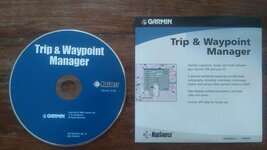
I got a "Trip & Waypoint Manager" MapSource CD and loaded/installed it to my laptop. Up & running and checking out tutorials online. Clunky & slow progress, but I was thinking "hey, if this is how it is, I'll just get on with it".

I saw Motogoloco mentioned on here and checked that out. With regard to the level I'm at (currently playing with creating hypothetical routes in France, Spain & Portugal), and my position on the GPS ladder-of-understanding, I personally find Motogoloco far more intuitive, aesthetically pleasing, and thorough/detailed. In fairness, I suspect the "Trip & Waypoint Manager" CD I got isn't the full version of MapSource, but TBH, I'd be happy to stick with Motogoloco, and then transfer files onto my GPS unit (on track to acquire a Zumo 550 in the not-too-distant future).

I think most folk would rather not let the GPS drag them around the place while on tour or whatever. What I'd be looking for is similar to that mentioned by others here - input start & end points so I end up at the planned location for my night's sleep. But as Ed Vedder sang in his pretty llittle ditty I Am Mine, "the in-between is mine" - I'd certainly not want to be unable to veer off any "planned" route. I'd like to be flexible with my day's end-point too - if I felt like riding on further or I really liked a town earlier on the route, I'd want that option, but without having to spend that night or the next morning re-plotting the next day's ride due to the altered over-night point. Not sure how to deal with that scenario if you're planning routes per-day? Just edit the next day's new start point, probably?

I'd fancy traveling on some light un-paved off-road tracks while touring in Spain & Portugal (for example), and I suspect it would be difficult (and perhaps undesirable) to plot specific routes on off-road tracks in many areas, but I'd still like to be able to a) tell where I am, and b) record a log of the route I actually take.

Motogoloco seems to know which un-paved tracks/trails are or aren't allowed - I can select some, but not others.

I'm not really adding any advice or info for OP with this post, and my comments obviously can't reflect a full experience with MapSource, but I'm just saying that seeing as MapSource was created a while ago, it's possible that some newer applications might be "better", particularly for GPS noobs?
 
As a another relatively-new-to-GPS guy, I'm interested in this too.

I got a "Trip & Waypoint Manager" MapSource CD and loaded/installed it to my laptop. Up & running and checking out tutorials online. Clunky & slow progress, but I was thinking "hey, if this is how it is, I'll just get on with it".
......

I'm not really adding any advice or info for OP with this post, and my comments obviously can't reflect a full experience with MapSource, but I'm just saying that seeing as MapSource was created a while ago, it's possible that some newer applications might be "better", particularly for GPS noobs?

It is worth checking that you have the last version of Mapsource. Open it up and under the help menu-about Mapsource- you will see the version number, mine says 6:16:3

One reason I still use Mapsource-apart from it being less complicated than Basecamp, is it uses the same maps as the device. In my case it is OSM maps although I do keep my Garmin maps up to date too. This avoids any problems caused by differences in maps. Google, for instance, has at least one non existent road in the village I now live in. Garmin has one pub and the village school in the wrong place Serious stuff misplacing a pub! But seriously differences in maps, ie using a Google map to plan and a Garmin map for navigating is really not a good idea. There are bound, sooner or later, to be differences.

Plotting a route between two points takes seconds, I take your point about not wanting the machine to make the decisions for you but you are doing just that if you only put in a start and end point. It's worth treating the initial route as the machines suggestion. You can accept it as is or tell it you want another option. Put in a few via points to ensure it takes you on your roads and away you go. Even then you don't have to obey it, just do your own thing and let the device recalculate you if you need it. Most of us bought the device to help us not rule us.

John
 
You can waste hours and hours and get seriously pissed off trying plan and store routes - if you must use a sat nav then do it the way Nutty suggests - better still take some detailed paper maps and use your own built in compass and eyes.

I'm the other way round, at least when out hiking - GPS primary, paper maps & compass back-up. Using GPS for motor travel may be many folk's only exposure to navigation, so map-reading may not be a skill many motor-travelers possess?

It is worth checking that you have the last version of Mapsource. Open it up and under the help menu-about Mapsource- you will see the version number, mine says 6:16:3

One reason I still use Mapsource-apart from it being less complicated than Basecamp, is it uses the same maps as the device. In my case it is OSM maps although I do keep my Garmin maps up to date too. This avoids any problems caused by differences in maps. Google, for instance, has at least one non existent road in the village I now live in. Garmin has one pub and the village school in the wrong place Serious stuff misplacing a pub! But seriously differences in maps, ie using a Google map to plan and a Garmin map for navigating is really not a good idea. There are bound, sooner or later, to be differences.

Plotting a route between two points takes seconds, I take your point about not wanting the machine to make the decisions for you but you are doing just that if you only put in a start and end point. It's worth treating the initial route as the machines suggestion. You can accept it as is or tell it you want another option. Put in a few via points to ensure it takes you on your roads and away you go. Even then you don't have to obey it, just do your own thing and let the device recalculate you if you need it. Most of us bought the device to help us not rule us.

John

Ah. That makes sense. A noob presumption that all mapping would match.

My CD says v 3.0 - see attached pic. I'm guessing this isn't even "real" MapSource?

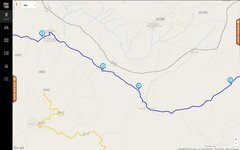
What's the detail like on the most up-do-date full version of MapSource? And how would one obtain a copy? Anyone inclined to post a screen grab of MapSource's answer to the attached screen grab from Motogoloco (vicinity of Quintana de Vale da Pena, NE Portugal). After entering start and end points, I've dragged the line proposed by MGL (normal paved roads) to off-road tracks (the narrow grey lines) to create a route of my own choosing. Does Garmin's mapping display these tiny off-road trails & tracks?

OP - sorry to hi-jack your thread. :rolleyes: :beerjug:
 

Attachments

  • MapSource CD 20.jpg
    MapSource CD 20.jpg
    66.9 KB · Views: 145
  • Quintana de Vale da Pena Screen.jpg
    Quintana de Vale da Pena Screen.jpg
    32.3 KB · Views: 148
Last edited:
...
My CD says v 3.0 - see attached pic. I'm guessing this isn't even "real" MapSource?

What's the detail like on the most up-do-date full version of MapSource? And how would one obtain a copy? Anyone inclined to post a screen grab of MapSource's answer to the attached screen grab from Motogoloco (vicinity of Quintana de Vale da Pena, NE Portugal). After entering start and end points, I've dragged the line proposed by MGL (normal paved roads) to off-road tracks (the narrow grey lines) to create a route of my own choosing. Does Garmin's mapping display these tiny off-road trails & tracks?

OP - sorry to hi-jack your thread. :rolleyes: :beerjug:[/QUOTE]

Mapsource is not the maps, it a program for working with your maps. Do you have any Garmin maps? You can always use osm ones instead they are free! link here Choose the new style ones and download the country you want or select tiles from the world map to cover a bigger area. Make sure you zoom in so you don't miss a tile. The osm mapping is better than Garmin's version at showing tracks

But your Mapsource version is an early one. You can download an update here or you can simply have a copy of my version here

John
 
Mapsource is not the maps, it a program for working with your maps. Do you have any Garmin maps? You can always use osm ones instead they are free! link here Choose the new style ones and download the country you want or select tiles from the world map to cover a bigger area. Make sure you zoom in so you don't miss a tile. The osm mapping is better than Garmin's version at showing tracks

But your Mapsource version is an early one. You can download an update here or you can simply have a copy of my version here

John

Very generous John - thanks. My Dropbox was out of date, but I got sorted. :thumb2

The OSM files seem to be big - Spain threatened to take 1hr 5mins to download. :eek: That's still probably quicker than if I separated out just the regions me & my mate are planning to pass through. I'll have to wait till I can scrounge my dad's wifi - my own www access is currently via slow and not-dependable tether to my mobile phone. :rolleyes:

I have no Garmin maps. So even though the OSM mapping isn't technically Garmin (IIUC), it'll still match better with Garmin mapping than google maps (and by extension Motogoloco, et al)?

Thanks again. :thumb2

Hope this stuff might be of some use to OP.
 
Very generous John - thanks. My Dropbox was out of date, but I got sorted. :thumb2

The OSM files seem to be big - Spain threatened to take 1hr 5mins to download. :eek: That's still probably quicker than if I separated out just the regions me & my mate are planning to pass through. I'll have to wait till I can scrounge my dad's wifi - my own www access is currently via slow and not-dependable tether to my mobile phone. :rolleyes:

I have no Garmin maps. So even though the OSM mapping isn't technically Garmin (IIUC), it'll still match better with Garmin mapping than google maps (and by extension Motogoloco, et al)?

Thanks again. :thumb2

Hope this stuff might be of some use to OP.

You don't need anything to use the dropbox link, just click on it and it should download. The osm maps do take a while but you can do other things while it downloads. Get your Mapsource updated, load the maps on the PC once they have downloaded. You might have to restart the PC to get Mapsource to see the maps but once it does they will appear in a drop down menu top left. You can have several maps on file as long as they have different names. You can transfer the required maps to your device from Mapsource if you want-use the map tool from the top and select all the tiles then transfer to device. You then have identical maps on both the PC and your device. You an update the osm maps as often as you like, just make sure you do both the PC and the device.

Once you have it all working try just creating two waypoints, one as a start point and one as a destination. If you then hold the control key and click on your two waypoints, right click and you will get a drop down menu, choose the top option and Mapsource will create a route for you. If you then use the pointer tool and click on the highlighted route you can drag and drop the route to suit yourself. Be careful where you drop it as it is easy to pick the wrong side of a dual carriageway or be slightly off the road. As long as you have dropped the route on a road it will create a via point for you. Add via points until you are happy but remember to set the routing preferences to suit (Edit Menu-at bottom of list)

Have fun!

John
 
You don't need anything to use the dropbox link, just click on it and it should download. The osm maps do take a while but you can do other things while it downloads. Get your Mapsource updated, load the maps on the PC once they have downloaded. You might have to restart the PC to get Mapsource to see the maps but once it does they will appear in a drop down menu top left. You can have several maps on file as long as they have different names. You can transfer the required maps to your device from Mapsource if you want-use the map tool from the top and select all the tiles then transfer to device. You then have identical maps on both the PC and your device. You an update the osm maps as often as you like, just make sure you do both the PC and the device.

Once you have it all working try just creating two waypoints, one as a start point and one as a destination. If you then hold the control key and click on your two waypoints, right click and you will get a drop down menu, choose the top option and Mapsource will create a route for you. If you then use the pointer tool and click on the highlighted route you can drag and drop the route to suit yourself. Be careful where you drop it as it is easy to pick the wrong side of a dual carriageway or be slightly off the road. As long as you have dropped the route on a road it will create a via point for you. Add via points until you are happy but remember to set the routing preferences to suit (Edit Menu-at bottom of list)

Have fun!

John

I must be doing something wrong, because I can't do that - Windows PC.


Back
Top Bottom