Ongoing problems with my XT - Strange routing instructions in bespoke routes I have created in BaseCamp

er-minio

Well-known member
UKGSer Subscriber
Joined
Mar 10, 2008
Messages
10,488
Reaction score
3,485
Location
London/Rome
I assumed I smoothed out all the issues, but nope.

I don't road-ride that much in the UK so, unfortunately, all the gremlins are noticed when I travel abroad, so that makes it worse.

Anyway, in a couple of shortish rides in the UK, I noticed that the Zumo would try to route me away from the intended route (fairly standard, and I place shaping points every few miles just to be sure it follows + I always have the underlying track for reference if it veers off) and along the way every once in a while it tries to force you off the main road taking some secondary road behind some housing, just to rejoin the main road a few hundred yards later.
In a couple of multiple clustered roundabout it wanted me to do a "pinball" pattern instead of following the route (I could see the track) for no reason.

No biggie.


In Spain (.gpx file you have on my trip report) I encountered a few issues:

1st segment (Bilbao to Potes). Despite me having created two or three waypoints in case we had to restart the route midway, in order to have them as potential starting points, they didn't appear on the selection screen at the start.
Additionally it wasn't able to calculate at all if I selected "closest entry point".
Apart from this, when we started the route and it was navigating us to the beginning of it, it kept trying to push us across side roads, doing some nonsensical detours.
Even during the route it would give spurious indications here and there in between shaping points.

Had to stop/restart routing a couple of times because of this weird calculation, and the fact that it wouldn't find closest entry point it made it more difficult an frustrating (hence the "launch").

It is set to "fastest route" and the only avoidance is gravel roads.
Maps are updated. Latest firmware update.

Again when around Potes on the second day, it would try to send us up single track roads more than once instead of following the main road (that was the shortest and fastest route to the next point).
I've noticed some signs around Potes over GPS issues so I assumed this was mapping errors.

Third or fourth day, we had to detour from our route and retreat to the hotel we booked because of heavy rain.
A to B navigation. We just selected the hotel waypoint and pushed go. Keep in mind both bikes have a Zumo XT. Same gpx files used, same firmware.

I check the proposed route (I always do) and, as logic dictates, it's mostly motorway and then B roads for the last 15/20 miles to the hotel.
I get on the motorway and start riding.
After the first motorway junction, correctly indicated, I keep going and see that the next exit is in 60km. Seems a lot but I don't give it much importance.
After a few miles my mate start closing up to me and, via the intercom asks me why I skipped the exit.
At this point I check the route and notice that the Zumo changed its routing and is sending me all over to the coast, then criss-cross on some very small (not visible on the map at that zoom level) roads all the way to the hotel. The total mileage for this is about 4 times what the initial route was.

We stop. I stop the routing. Re-start it and it's correct again, we manage to get to the hotel without riding 5 hours in the rain.


On the last day I had the usual straight lines across shaping points, but to be fair those would recalculate while approaching the shaping point itself.

1581458.png


1697448.png


1748152.png


2628410.png


But... bottom line is, I don't find the XT a trustworthy device.
I have to second guess every turn it tells me to do. In Italy more than a few times and made me get out of a motorway, just to go around the roundabout after the exit and rejoin the motorway.
The shit it pulled on the rainy day above alone was infuriating.

Last year I had to ride 100 miles on the bike while fairly sick before reaching an hotel (and spend the next 24 hours in knocked out in bed) and a trick like the one it pulled above would have not been appreciated.

I'm reading and asking on Zumoforum as well. And it seems like the XT has some flawed calculation algos... and has some issue calculating stuff "behind you". Maybe the reason why the XT2 is a completely different device software-wise?

At this stage, I'd rather "navigate" tracks. Something the Montana would do.
I already use the sat nav as an improved paper map, sort of...

I don't mind losing the bluetooth integration too much.
I use a Cardo. Command the music from my phone via Siri, answer the (rare) call with a button.
All of Zumo does in the picture is mess up the volume levels and - somehow - hang up calls when they happen (work fine without the zumo in the picture).

I'd miss the data integration (traffic, weather) because that one seems to work more than ok.

Also: I wouldn't mind profiles. I regularly use a GPSMap 64s and I'm quite used to the logic of the "standard" sat navs from G.
 
Last edited:
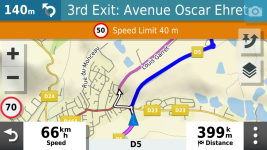
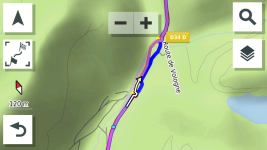
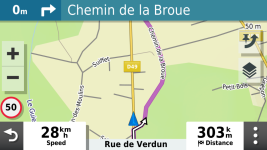
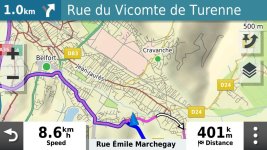
Some more examples from a trip in France.

743403.png

1213475.png

1430544.png

732296.jpg

These "detours" are short and visible. But sometimes it can send you on a 20k errand...
 
Last edited:
I assumed I smoothed out all the issues, but nope.

I don't road-ride that much in the UK so, unfortunately, all the gremlins are noticed when I travel abroad, so that makes it worse.

Anyway, in a couple of shortish rides in the UK, I noticed that the Zumo would try to route me away from the intended route (fairly standard, and I place shaping points every few miles just to be sure it follows + I always have the underlying track for reference if it veers off) and along the way every once in a while it tries to force you off the main road taking some secondary road behind some housing, just to rejoin the main road a few hundred yards later.
In a couple of multiple clustered roundabout it wanted me to do a "pinball" pattern instead of following the route (I could see the track) for no reason.

No biggie.


In Spain (.gpx file you have on my trip report) I encountered a few issues:

1st segment (Bilbao to Potes). Despite me having created two or three waypoints in case we had to restart the route midway, in order to have them as potential starting points, they didn't appear on the selection screen at the start.
Additionally it wasn't able to calculate at all if I selected "closest entry point".
Apart from this, when we started the route and it was navigating us to the beginning of it, it kept trying to push us across side roads, doing some nonsensical detours.
Even during the route it would give spurious indications here and there in between shaping points.

Had to stop/restart routing a couple of times because of this weird calculation, and the fact that it wouldn't find closest entry point it made it more difficult an frustrating (hence the "launch").

It is set to "fastest route" and the only avoidance is gravel roads.
Maps are updated. Latest firmware update.

Again when around Potes on the second day, it would try to send us up single track roads more than once instead of following the main road (that was the shortest and fastest route to the next point).
I've noticed some signs around Potes over GPS issues so I assumed this was mapping errors.

Third or fourth day, we had to detour from our route and retreat to the hotel we booked because of heavy rain.
A to B navigation. We just selected the hotel waypoint and pushed go. Keep in mind both bikes have a Zumo XT. Same gpx files used, same firmware.

I check the proposed route (I always do) and, as logic dictates, it's mostly motorway and then B roads for the last 15/20 miles to the hotel.
I get on the motorway and start riding.
After the first motorway junction, correctly indicated, I keep going and see that the next exit is in 60km. Seems a lot but I don't give it much importance.
After a few miles my mate start closing up to me and, via the intercom asks me why I skipped the exit.
At this point I check the route and notice that the Zumo changed its routing and is sending me all over to the coast, then criss-cross on some very small (not visible on the map at that zoom level) roads all the way to the hotel. The total mileage for this is about 4 times what the initial route was.

We stop. I stop the routing. Re-start it and it's correct again, we manage to get to the hotel without riding 5 hours in the rain.


On the last day I had the usual straight lines across shaping points, but to be fair those would recalculate while approaching the shaping point itself.

1581458.png


1697448.png


1748152.png


2628410.png


But... bottom line is, I don't find the XT a trustworthy device.
I have to second guess every turn it tells me to do. In Italy more than a few times and made me get out of a motorway, just to go around the roundabout after the exit and rejoin the motorway.
The shit it pulled on the rainy day above alone was infuriating.

Last year I had to ride 100 miles on the bike while fairly sick before reaching an hotel (and spend the next 24 hours in knocked out in bed) and a trick like the one it pulled above would have not been appreciated.

I'm reading and asking on Zumoforum as well. And it seems like the XT has some flawed calculation algos... and has some issue calculating stuff "behind you". Maybe the reason why the XT2 is a completely different device software-wise?

At this stage, I'd rather "navigate" tracks. Something the Montana would do.
I already use the sat nav as an improved paper map, sort of...

I don't mind losing the bluetooth integration too much.
I use a Cardo. Command the music from my phone via Siri, answer the (rare) call with a button.
All of Zumo does in the picture is mess up the volume levels and - somehow - hang up calls when they happen (work fine without the zumo in the picture).

I'd miss the data integration (traffic, weather) because that one seems to work more than ok.

Also: I wouldn't mind profiles. I regularly use a GPSMap 64s and I'm quite used to the logic of the "standard" sat navs from G.
I had the same last Sunday
I was on the A65 near Ingleton, heading home
Now, local knowledge would tell me the best way home from 2 miles outside Ingleton is straight ahead, turn left in Ingleton and up past White Scar caves, to Ribblehead and onto Hawes
From Hawes, take the A684 to Wensley (near Leyburn) and then onto Middleham to Masham and home - a distance of some 65 miles away
I pulled over and set the Zumo XT to 'Go Home'
Instead of the route described above, it tried to make me do a U turn on the A65, back from whence I had come and back to J36 of the M6
Up the M6 to Penrith and then the A66 to Scotch Corner, then down the A1 to Bedale - a distance of some 90 miles - so further and on roads not as interesting on a bike (it's a bloody bike GPS, FFS)
My XT is set for Faster Time, but with the Adv routing slider, set to max
As you say it's not reliable as a bike GPS, to route you on decent biking roads
It's a car GPS made waterproof
 
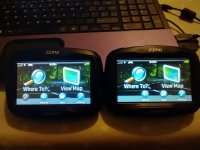
I tend not to use Adventurous routing I have that all set to min and faster time. As JB says the "Faster Time" logic in the XT means faster roads even if it takes you miles out of your way. This is very different than the older Garmin units which appeared to assess the time spend on a number of alternate routes to get from A-B and take the route which would result in the "Shortest Time". This had the disadvantage that the shortest time may have taken you down a goat track or on and off an A road bisected by lanes. That said it was a preference for me. I've got used to my XT and its foibles through extensive use even on routes I know well so that I can have confidence in it, in unfamiliar territory. If you are looking for something easy to use and using (in my view) "better" routing logic the 3XX garmin units (which are now about 12 years old and can be picked up for humble money) are a good units. 390 on the left and 340 on the right. You can use them with MRA by plugging them into your Android phone and transfering files.

IMG_20240312_200305927_HDR.jpg
 
Ye, me too. I used it only once traveling from Dijon to Germany, and it was all right to be fair.

But I either follow a route/track or I do direct A/B navigation without exotic settings.

As JB says the "Faster Time" logic in the XT means faster roads even if it takes you miles out of your way.

Yep, but in my case it was completely wrong on all accounts.
I'll later post an approximation of it.
 
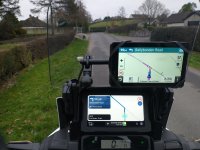
For AB routing its hard to better google maps. I have an Africa Twin at the moment with Android Auto (and carplay) big advantage is that once you have the phone connected and a bluetooth headset you can use speech commands to navigate.......just like in the car!! :D This is testing Myroute app against the XT but you get the idea. No judgement of my 1980's music preference :DIMG_20240112_132549036sml.jpg
 
I highly recommend the Montana 700 (it's a tri-band) and the 276cX
Both are excellent and should be a the price.

p.s There is a deal to be had for the 700 at the moment.
No connection but I have bought a unit from them once
 
Last edited:
Thank you, er-minio.

I’ll cut these posts into a new thread in the XT section.

I need to read through it but I suspect there is something wrong with your specific device or there is something odd in the settings. I have never touched or engaged ‘Adventurous routings’ and rarely run any routes that I haven’t created myself.

When you next go away, would you like to borrow my spare XT? I know it works OK. Leave the settings as they are and run your BaseCamp routes, to see what happens.
 
Thanks Wapping.

Yes, I think there might be something wrong with my XT.
In the motorway sample his XT was routing correctly, mine was going astray.

BTW. From memory this is the "weird" re-routing it did, unprompted.

Correct version was about this:
correct.jpg

The longer wrong version looked something like this:
wrong.jpg


And, yes, as stated above, I never touch the adventurous routing.
I like planning my routes at home, so if traveling I usually follow my pre-built routes.

Otherwise I do point the navi to take me to destination via the faster route.

Again, I used the adventure routing a couple of times in past years and it worked more than fine, but it's a rare case for me to use it. But on my normal use it is "off", not used.
I generally prefer to be in control of the routes :)
 
What is wrong with using adventure routing ?
I use a gps to select a place I want to go too, by selecting a destination on the unit
I have no interest in using MRA and Basecamp is just about bearable
I just want to pick a place and go there - isn’t that the point of a GPS ?
Otherwise I could use a map to follow in the direction of travel or just write a place names on a serviette and read the road signs ….
 
What is wrong with using adventure routing ?

Nothing at all.
But generally, when I do travel, I know where I want to ride through in advance, I know the roads I want to explore and I can load my specific routes on the sat nav.
Or if I'm offroad it's just following pre-created tracks as well.

That is my main use case for the sat nav.

Otherwise, I'd just need it to reach unknown destination the fastest way possible as I have shit to do: imagine going somewhere within London for work, or reaching an hotel at the end of the day or in bad weather, or cutting short a trip for some other reasons.
I know even in faster routing it has it quirks (from the A3 it wants to make me go all the way via the M25, while it's faster going through London on the bike, but that is ok).


Again, I used Adventure routing, first time I was in Dijon, going towards Germany to meet a friend and didn't had time in advance to plan an interesting route as I assumed I would go direct via main roads, instead I had a lot of time as I was very ahead. Pointed it to destination in Germany, selected Adventure routing and it actually sent me through an interesting series of B roads that I really appreciated.
But it is not a function I use much.
 
Last edited:
In relation to Er minio's post.

The only thing I can think of is notifications enabled via the Garmin Drive app?? However, it should warn of the delays on a little screen on the right side of the unit and offer to re-route you. That said I turned that off too....its generally out of date...... except when its not when I ignored a huge traffic Jam outside Westport Co Mayo when it had warned me about it :D. I, like Wapping, tend not to use it for planned routes only. But for a successful outcome I always do the following.

1. In trip planner make all trips "Saved" rather than imported....you can do this in trip planner by starting the route and going back into trip planner and saving active route. This gives it a new name that you can change to something similar(but no the same as the original). Avoids routing issues RUT if the route recalculates.

2. Switch off auto recalculation....see above and try as much as possible to navigate yourself back to the line

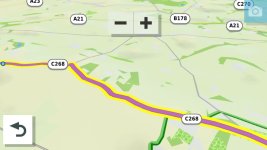
3. Make track visible as well as route if you have to re-calculate you can see how different the new route might be. It shouldn't be if you put in enough shaping points. BUT

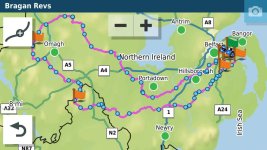
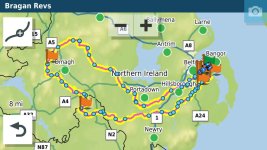
4. If you are doing a long out and back route with different but close together roads make sure that you have at least a Waypoint at the farthest end of the route. This will stop the unit shortcutting the route if you have to recalculate. In the old units they tried to get you to the next shaping point in the direction of travel...if another shaping point is closer to the XT it will just cut off a big lump of the route if you recalculate. For example in this route if you recalculated Just befre where the 1 is on the map it would cut off the rest of the route and take you to Hillsborough if it was all shaping points and no way points which have to be gone through.

5. I've had Garmin GPS units for 20 years and it drove me nuts for the first year of ownership but I know its foibles now and can get it to do what I expect.

6. Jheath's resource on the Garmin Zumo forums is invaluable in understanding the unit.

63045.jpg
 
Garmin is ...an acquired taste! :ChrisKelly
What a pity JohnA- it is an excellent navigation unit- maybe re-kindle your love for it?
All is takes is... the will to live!:yelrotflm
 
Hey Mzokk!
The only thing I can think of is notifications enabled via the Garmin Drive app?? However, it should warn of the delays on a little screen on the right side of the unit and offer to re-route you. That said I turned that off too....its generally out of date...... except when its not when I ignored a huge traffic Jam outside Westport Co Mayo when it had warned me about it :D. I, like Wapping, tend not to use it for planned routes only. But for a successful outcome I always do the following.

Yes. The panel is annoying because it keeps popping up even where there is "NO DELAYS" but I know this is just Garmin's terrible QA process on software.
I found the traffic re-routing actually decent in a few occasions over the years. I don't mind keeping it as an option.
Also the predicted weather along the route (for long 500k+ routes) is handy.

1. In trip planner make all trips "Saved" rather than imported....you can do this in trip planner by starting the route and going back into trip planner and saving active route. This gives it a new name that you can change to something similar(but no the same as the original). Avoids routing issues RUT if the route recalculates.

I didn't know this. Will have a look, thanks!

2. Switch off auto recalculation....see above and try as much as possible to navigate yourself back to the line

I considered this, but in the example above I'd be stuck with messy straight lines on the map on one of the routes...

3. Make track visible as well as route if you have to re-calculate you can see how different the new route might be. It shouldn't be if you put in enough shaping points. BUT

I've been doing this for years. You can see it in some of the screenshots above.
Curiously, with the latest software update it seems you cannot see the track from BELOW the route.
I used to have a purple route with blue track, so you'd see the blue border around the route.

Also, when you have multiple tracks (and if they overlap) it's a mess as you cannot adjust the vertical (stacking) order and you cannot disable them individually unless you faff with collections... again another fuckup in their latest updates (Explore syncing).

4. If you are doing a long out and back route with different but close together roads make sure that you have at least a Waypoint at the farthest end of the route. This will stop the unit shortcutting the route if you have to recalculate. In the old units they tried to get you to the next shaping point in the direction of travel...if another shaping point is closer to the XT it will just cut off a big lump of the route if you recalculate. For example in this route if you recalculated Just befre where the 1 is on the map it would cut off the rest of the route and take you to Hillsborough if it was all shaping points and no way points which have to be gone through.

Ye, I try to add a few waypoints along most routes. I noticed Basecamp fucks up the distinction between shaping/waypoint sometimes.
I'll be more attentive to it.

5. I've had Garmin GPS units for 20 years and it drove me nuts for the first year of ownership but I know its foibles now and can get it to do what I expect.

6. Jheath's resource on the Garmin Zumo forums is invaluable in understanding the unit.

Ya same. Jheath's has been incredibly helpful.
A lot I've learnt over the logic of Garmin software is thanks to him and thanks to Wapping's patience in here too.

I don't mind products with a steep learning curve... but I pretend (silly me) that they work correctly after that.
XT is proving to be a fairly fucking buggy product consistently.
 
Ah, with regard to 3 completely disconnect the unit from explore. It's at best an embarrasment. As you say if you make a collection visible and go out of mobile coverage you are stuck with lines all over the place. With regard to the track lines you can make them visible by creating your own theme.
I made the one below up. Its only an matter of opening an existing theme in a text editor and changing the track line scale. I think it defaults to 1.00 I choose 2.50

<STYLE field = "MAP_TRK_CLR" scale = "2.50" >
<COLOR >
<PRIMARY day = "#06EEEE" night = "#06EEEE" />
<SECONDARY day = "#0A92E2" night = "#0A92E2" />
</COLOR>
</STYLE>


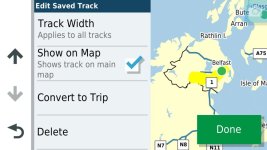
Set track width to "widest" and once you have dissconected explore you can turn tracks on and off on the unit, by selecting the track spanner show on map. A much simpler process.

14768.jpg

47627.jpg

61934.jpg
 

Attachments

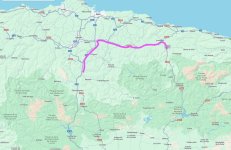
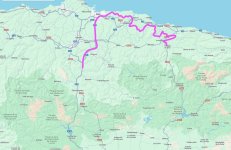
BTW, regarding my point #1. The XT not finding other entry points in the route from Bilbao to Potes, here's said route (and the extra shaping points):

bi-pot.png


picos-west.png
 
I had the same last Sunday
I was on the A65 near Ingleton, heading home
Now, local knowledge would tell me the best way home from 2 miles outside Ingleton is straight ahead, turn left in Ingleton and up past White Scar caves, to Ribblehead and onto Hawes
From Hawes, take the A684 to Wensley (near Leyburn) and then onto Middleham to Masham and home - a distance of some 65 miles away
I pulled over and set the Zumo XT to 'Go Home'
Instead of the route described above, it tried to make me do a U turn on the A65, back from whence I had come and back to J36 of the M6
Up the M6 to Penrith and then the A66 to Scotch Corner, then down the A1 to Bedale - a distance of some 90 miles - so further and on roads not as interesting on a bike (it's a bloody bike GPS, FFS)
My XT is set for Faster Time, but with the Adv routing slider, set to max
As you say it's not reliable as a bike GPS, to route you on decent biking roads
It's a car GPS made waterproof
Why did you set your gps if you know the way?

And really no surprise if it came out with a weird route, with faster time set but twiddling the adventurous routing slider, and no avoidances. It’s well known that any gps device with a twisty roads setting will take you miles out of your way to go through a hairpin in a housing estate, and then you confuse it by saying you want to go on motorways as well!

Stick to paper maps, JB, and tracks on your Montana.
 
So, looking into this.

Looks like the weird routing on the first bit of the trip from Bilbao to Potes was (as Mzokk correctly suggested) the U turn request.

I'll do as Mzokk suggest (save).

I just disconnected the Zumo from the Explore account too. Thank god.

Scrap that... reactivated wifi and it reconnected.
I think there was another procedure to disconnect it forever.
 
Last edited:


Back
Top Bottom