Ongoing problems with my XT - Strange routing instructions in bespoke routes I have created in BaseCamp

So, looking into this.

Looks like the weird routing on the first bit of the trip from Bilbao to Potes was (as Mzokk correctly suggested) the U turn request.

I'll do as Mzokk suggest (save).

I just disconnected the Zumo from the Explore account too. Thank god.

Scrap that... reactivated wifi and it reconnected.
I think there was another procedure to disconnect it forever.
There is, I posted it somewhere in another thread. I think you have to delete the drive app, delete the pairing, then re-pair but when it asks you to about Explore just skip that step.
I binned Explore when it deleted all of my TET tracks off my Montana for reasons of its own
 
I use this proceedure to disconnect mine


I do the jfheath thing first and then the Berin thing. Seems to break the link. I've reconnected a few times to test stuff, then hit myself a slap, and disconnected again :D
 
Why did you set your gps if you know the way?

Stick to paper maps, JB, and tracks on your Montana.
Just to see how crazy a route it would devise 😳
The older 2610 would have selected the same route that I described, across country
With the only avoidances being u turns
 
What is wrong with using adventure routing ?
I use a gps to select a place I want to go too, by selecting a destination on the unit
I have no interest in using MRA and Basecamp is just about bearable
I just want to pick a place and go there - isn’t that the point of a GPS ?
Otherwise I could use a map to follow in the direction of travel or just write a place names on a serviette and read the road signs ….

Nothing, I guess.

But er-minio is using bespoke routes, that he has created himself in BaseCamp, not some “Take me from A to B, you wonder machine and give me an Aaaadventuuuuure on this awesome steed” :D

:beerjug:
 
Just to see how crazy a route it would devise 😳
The older 2610 would have selected the same route that I described, across country
With the only avoidances being u turns

You really do need to sell the pile of crap you brought, as it’s clearly useless to you :augie

:beerjug:
 
Last edited:
@Mzokk I was looking at the Java program solution on zumoforum. Funnily enough I noticed that they also list the solution by John Armstrong in the topic I opened last year after my trip to France :D

My question is this: using the Java script (and not javascript :D ) to alter the .trip file... is that a definitive solution, or shall be done every time new routes are imported (looks like new trip files are generated each time).
Asking here since I didn't read all 10 pages on the zumo forum, as I have the attention span of a dead goldfish.

Thanks.
 
@Mzokk I was looking at the Java program solution on zumoforum. Funnily enough I noticed that they also list the solution by John Armstrong in the topic I opened last year after my trip to France :D

My question is this: using the Java script (and not javascript :D ) to alter the .trip file... is that a definitive solution, or shall be done every time new routes are imported (looks like new trip files are generated each time).
Asking here since I didn't read all 10 pages on the zumo forum, as I have the attention span of a dead goldfish.

Thanks.
My solution needs to be done on each trip imported into the XT. The faster roads routing error still occurs, but at least the XT isn't asking you to do hundreds of u-turns on them.
 
Hi John, thanks.

Ok, in that case I’do the manual save as you suggested on the other thread.
 
Like the poster I only really need a Nav for trips, and similarly I like to plan ahead the routes I will take, I found the XT to be a piece of crap and untrustworthy, nearly spoiled my holiday, luckily my mate had routes all loaded on his old 660.
On return from my trip I have reverted to Nav 6, given up with the nonsense the xt produced.
 
@Mzokk I was looking at the Java program solution on zumoforum. Funnily enough I noticed that they also list the solution by John Armstrong in the topic I opened last year after my trip to France :D

My question is this: using the Java script (and not javascript :D ) to alter the .trip file... is that a definitive solution, or shall be done every time new routes are imported (looks like new trip files are generated each time).
Asking here since I didn't read all 10 pages on the zumo forum, as I have the attention span of a dead goldfish.

Thanks.
I use Johns method to turn imported routes into saved routes.
 
In my various fits of rage with the XT, at some point (serious) I considered filing a complaint….

If it any comfort to you, my XT (running some quite complex bespoke routes) behaved perfectly.

Routes created in MyRoute, not in BaseCamp, but that should not make any difference

Exported to the XT via Garmin Drive, in version 1.1

The same routes also ran perfectly on an XT2 and on my phone, running through MyRoute’s Navigation app

I also used the ‘skip’ function, which worked perfectly, too.

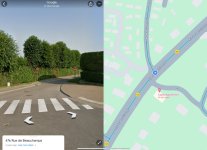
The only error encountered was a mistake in the HERE maps, which directed me to turn into a no entry road. Looking on Google street view, the road has been no entry for at least 10 years. I have reported the error to HERE, along with an error in the next road along, which HERE shows as one way, when it very obviously isn’t.

1. Clearly no entry but HERE says turn in and drive up it

IMG_5666.jpeg


2. Clearly two way, but HERE says you can’t turn in

IMG_5667.jpeg
 
Last edited:
It’s interesting - or Funny Ha Ha - depending on your outlook , how we get on differently with the same piece of kit.

I’m 2 weeks in to this trip (now enjoying a beer on the street in Echternachbruck) and the XT has behaved perfectly (apart from leaving the ship today - another story). Loaded with a dozen or more Routes for day to day travel. Planned on Basecamp in the comfort of my den.

And it’s created a couple of AdHoc Round Trips without problem. Though some of the country lanes were a bit too country in places.

Having used Garmin devices, including NAV6, for many years on 2 wheels and 4, I concluded its just a battle between the user (me) and Garmin.

Which I believe I’ve won.


Back
Top Bottom