PC App Store has taken over my computer.

King Rat

Well-known member
UKGSer Subscriber
Joined
Nov 18, 2006
Messages
16,031
Reaction score
10,654
Location
Uttoxeter, England
I was told by Innovv support to download something or other from the PC App Store to be able to read the camera card..... I am kot giving them my bank details and their 'install' page will not go. I cannot open any other page whatsoever. Their form to give my bank details takes over everything.

What do I have to do please?
 
just download the files to your PC, they are std MP4 video files

windows medai olayer has no issues withthem

or if you want a free alternative

Potplayer

re the pc hijack

turm it off and on agian
 
Couple of options, if you've not already sorted this, if you have a power button, press and hold that in for a 10 to 20 secs, it will restart the computer.

Otherwise press CTRL+ALT+DEL together in that order, it will bring up task manager, select your browser session, and right click - End Task, that closed down programs
 
In respect of trying to play the video, a quick google of 'innovv dash cam play on pc'

And I get these other two recommendations, VL is free and very good, for more dedicated dash cam playback, one of the products like Dash Cam viewer.


Step 2: Play the Videos
Since INNOVV uses the H.264 or H.265 video codecs, you may need a dedicated media player for smooth playback and audio support. [1]
    • VLC Media Player: The most recommended free player for Windows and Mac. It effortlessly handles both MP4 and TS file formats without codec issues. Download it from the VideoLAN Official Website. [1, 2, 3, 4]

Step 3: View GPS and Speed Data
If you want to view your travel route, speed, and mapping alongside your video footage, you can use the highly-rated third-party application Dash Cam Viewer. [1, 2]
 
just download the files to your PC, they are std MP4 video files

windows medai olayer has no issues withthem

or if you want a free alternative

Potplayer

re the pc hijack

turm it off and on agian
That is what I have done. Left it off for an hour. As soon as I turned it back on that same page is blocking everything, it is a form demanding my personal and bank details on a form. I used the SHUT DOWN method. That didn't work so pressed the power button until it went off. No difference.
 
Couple of options, if you've not already sorted this, if you have a power button, press and hold that in for a 10 to 20 secs, it will restart the computer.

Otherwise press CTRL+ALT+DEL together in that order, it will bring up task manager, select your browser session, and right click - End Task, that closed down programs

I'll try this. Thank you.
 
if the "pay now" screen keeps appearing it is possible you were on a malware website rather than a genuine innov one, with some nasty stuff installed on your machine in an attempt to extort money

many here might be confident in dealing with such a situation to get rid of the malware. In your situation and relative inexperience in matters of computers, I suggest you outsource the recovery process. In the first instance, check your home insurance to see if this situation is included in the cover you have. If that is not an option, you might have a bundled bank account such as Nationwide Flexplus that has gadget cover with cover for this situation.
 
Couple of options, if you've not already sorted this, if you have a power button, press and hold that in for a 10 to 20 secs, it will restart the computer.

Otherwise press CTRL+ALT+DEL together in that order, it will bring up task manager, select your browser session, and right click - End Task, that closed down programs

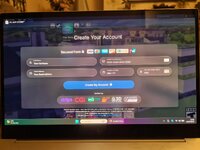
This is what happens on my screen as soon as I turn it on.

20260718_230808.jpg

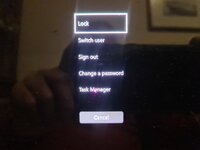
When I do your Ctrl+Alt+Del buttons together I get this list but clicking on the Task Manager, or Right clicking on Task Manager brings me straight back to the coloured form page.

20260718_231021.jpg

That white square around LOCK will not move down the list. I Darenth click on the LOCK button for fear of locking it and the guys at the other end keeping it locked.
 
if the "pay now" screen keeps appearing it is possible you were on a malware website rather than a genuine innov one, with some nasty stuff installed on your machine in an attempt to extort money

many here might be confident in dealing with such a situation to get rid of the malware. In your situation and relative inexperience in matters of computers, I suggest you outsource the recovery process. In the first instance, check your home insurance to see if this situation is included in the cover you have. If that is not an option, you might have a bundled bank account such as Nationwide Flexplus that has gadget cover with cover for this situation.

I need the computer to get at the house insurance. Then they want to send an email to confirm it is me....Guess where my email is. NO I don't have email on my phone, I don't know how to do it and I don't know what my password is either because it was all set up for me by someone who understands these things. I have never set up anything or even downloaded a programme before - I won't be doing it again.
 
It's malware or very close to it.

Did you install Steam? In simple terms: do you use the computer to play games?
If not, it might be that the pc whatever store has been somehow bundled with Steam (visible underneath) and removing/disabling Steam could solve, maybe.
Unless that is just some random background graphics applied to that form.
 
I need the computer to get at the house insurance. Then they want to send an email to confirm it is me....Guess where my email is. NO I don't have email on my phone, I don't know how to do it and I don't know what my password is either because it was all set up for me by someone who understands these things. I have never set up anything or even downloaded a programme before - I won't be doing it again.

seek professional advice

they will be able to assist with recovering accounts to different devices. You are in a situation that is relatively common, sadly.

in future, if you buy insurance online and they send you electronic documents, print them off. I am very tech savvy but I still take hard copies of insurance documents on a trip as you do not always have a mobile phone signal on top of a pass in the Pyrenees. I have a phone and tablet with me. I am a big fan of multiple redundancy when solo travelling.

as I have suggested previously, consider enrolling on an IT course to get to grips with using email on a phone. This can provide an extra layer of security through 2nd device verification. You have an engineering bent and skills with photography. I find it difficult to accept you do not have the ability to adapt to a different technology, unless there is some neurodiverse or psychological barrier to "the computer." I take this view based on a decade of experience from 1990 in an industrial context teaching manual factory workers with no prior experience to use computer based tools.
 
seek professional advice

they will be able to assist with recovering accounts to different devices. You are in a situation that is relatively common, sadly.

in future, if you buy insurance online and they send you electronic documents, print them off. I am very tech savvy but I still take hard copies of insurance documents on a trip as you do not always have a mobile phone signal on top of a pass in the Pyrenees. I have a phone and tablet with me. I am a big fan of multiple redundancy when solo travelling.

as I have suggested previously, consider enrolling on an IT course to get to grips with using email on a phone. This can provide an extra layer of security through 2nd device verification. You have an engineering bent and skills with photography. I find it difficult to accept you do not have the ability to adapt to a different technology, unless there is some neurodiverse or psychological barrier to "the computer." I take this view based on a decade of experience from 1990 in an industrial context teaching manual factory workers with no prior experience to use computer based tools.
Thank you for understanding and helping.
I have asked about for a course but couldn't find one. They suggested enrolling for an O level course, or whatever they call it now.
I haven't found a night school or adult learning option. I wonder if the U3A would do it?
 
It's malware or very close to it.

Did you install Steam? In simple terms: do you use the computer to play games?
If not, it might be that the pc whatever store has been somehow bundled with Steam (visible underneath) and removing/disabling Steam could solve, maybe.
Unless that is just some random background graphics applied to that form.
I have never played any kind of video game, unless you count the table top space invaders in the pub in the 70s...I never got to stage 2.
 
What browser are you using. Chrome or bing

If chrome open a bing browser and vice versa

Then you should be able to use the alternative browser as a work round

Ctrl alt delete. And open task manager, and find the browser that's the problem, right click and end task, that should kill it

It looks like it's set it's startup page to the payment page


You need to find the browser exe file and right click and look at the startup tab. I bet it says something along the lines of xxx.payment .html. Ir similar. Just delete that and type www.google .co.uk and press save

Then when you restart the affected browser it should start with Google

Then run a virus scan. And malware check. And stop clicking links, especially the first link that pops up it's normally junk warehouse lol
 
Thank you for understanding and helping.
I have asked about for a course but couldn't find one. They suggested enrolling for an O level course, or whatever they call it now.
I haven't found a night school or adult learning option. I wonder if the U3A would do it?

I live in a rural area. Often, the support is through fairly informal groups where you are buddied with someone like me in your area rather than a formal programme where you get a certificate. You might be able to get some info from a local library or other organisation. The nature of the world is that such groups are often promoted by the likes of Facebook groups, which is counterintuitive for those who do not subscribe to social media.

You mention U3A which is a possibility. After typing the above, I found this website that suggests your local library as a first point of access
https://www.staffordshire.gov.uk/ad...ing-old-age-0/transport-and-staying-connected

there are charities https://www.ageuk.org.uk/services/in-your-area/it-training/ but again, counter intuitively, you need some ability with Google search to find them

don't give up. Getting to grips with IT is just another skill like learning to knit, husband cows and cook chicken. Most can learn the basics but not everyone will make a Fair Isle sweater, cope with a breach birth calf or get a Michelin star for a chicken noodle soup.
 
That is what I have done. Left it off for an hour. As soon as I turned it back on that same page is blocking everything, it is a form demanding my personal and bank details on a form. I used the SHUT DOWN method. That didn't work so pressed the power button until it went off. No difference.
Looks like you have been hacked perhaps?
 
if the "pay now" screen keeps appearing it is possible you were on a malware website rather than a genuine innov one, with some nasty stuff installed on your machine in an attempt to extort money

many here might be confident in dealing with such a situation to get rid of the malware. In your situation and relative inexperience in matters of computers, I suggest you outsource the recovery process. In the first instance, check your home insurance to see if this situation is included in the cover you have. If that is not an option, you might have a bundled bank account such as Nationwide Flexplus that has gadget cover with cover for this situation.
Great advice 👍
 
Maybe you could put incorrect bank/email details in, might make the pc useable again, install a virus checker like avg, run a scan and see what it says. It might be too late for the virus checker as the systems already affected but you never know?


Back
Top Bottom