PC virus has managed to get through ESET... any advice

AndyT

Well-known member
UKGSer Subscriber
Joined
Jun 26, 2002
Messages
8,331
Reaction score
10
Location
Stuck in SE Asia.....Thank you Covid 19
I have ESET NOD32 installed on my desktop however I appear to have some sort of virus which stops me accessing the internet and just keeps directing me to a site to purchase antivirus software........ I note that it opens up IE however my defalt browser is FireFox.....

I can't even see task manager as when I do the old Cntl-alt-del it immediately says I have several exe files which are infected. I've tried running a scan via ESET but it seems to stall after 33% complete but finds no virus!!

Any clues on what to do. I'm writing this from my Laptop as can't really use my Desktop with this situation:(

Any advise very much appreciated

regards

AndyT:thumb2
 
Some of these viruses get on to your machine from websites, and some anti-virus programmes don't pick them up.

If you can boot your machine in safe mode (boot holding F8 key, then choose safe mode), hopefully you can then run msconfig (type this in the command box), look through the lists under "startup" and "services" and untick any that have really odd looking names (although some genuine programmes have odd names to be honest) or that you don't recognise as installed programmes.

Then reboot the machine and scan, I'd also suggest you get malwarebytes to scan with as well. Hopefully that will dig the culprit out.
 
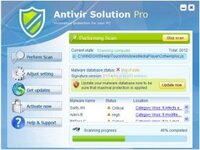
Andy I think you've got a malware called 'Antivir solution' can you run a boot scan with your antivirus if you can that should get rid of it, if not download Superantispyware Portable onto a flash drive and try running that, if you do get to run it it will get shot of it, then install Superantispyware on your laptop and PC, the professional version works out at about 18 quid and you can use it on two machines for that.

http://www.superantispyware.com/portablescanner.html?tag=SAS_HOMEPAGE
 
Hi Shugie, I've trid to boot in safe mode but either i'm doing it wrong or it doesn't want to play ball. I've tried holding F8 key down as I switch on, as it boots up and all sorts of conotations but it always boots up all the way to my log in screen. Its a Dell PC if thats anything to do with it running windows XP

Thanks in advance

Andy
 
Andy I think you've got a malware called 'Antivir solution' can you run a boot scan with your antivirus if you can that should get rid of it, if not download Superantispyware Portable onto a flash drive and try running that, if you do get to run it it will get shot of it, then install Superantispyware on your laptop and PC, the professional version works out at about 18 quid and you can use it on two machines for that.

http://www.superantispyware.com/portablescanner.html?tag=SAS_HOMEPAGE

Thanks for that Dickie - I downloaded it onto a usb stick but it won't run on my desktop as I just get the same message (SAS-antivirus.exe file is infected etc.....)..

Any other thoughts, I normally use my brother but he's down the pub:blast
 
Andy if you can't boot up in safe mode it's going to be difficult have you tried just tapping F8 as opposed to holding it down?

With Nod32 if you right click on it's icon instead of double left, does it give you an option to run a boot scan?

If it is Antivir Solution it is an absolute bastard to get rid of and you really need to either run the bootscan or start in safe mode the only problem being one it's variations even buggers the PC when running in safe mode as well.

You might try the Kaspersky free rescue boot cd as well:thumb2

http://www.softpedia.com/get/Antivirus/Kaspersky-Rescue-Disk.shtml
 
Thanks for that Dickie - I downloaded it onto a usb stick but it won't run on my desktop as I just get the same message (SAS-antivirus.exe file is infected etc.....)..

Any other thoughts, I normally use my brother but he's down the pub:blast

you'll need to do any downloads on an uninfected PC. The virus will knobble anything you try with the infected PC.

1. Download the file Dickie recommends to a USB stick
2. Boot the infected machine from the USB stick

If your machine won't boot from a USB stick then create a boot CD/DVD, again uising a clean PC.
 
Andy if you can't boot up in safe mode it's going to be difficult have you tried just tapping F8 as opposed to holding it down?

With Nod32 if you right click on it's icon instead of double left, does it give you an option to run a boot scan?

If it is Antivir Solution it is an absolute bastard to get rid of and you really need to either run the bootscan or start in safe mode the only problem being one it's variations even buggers the PC when running in safe mode as well.

You might try the Kaspersky free rescue boot cd as well:thumb2

http://www.softpedia.com/get/Antivirus/Kaspersky-Rescue-Disk.shtml
Got it to boot up in safe mode and currently running virus checker in your link. I can't right click nod32 as I immediately get an error message and it takes me to the AntiVurus Suite site to pay up....... We'll see what this brings up. I'll lso look at the config.sys as per shugies note:thumb2
 
Got it to boot up in safe mode and currently running virus checker in your link. I can't right click nod32 as I immediately get an error message and it takes me to the AntiVurus Suite site to pay up....... We'll see what this brings up. I'll lso look at the config.sys as per shugies note:thumb2


Superantispyware will get it Andy and if/when you install the PC version whether it be the free or the professional it's one of the few programs that will run even if you are unlucky enough to get that particular piece of malware on your PC:thumb2
 
Well the spyware finished running and seemed to find a myriad of files that it saw as a threat so I quarantind them and they were deleted so I was full of smiles however on rebooting I have the exact same problem:tears:tears:tears:tears


Time for bed and a rethink.

I used this laptop to download the spyware program. I can't use my desk top as it keeps saying all the exe. files are infected and opens a web page to buy some software.......

I'll let you know how I get on:thumb2

Thanks everyone so far:thumb2
 
Andy, did you click-on a pop-up on the task bar that looked just like the Microsoft Security icon?
 
Andy, did you click-on a pop-up on the task bar that looked just like the Microsoft Security icon?

There is an icon which keeps getting the messages next to it and also the same as on the pop up web page that looks like a Green shield with a yellow bar running diagonally through it called Security Suite. Thats also the name of the web page that keeps opening and asking me to buy for $69-99:(
 
Andy run SASW again and quarantine files, then before restarting go to Microsoft.com download install and run the Microsoft security essentials.

You may find that your browser has also been hijacked so after running the SASW go to Internet Options (in control panel), click on the connections tab and then the 'LAN settings' if there is a tick in the 'Use Proxy' box uncheck it and then open your browser again, also if the box is ticked that might be why the machine was reinfected on the restart.
,I should say that that applies to IE only, I've just had a look in the firefox options and can't find anything similar re proxy settings.
 
There is an icon which keeps getting the messages next to it and also the same as on the pop up web page that looks like a Green shield with a yellow bar running diagonally through it called Security Suite. Thats also the name of the web page that keeps opening and asking me to buy for $69-99:(

Something similar happened to me a few months ago.

I found that it prevented me from running any system tools, even connecting to the web but using my laptop, I found the manual method to disable the trojan after searching for the info on the web. Then I downloaded Microsoft's own anti-virus (free) and that located and cleared the trojan.
 
Methods of Infection:

Antivir Solution Pro is installed via a Trojan typically from questionable websites (i.e. pornography or gambling), but it has also been found on hijacked fake news websites and in torrent downloads

Stay away from those hijacked News sites Andy:rob

Link to Microsoft Security essentials, Open the file instead of saving:thumb2

http://www.microsoft.com/security_essentials/?mkt=en-us
 

Attachments

  • antivir-solution-pro-rogue-screenshot.jpg
    antivir-solution-pro-rogue-screenshot.jpg
    16.3 KB · Views: 137
virus

Click start go to control panel and click add and remove programme, go through programmes until you find 'Antivir solution' and delete it then try your computer again,
Then install microsoft essentials and this will keep them out,
I think you have clicked on one of the sites which offers free antivirus programme these twats then go through a check of your computer , find loads wrong then ask you to buy there sysyem, get it dumped
 
Click start go to control panel and click add and remove programme, go through programmes until you find 'Antivir solution' and delete it then try your computer again,

I think you'll find that if it were that easy Andy would not be asking for assistance.
 
Andy run SASW again and quarantine files, then before restarting go to Microsoft.com download install and run the Microsoft security essentials.

You may find that your browser has also been hijacked so after running the SASW go to Internet Options (in control panel), click on the connections tab and then the 'LAN settings' if there is a tick in the 'Use Proxy' box uncheck it and then open your browser again, also if the box is ticked that might be why the machine was reinfected on the restart.
,I should say that that applies to IE only, I've just had a look in the firefox options and can't find anything similar re proxy settings.

I can't go to Microsoft before I ddelete the files as I am in safe mode and it doesn't seem to want to give me access to the net:(

I'm just trying the Antivir that SHugie linked and whilst thats running will look at the other sites that have been mentioned....... back soon:comfort
 
Well its not looking good:(

I tried the Anvira software that Shugie suggested and it didn't find anything, I tried the Superantispyware that Dickie boy suggested and it found quite a few but even after the ones it finds are deleted it is the same. I tried running the Microsoft Essential software however this won't run in safe mode and when i try to run it in normal mode the virus come in straight away telling me the files affected and i need to purches AntiVirus suite:(

I have tried to look at add/remove programs in control panel but it won't let me use that option:(


Not sure what to do now so pondering on next steps whilst i take the dog out for a walk.............


Back
Top Bottom