
'Permissions' screen comes up - MRA with Iphone SE Gen 3 on Apple Car Play

the woodster

Well-known member
UKGSer Subscriber
Joined
Nov 14, 2016
Messages
1,342
Reaction score
709
Location
Orpington, South East London
Several bikermates and myself are experiencing an issue with MRA (I think) when using the 'destination' feature for a simple A to B route. We get the below notification coming up on the screen from MRA. We all give the app permission but it still keeps doing it. It doesn't appear to happen if you run a route from your route library. Any ideas?
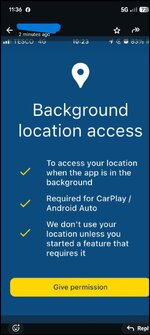
Screenshot_20260331-113603.jpg
 
That was my next port of call. I recall something on here but I'm buggered if I can find it.
I had a look on the MRA forum, but couldn't find anything, you'll maybe have to post a new topic. Let us know if you find out anything - good luck :)

Edit - just tried it on my iPhone and got the same screen as you, I agreed, closed the app and opened again and the same screen came up.

I went into the iPhone settings and under location for MRA, the "allow once whilst using app" was ticked. I changed to allow always and that stopped the request screen.

So it looks like you either accept the request and allow only when using app or allow always and that fixes the issue.
 
Last edited:
I had a look on the MRA forum, but couldn't find anything, you'll maybe have to post a new topic. Let us know if you find out anything - good luck :)

Edit - just tried it on my iPhone and got the same screen as you, I agreed, closed the app and opened again and the same screen came up.

I went into the iPhone settings and under location for MRA, the "allow once whilst using app" was ticked. I changed to allow always and that stopped the request screen.

So it looks like you either accept the request and allow only when using app or allow always and that fixes the issue.
Boom! Thank you.


Back
Top Bottom
