Placing signature in documents

karlp

Well-known member
UKGSer Subscriber
Joined
Dec 8, 2007
Messages
4,993
Reaction score
1,724
Location
Southampton, England
What is the best way to get my signature on to documents such as word or excel so that I can email without printing/ scanning first.

I want a professional looking result

Just scanning my signature and then pasting to the spot just looks rubbish.
 
I did this by scanning the converting the scan to have no background!

The other way is to use a digital pen mouse thing!
 
this is gonna sound stupid but make your web signature different and distinctive from your formal signature....

can't be too careful

:thumb2

scan, photoshop, stip off / seperate the alpha layer paste insert and make as templated footer.
 
this is gonna sound stupid but make your web signature different and distinctive from your formal signature....

can't be too careful

:thumb2

scan, photoshop, stip off / seperate the alpha layer paste insert and make as templated footer.

Thanks for the advice.

I own a chemical / analytical chemistry laboratory and my reports may go to government departments and may end up as evidence in court so the signature needs to be similar to my 'proper' one.
 
Thanks for the advice.

I own a chemical / analytical chemistry laboratory and my reports may go to government departments and may end up as evidence in court so the signature needs to be similar to my 'proper' one.

It'll most likely need to be a genuine signature then.

:beerjug:
 
Thanks for the advice.

I own a chemical / analytical chemistry laboratory and my reports may go to government departments and may end up as evidence in court so the signature needs to be similar to my 'proper' one.

Then send a paper report.

It's just too easy to rip a signature off an electronic document and use it elsewhere without your knowledge.

elizabeth2_sig.jpg
 
What is the best way to get my signature on to documents such as word or excel so that I can email without printing/ scanning first.

I want a professional looking result

Just scanning my signature and then pasting to the spot just looks rubbish.

What looks rubbish about it? Have you removed any unnecessary background?
 
What looks rubbish about it? Have you removed any unnecessary background?

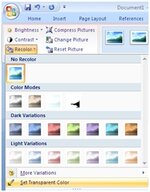
Once you've scanned your signature, paste it into MSWord and make the white background transparent using the menu option below.

Note: this clip is from MSWord 2007, in Word 2003 the set transparency colour button is on the PICTURE toolbar.

It then just looks like a normal signature.

Definately agree about the changes in signatures; I have a "professional" signature for all my reports etc at work and a personal signature for the bank etc. Have done so for the past 17yrs with no problem.
 

Attachments

  • trans.jpg
    trans.jpg
    43.2 KB · Views: 64
Thanks for all the info especially about the change in signature for ,professional, and personal.

Never thought of the implications before

99% of reports are sent by email in the first instance and if it then develops further then originals are required.

Thanks agin all
 
The way I did mine was to use a thick blue marker pen and write my chosen web-signature n large letters on A4 paper (use all of it). Then scan, make background transparent (use pictures function in Word) et voila

If you struggle feel free to send your scanned sigfnature file to me (PM me for email) and I can assist with the rest - takes 1 minute once you know how

Alan


Back
Top Bottom