Please help! Zumo 660 map update has lost Europe maps

lagauk

Active member
UKGSer Subscriber
Joined
Oct 15, 2014
Messages
182
Reaction score
6
Location
Norf Laandan COYS
I recent map update has lost the Europe maps. The instructions said there wasn't enough space on the device for the map update and I should insert an SD card. I did this and downloaded and installed the map using Garmin Express but now the Europe maps have gone.
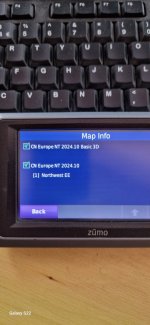
The only map installed is CN Europe NT 2024.10 Northwest EE, which doesn't include the UK.
A search on Garmins website says map downloads are no longer available. Does anyone know where I can go to download the Europe maps?
Cheers
 
Go back into Garmin express, change the map set to South west Europe which contains the uk. Download the whole map set to your pc. If you are doing a tour that requires parts from the different European map set sub divisions you can make up a custom set from the map you installed on your pc using mapinstall in Basecamp.
 
Go back into Garmin express, change the map set to South west Europe which contains the uk. Download the whole map set to your pc. If you are doing a tour that requires parts from the different European map set sub divisions you can make up a custom set from the map you installed on your pc using mapinstall in Basecamp.
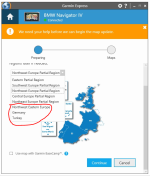
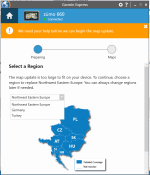
Hi Mzokk. The only maps available in GE to change to are Northwest Eastern Europe, Germany and Turkey. Need to get back the original Europe map.
 
is the 660 seeing the SD card? Needs to be 32GB or less
Hi Wessie. The SD card is only 16GB and yes the 660 is seeing it but that isn't the problem. Although the message said there wasn't enough space on the device and I should insert an SD card the map update actually installed onto the device and not the card and whilst doing this overwrote the existing Europe maps.
 
Hi Wessie. The SD card is only 16GB and yes the 660 is seeing it but that isn't the problem. Although the message said there wasn't enough space on the device and I should insert an SD card the map update actually installed onto the device and not the card and whilst doing this overwrote the existing Europe maps.

Reading your first post, it seems you have looked in settings for the list of maps installed so this might not apply.

I have a Zumo 390. This ran out of internal memory a while ago. There is a legacy map segment in the internal memory and I have the latest 2025.10 maps installed on the SD card. I just ignore the old maps by unticking the box in settings so that it is only the latest ones seen.
 
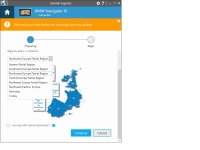
Can you get to this page on Garmin Express? This is what I have on my old Nav 4 at the moment which is similar to the old 660. It only gets ocassional use by my missus and the kids. For UKI its the NW partial region not SW as I spuriously suggested.

Express.jpg
 
The Sequence is connect Zumo to GE select Map Details > new page map options>New page Change map gets you to the page above. Third page also alows you to install the map on the computer.
 
Reading your first post, it seems you have looked in settings for the list of maps installed so this might not apply.

I have a Zumo 390. This ran out of internal memory a while ago. There is a legacy map segment in the internal memory and I have the latest 2025.10 maps installed on the SD card. I just ignore the old maps by unticking the box in settings so that it is only the latest ones seen.
Yes tried that but didn't work
 
Can you get to this page on Garmin Express? This is what I have on my old Nav 4 at the moment which is similar to the old 660. It only gets ocassional use by my missus and the kids. For UKI its the NW partial region not SW as I spuriously suggested.

View attachment 318132
Yes I can get to that page but the only maps I see are the ones circled 1713780779789.png
 
That is weird. Are you logged into your Garmin Connect account? and have you selected the correct Garmin connect authentication domain? Its under settings>general> advanced.
 
That is weird. Are you logged into your Garmin Connect account? and have you selected the correct Garmin connect authentication domain? Its under settings>general> advanced.
Very weird. Yes and yes to answer your questions. It doesn't matter what I do I just don't have the option to change the map to Europe. All I see is
1713809315856.png
 
Last edited:
Pretty much out of Ideas now except maybe log out of Garmin Connect and reinstall Garmin Express and log in again? Sorry.
 
Pretty much out of Ideas now except maybe log out of Garmin Connect and reinstall Garmin Express and log in again? Sorry.
No probs. Really appreciate you trying.

What's even more weird is the map shows up on the device but when I untick the Northwest EE map to only see the Europe map the zumo doesn't find any countries, cities or streets and if I leave it ticked as in the pic I don't see UK or western Europe eg: France, Spain, Portugal etc
 

Attachments

  • zumo.jpg
    zumo.jpg
    79.9 KB · Views: 7
I recent map update has lost the Europe maps. The instructions said there wasn't enough space on the device for the map update and I should insert an SD card. I did this and downloaded and installed the map using Garmin Express but now the Europe maps have gone.
The only map installed is CN Europe NT 2024.10 Northwest EE, which doesn't include the UK.
A search on Garmins website says map downloads are no longer available. Does anyone know where I can go to download the Europe maps?
Cheers
Hi, did you ever resolve this issue? I have the exact same issue. With the map choice missing in garmin express. Thanks.


Back
Top Bottom