Pooter/Hi Fi interface requirement

  • Thread starter Thread starter Bigtwin
  • Start date Start date

Bigtwin

Guest
Here's the problem.

Mac one end of the ground floor, full of itunes and MP3 fun and frolicks, HiFi the other, scene of highly spohisticated and desireable social interaction goings on, being in the scoffing room. Too many fitted carpets/doorways etc in the way to connect the two with cables.

Is there a nice not too expensive wireless solution to this - along the lines of those doohickeys you can get to connect yer Pod to yer car radio or similar? Anything particularly good/bad to look out for?
 
Netgear do something that sits on your wireless network and will play all your audio files - but it's well over £100 IIRC!

You could use it as an excuse to buy a cheap laptop and hook it up wirelessly!

Otherwise, I suspect the range of these transmitting gadgets would be a bit on the short side.

Iain
 
Steve said:
Did you say Mac?

Sir will be wanting one of these then......

http://www.apple.com/airportexpress/

Ah-ha! Looks like those cleaver chappies at Mac have been there before me with that thought process.

Am I right in assuming that one needs an airport card in the mac to work this?

Now to look at the costs involved....

Cheers!
 
Yep, you'll need an Airport card in the Mac.
Of course, if you have an iPod, just connect that up to your hifi - it should be a more or less exact copy of iTunes depending on your preferences and way less hassle than airporting everything over the house (in my very humble, slightly opinionated, opinion).

You can get kit that allows you to scroll through your music directories on your PC via your TV and then output through to your HiFi, but I haven't seen one myself ('What HiFi' should have them in the back section I guess).

My IT guys and I were talking about this very thing earlier today...
 
The airport express is the way to go on this one. You can cable it, or do it wireless. There's also the slim devices squeezebox if you want a display of what's playing out in the lounge.

I'm happy with the cabled airport express, which also gives me wireless acces s downstairs for guests/work laptop.
 
Another benefit of the Airport Express set up is that you bypass the Macs soundcard and provide your hi-fi with a very clean audio feed, as long as the signal is good. It seems this method of getting music out is well respected in audio/hifi forums.

There may be other brands of equipment available that will allow you to connect to your hifi wirelessly, there must be a windows PC version which may well be compatable, but for sheer simplicity and neatness an airport card in your mac transmitting to an Airport Express Air Tunes reciever plugged in to the nearest powerpoint to your hifi, from where a short audio cable will connect it to your hifi, is the best solution. (IMHO)

Is there a nice not too expensive wireless solution to this - along the lines of those doohickeys you can get to connect yer Pod to yer car radio or similar? Anything particularly good/bad to look out for?

The FM transmitter type of doohickey used by the iPod can certainly be found as a generic transmitter useable by any equipment with a 3.5mm headphone jack. However the range is typically under 10metres and is meant only to be used in close proximity.

Andy
 
Thanks guys - excellent! More stuff to spend money on I haven't got!
 
Andy80F said:
The FM transmitter type of doohickey used by the iPod can certainly be found as a generic transmitter useable by any equipment with a 3.5mm headphone jack. However the range is typically under 10metres and is meant only to be used in close proximity.

Andy

I have tried a few of these ... they are truly awful ... nowhere near cd quality ... by far the worst was a Griffin Roadtrip ... when plugged into the car it was only just picked up by the car stereo and drifted wildly off frequency ... when plugged into my laptop it wouldn't transmitt more than 3 meters...
 
just in passing - I found this... Slim stuff
or
Roku

I have used an Griffin iTrip and found it appalling too!

Haven't used the Roku or Slim unit, but am sorely tempted....
 
You'll probably have to check Mac compatibillity and local prices, but Netgear do some decent stuff

http://www.netgear.com/products/details/MP101.php

The old version of this was about 170euro, so should be less than 100quid in the UK.

There is a newer version to sream all the Videos and media files direct to your TV (and Argos are starting to sell them).

Bigtwin said:
Here's the problem.

Mac one end of the ground floor, full of itunes and MP3 fun and frolicks, HiFi the other, scene of highly spohisticated and desireable social interaction goings on, being in the scoffing room. Too many fitted carpets/doorways etc in the way to connect the two with cables.

Is there a nice not too expensive wireless solution to this - along the lines of those doohickeys you can get to connect yer Pod to yer car radio or similar? Anything particularly good/bad to look out for?
 
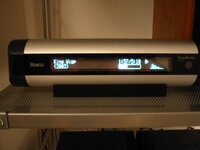
And here you go - had it up and running in about 10 minutes.
So far I'm flippin' pleased - CD's can now be banished to the spare room....
 

Attachments

  • roku 1.jpg
    roku 1.jpg
    108.6 KB · Views: 58
HTB said:
And here you go - had it up and running in about 10 minutes.
So far I'm flippin' pleased - CD's can now be banished to the spare room....


Is that the expensive one, or the more expensive one :D ?

Takl us through it then...
 
It's the cheaper one! the M1000, Honest.... The £150 jobbie (Cheap! Ha!).

Before I saw this thread I'd been getting a bit fed up with the amount of CDs that I had on show (5 to 600), particularly when I had all of them on my PC (Euww.. Pc, yuk!) and having gone Mac recently though that with Airport and my WiFi connection, there had to be a better way of doing things. Anyway, your question kind of spurred me into action.

Picked the ROKU becasue it was the cheaper of the sort of 'out of the box' options and was available off Amazon. It now comes WiFi enabled, rather than previously when you had to buy a WiFi card to put in it. It's also really well rated by What HiFi (5/5 I think).

Anyway, plugged the Roku in and it boots itself up after 10 seconds or so. I guess it's about the size of two normal cans of coke end to end. Comes with 1)WiFi 2)Ethernet connection 3)Optical link 4)Digital out 5) Standard phono plugs and a rubber base that it sits on. Comes with a remote control too.

My home network is set up allowing only those MAC addresses that it 'knows' to connect to it. Scrolled through the settings on the Roku to find the MAC address - really simple - entered it into my router and Bob's your uncles brother etc. etc. It looks like it will handle any security protocol for a Wireless network. The only other thing you need to do is allow file sharing in iTunes (if that's what you use).

So far, I've realised that, in my case, it runs through iTunes so that must be running on the PC for it to work. If you close iTunes, the Roku can't connect to your folders, so you can't access your tunes.

Lots of variation on how you set the display up - large or small text, song names, albums etc. It allows you to play your 'playlists' - basically it's a front end for iTunes (and not exclusively iTunes either) and a bit like running an iPod menu system - you can search by any variable. I can see what's playing from the other side of the room (all be it 15ft) without a problem - the iPod just didn't allow me to do that and I figured, even with a remote fitted, I'd never be able to scroll through my tunes on the iPod without getting up and gawping at the tiny screen.

The other point (sorry if I'm boring you here), is that you can connect to self powered speakers (JBLs or something). If you want a second one and get some additional speakers, you can run more than one in the house.

Anyway, it seems to be doing what I need it to do and is pretty slick with it. Almost wish i'd bought the one that handles photos and video as well, allowing you to display them on you TV!

Seeing as your in Guildford, if you're passing Kingston, give me a shout and you can come and try and break it (via the remote, not bu chucking it around)!

 
HTB said:
It's the cheaper one! the M1000, Honest.... The £150 jobbie (Cheap! Ha!).

Before I saw this thread I'd been getting a bit fed up with the amount of CDs that I had on show (5 to 600), particularly when I had all of them on my PC (Euww.. Pc, yuk!) and having gone Mac recently though that with Airport and my WiFi connection, there had to be a better way of doing things. Anyway, your question kind of spurred me into action.

Picked the ROKU becasue it was the cheaper of the sort of 'out of the box' options and was available off Amazon. It now comes WiFi enabled, rather than previously when you had to buy a WiFi card to put in it. It's also really well rated by What HiFi (5/5 I think).

Anyway, plugged the Roku in and it boots itself up after 10 seconds or so. I guess it's about the size of two normal cans of coke end to end. Comes with 1)WiFi 2)Ethernet connection 3)Optical link 4)Digital out 5) Standard phono plugs and a rubber base that it sits on. Comes with a remote control too.

My home network is set up allowing only those MAC addresses that it 'knows' to connect to it. Scrolled through the settings on the Roku to find the MAC address - really simple - entered it into my router and Bob's your uncles brother etc. etc. It looks like it will handle any security protocol for a Wireless network. The only other thing you need to do is allow file sharing in iTunes (if that's what you use).

So far, I've realised that, in my case, it runs through iTunes so that must be running on the PC for it to work. If you close iTunes, the Roku can't connect to your folders, so you can't access your tunes.

Lots of variation on how you set the display up - large or small text, song names, albums etc. It allows you to play your 'playlists' - basically it's a front end for iTunes (and not exclusively iTunes either) and a bit like running an iPod menu system - you can search by any variable. I can see what's playing from the other side of the room (all be it 15ft) without a problem - the iPod just didn't allow me to do that and I figured, even with a remote fitted, I'd never be able to scroll through my tunes on the iPod without getting up and gawping at the tiny screen.

The other point (sorry if I'm boring you here), is that you can connect to self powered speakers (JBLs or something). If you want a second one and get some additional speakers, you can run more than one in the house.

Anyway, it seems to be doing what I need it to do and is pretty slick with it. Almost wish i'd bought the one that handles photos and video as well, allowing you to display them on you TV!

Seeing as your in Guildford, if you're passing Kingston, give me a shout and you can come and try and break it (via the remote, not bu chucking it around)!

Cheers - top info. Actually I have to go see Steptoe to give him some cash for some bolts, so may well take you up on the offer - I'll PM!


Back
Top Bottom