
Power Commander 5 and Auto Tune 300

lmg

Registered user
Joined
Oct 29, 2011
Messages
758
Reaction score
82
Location
South Yorkshire, England
Hi All,

I am putting a shout out for some help with setting up PC5 and AT300. My setup is a 2010 GSA 1200 running an Akropvic exhaust (Remus headers) with baffles in and a stock filter.

I have downloaded the latest software from the PC site and installed on my laptop, and took the "European Bike/Akro Exhaust with Baffles/Stock filter" tune also from the PC site.

With the ignition on/engine not running, the PC5 has a green light and the AT300 has a red light - I presume this is correct?

Connecting the USB cable from the laptop to the PC5 ive fired up the software. First thing I did was calibrate the throttle in the software. Next was to go in to the configuration screen and setup the AT300. I used the default settings of:

at300.JPG


  • 60 seconds start up
  • No temp monitoring enabled
  • Trim defaults of 20/20
  • Two/2 air sensors (even though the screen shot shows 1) - is this correct for the AT300 and my bike - I think it is?

Next I load up the downloaded map and hit "send map" to load it in to the PC5 - which it reports it has done.

(this is a stock image - not mine)
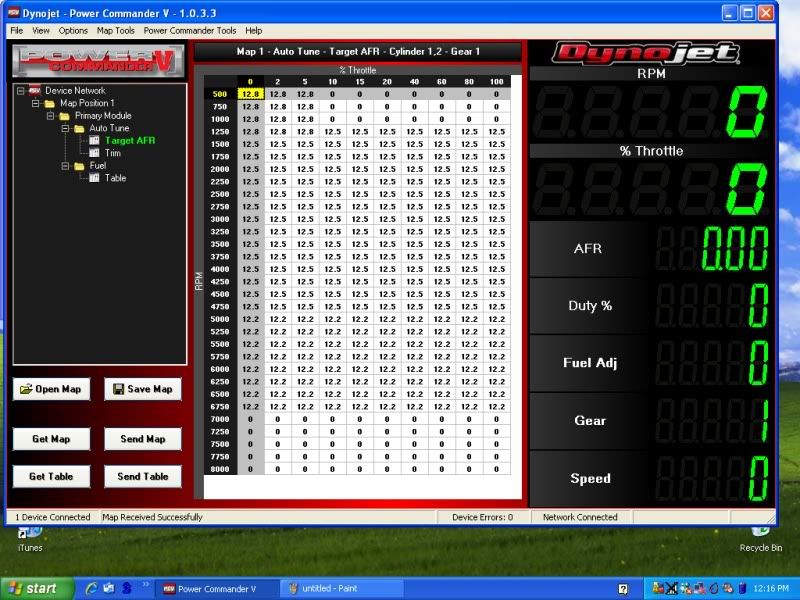
TargetAFR-1.jpg


Looking at the videos on YouTube, when the bike is running (and has been running for 60 seconds), the AutoTune light on the screen ought to turn green, but my bike it does not.

(this is a stock image showing the AT light on)
at300-1.JPG


What am I doing wrong?

Also, do I need to put in a Target AFR manually?

Is there anything else I ought to be doing to PC5 and AT300?
 
Looking at the vid it would appear you have to have the field populated so there are afr values showing (but not in the low rev/throttle zone on some bikes). If there is nothing there the autotune cant adjust anything. As you left the configuration menu did you check the autotune box was ticked?

I'm assuming the map you downloaded and transferred should show up in the boxes. The autotune light should only come in when you rev the bike as it can only tune the boxes that have a value, so if there is nothing until 2000rpm light will be off then on when 2000 is hit. Thats the way I understand it.
 
Last edited:
? What video? The pictures are not of my screen - they are only stock photos to illustrate the bits I'm referring to in the text.

Sent from SYDland......
 
Have you checked your map has loaded, it looks like you open up Map position 1, primary module,autotune, target afr. That should then display the map you have.

Just gleaning this from the video. There doesnt seem to be an instruction manual to download anywhere which is a bit rubbish.
 
Alright Guys

I am having mare with this also.....I phoned and spoke to a guy a dynojet tech today and he says you download a base map and install then you have to set target AFR to the ratio you want and go for a ride

The autotune with collect data as trim values so once your back you can see the values and accept them so that the map has a closer starting point to your target AFR then previous. Obviously it gets

to a point were trim data slows or stops.

I cannot get my autotune running light to come on either and the software wont show me an AFR1 AFR2 value on the right hand side of the screen when plugged in to which he said the sensors may need to heat up first but

I left them for 5-10 mins and still nothing still no values there.....I know autotune is working because im getting trim values that I can accept.

Ill keep trying to make it work but thats were im at just now.
 
If you put values in the afr table then the at light comes on (after 60 secs) in the pc software.

The question is whether 12.5 (the value I've plonked in there) is correct as an afr value?

Sent from SYDland......
 
If you put values in the afr table then the at light comes on (after 60 secs) in the pc software.

The question is whether 12.5 (the value I've plonked in there) is correct as an afr value?

Sent from SYDland......

Does yours do that? because if it does then there's something wrong with mine

The values I've got just now are mainly 13.2 with some 13.5 and 13.8 in their to.
 
no idea what that is. can you explain? it might help me. are you saying i ought to be entering 14.7 in to the afr table?

Stoichiometric is the correct air/fuel ratio for complete combustion of a fuel. For petrol it's 14.7:1. I suspect that the standard BMW AFR is around that. So you probably want to be a bit richer.
 
Thanks (ish). So to be clear your saying the afr ought to be 14.7 or more? At 12.5 or 13.5 that's too lean?

Sent from SYDland......
 
Thanks (ish). So to be clear your saying the afr ought to be 14.7 or more? At 12.5 or 13.5 that's too lean?

No, it's the other way round. More air = a leaner mixture. So 13.5:1 is quite a bit richer than 14.7:1.
 
Ok. Thanks again. So I've set mine to 13.2 - that's homing in on the right level?

I must admit I thought the auto tune would have sorted this out - some sort of magic solution.

Sent from SYDland......
 
Ok. Thanks again. So I've set mine to 13.2 - that's homing in on the right level?

I must admit I thought the auto tune would have sorted this out - some sort of magic solution.

Sent from SYDland......

As I understand it, never having used one, you need to set a base level and then keep doing runs and accepting the trims until finally.....
 
Have seen on some dyno's that GS's can run as lean as 20:1 at the lower end. This is what causes the inlet valves to burn out as they are not getting the cooling benefit of the fuel. 14.7:1 as Schtum said is the perfect mix however to get more power you need a bit more fuel..but not to much! 13.something is better for power. Someone showed their dyno graph on here, cant remember who but it might be worth searching it out as it had a graph showing afr/revs.
 
Don't take this the wrong way but it does sound to me that you will save yourself some significant time if you enlist the help of a professional.
If, like me you want to have a go yourself, I think you need to do some reading up of the basics before applying values that may cause some irreparable damage.


Back
Top Bottom
