Q: MESH in the home - what's good, and what's not?

lmg

Registered user
Joined
Oct 29, 2011
Messages
758
Reaction score
82
Location
South Yorkshire, England
I am moving to a much larger property and am wondering about WIFI in the household and how to ensure a decent internet connection throughout the property.

I am on Vodafone Full Fibre 500 (Fibre to the house) and am perfectly happy with the speed. I believe the Vodafone router is a WiFi 6E level, so I get a decent WIFI connection (circa 500 Mbps according to fast.com) however, since the new property is much larger, I am not sure what the signal coverage will be.

I plan on having the Routers in my office, which will be diametrically opposite to where the lounge will be in the house, and therefore Sky Q, TV, firesticks, and console wifi connections will have to work hard.

Of course, I will see what the signal is like in the house once installed in (in under 8 weeks now); however, if we assume for the moment that the signal is weak, what wireless options to do we have? I need the router in my office as I have an Ethernet-only NAS and printer which need the network ports off of the back of the router (likewise, some older machines with weaker wifi modules), so I am thinking about MESH.

Can anyone suggest a good wireless solution to my potential problem, and would that solution be a MESH setup?

TIA.
 
MESH would be my first choice (well, actually having the house fully wired with ethernet cables would be the first choice but...)

Stick whatever router Vodaphone gave you into bridge mode and get yourself a UniFi Dream Machine Pro and probably four access points to start with.

Easy as anything to setup (at a basic level, you can get complicated quite quickly if you really want to).

Get as many things wired directly to it as you can (look for flat ethernet cable - much easier to run through the house)

You'll need one master AP hard wired to the UDM but the rest can be dotted around wherever you want and powered by PoE injectors (don't get cheap ones, they're crap, and make sure they're the right type for the APs)

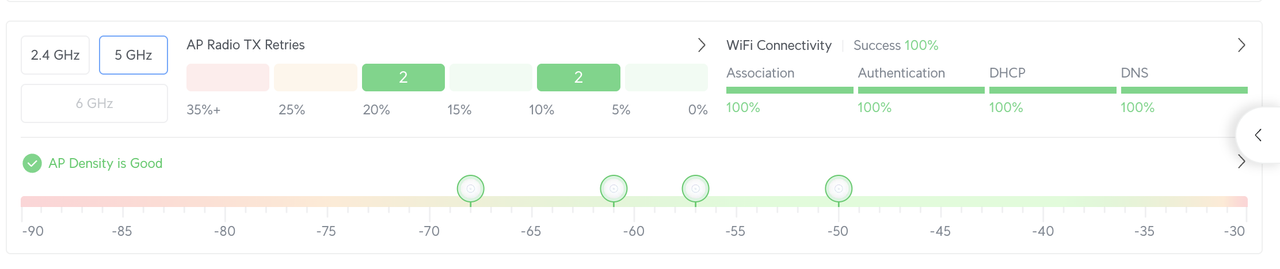
UniFi has a really nice interface that shows you if your AP density is good or bad and what the signal strength is like etc...

It will cost a small fortune to setup initially, but there are no ongoing subscription fees and it will 'just work' and can be easily expanded if you want.

You can also use it for CCTV etc etc if you want.

Alternatively, keep the Vodaphone router and get a pack of Orbi 770, 870, or 970s depending on your budget and see how you get on.
 
I don't want to wire anything such as Access Points - I am looking for a wireless solution if humanly possible.

I do plan to install Wireless CCTV in a few places around the house.

I appreciate the "you get what you pay for" mantra, but are Orbi really worth £700+ for a few MESH dishes around the house? It's hard for a layman to justify that cost when you can get the BT MESH ring 3pack for a little over £100.
 
BT Mesh will do the job, up to a point.

Orbi will do it better

Full router + AP UniFi will do it even better

Depends on how deep your pockets are and how much of your 500Mbps you're prepared to lose.

You'll still have to 'wire' the BT mesh pods in exactly the same way as the APs (i.e. plug something into a power socket and have a wire going from that to the pod/AP)

The 'wireless' part refers to how your computers connect to the network, rather than how the network is constructed. All MESH networks will need wires for the network part of it (although they don't all need to connect to a central hub with wires)

Get a set of BT ones off Amazon, see if they work, if not return them and accept you're going to have to spend a bit more.
 
BT Mesh will do the job, up to a point.

Orbi will do it better

Full router + AP UniFi will do it even better

Depends on how deep your pockets are and how much of your 500Mbps you're prepared to lose.

You'll still have to 'wire' the BT mesh pods in exactly the same way as the APs (i.e. plug something into a power socket and have a wire going from that to the pod/AP)

The 'wireless' part refers to how your computers connect to the network, rather than how the network is constructed. All MESH networks will need wires for the network part of it (although they don't all need to connect to a central hub with wires)

Get a set of BT ones off Amazon, see if they work, if not return them and accept you're going to have to spend a bit more.

The MESH dishes only need a power supply, which is fine and can be found in any room.

What I don’t want to do is to have to run Ethernet cables to the APs and/or mount them in the ceiling.

Sorry if I have misunderstood, but my desire to be “wireless” is not from a power prospective, but from an Ethernet prospective.
 
The APs technically have an ethernet cable that runs from them to a PoE injector which plugs into a power socket - but it's not really much different to a power cable running to a BT pod thing. Again, flat ethernet cables are 'prettier' than the round stuff if that's a consideration.

APs can be ceiling mounted (and usually are in offices etc) but they don't have to be. None of mine are (because I can't be doing with the cabling faff). They might not be getting quite as much efficiency as on the ceiling, but it's not far off. You can also wall mount them if you want, but mine are all just sitting on shelves etc.
 
I'm no expert and have very limited knowledge of mesh set up's.

I was having issues with repeaters when moving between rooms and the signal dropping out, and the computer throwing a wobbly. I purchased this set the Deco system from Amazon and not experienced it since.


I'm on the same plan as you and my speed (through the Deco) varies between around 300 to 500.

As Sparky knows, my home isn't big and I don't have the knowledge to know if one of the more expensive set up's would work significantly better. However, it works for me.
 
The MESH dishes only need a power supply, which is fine and can be found in any room.

What I don’t want to do is to have to run Ethernet cables to the APs and/or mount them in the ceiling.

Sorry if I have misunderstood, but my desire to be “wireless” is not from a power prospective, but from an Ethernet prospective.
I think that’s what Sparkplug is saying. Any access point, including the BT one, needs to be powered, so you can either run a power cable to it from a socket, or you can run an Ethernet cable from a power over Ethernet (PoE) injector to it. Either way it needs a cable, but with Mesh you don’t need Ethernet in the room. Although that would be better.

You could also try powerline adapters for things like your telly. If your wiring isn’t too bad you may not lose too much speed
 
Stick whatever router Vodaphone gave you into bridge mode and get yourself a UniFi Dream Machine Pro and probably four access points to start with.

+1 for Unifi.
Best money I spent on tech gear last year, by far.

Screenshot 2025-07-02 at 15.23.20.jpg
 
Powerlines are another option.

My personal experience has been hit and miss. When it works, it works really well. When it doesn't .....

Plug directly into the wall (avoid extension sockets) and try to stick to the same ring main wherever possible for best results.
 
+1 for Unifi.
Best money I spent on tech gear last year, by far.
I think it's the best out there without stepping up to full enterprise solutions,

Here's an illustration of what I mean about it showing the AP distribution and how effective it is.

Screenshot-2025-07-02-at-16-03-41.png


One of mine is stuck out in the garage and gets poor reception but it's still about 50Mbps (down from 300) which is good enough for what I need there.
 
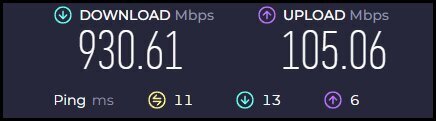
I've been running a TP-Link Deco X60 with 3 access points, with Virgin 1Gb coming into the house. No complaints about it over the last 12 months of use, I'm working from home on Azure / M365 / InTune all the time and when my sons home he hammers it for games, no pinch points or slow downs, easy to setup and secure, covers the house and out to the garden and summerhouse where there's a Sonos play one hooked up and again no issues.

This is a speedtest over WiFi from my PC in the office, not that it counts for that much in the grand scheme of things

1751470203148.jpg
 
  • Like
Reactions: lmg
I worked for a couple of ISPs who specialised in multi-tenanted properties, so this stuff is bread and butter to me.

The bottom line is that everything WiFi depends on the fabric of the building and the interference from other signals on the same frequency range.

This is why having something that will show you any interference and will allow you to tweak the ranges you're using as well as the output power of your APs will always give you the best possible reception and reliability of service.

Your 'el cheapo' solutions might work just fine - but if they don't then you're pretty much screwed. Without an expensive WiFi survey there's not really much way of knowing unless you know what you're doing.

I'm not knocking BT hubs or their equivalent. They do work perfectly well in a lot of scenarios.

Probably a half reasonable place to start.

I do have a habit of over engineering everything, but it serves me well.

I'm also perhaps a bit more fortunate in that I work in the industry so I pay a fraction of the price.

My home UniFi setup was pulled out of a Science Park that had outgrown it and needed some 'big boy' kit putting in at a cost of tens of thousands.

The company couldn't realistically put it in to a new customer site as it was a couple of years old and it was too good to WEEE so I bought it for peanuts.
 
I've been running a TP-Link Deco X60 with 3 access points, with Virgin 1Gb coming into the house. No complaints about it over the last 12 months of use, I'm working from home on Azure / M365 / InTune all the time and when my sons home he hammers it for games, no pinch points or slow downs, easy to setup and secure, covers the house and out to the garden and summerhouse where there's a Sonos play one hooked up and again no issues.

This is a speedtest over WiFi from my PC in the office, not that it counts for that much in the grand scheme of things

View attachment 424217
Plus 1

for TP Link Deco
 
Powerlines are another option.

My personal experience has been hit and miss. When it works, it works really well. When it doesn't .....

Plug directly into the wall (avoid extension sockets) and try to stick to the same ring main wherever possible for best results.
But maybe worth a try.
 
But maybe worth a try.
Absolutely.

£40ish for a pair - not expensive. In fact I've just bought some for my work laptop that keeps kicking me off the VPN on WiFi in case a 'wired' connection is better.

Depends on how much coverage you need.

You can get them with or without WiFi

Every install is going to have different requirements.

I suspect a MESH network will work better for this particular setup, but without floor plans and knowing what the fabric of the building is, it's hard to really know.
 
I have a Asus mesh system that allows me to add nodes, which help to ensure I get coverage in the whole house. I'm on virginmedia so just use their hub as a passthrough switching off the inbuilt wifi. Seems to work fine and solved the problem I had where the 'office' wasnt getting great signal. I wont quote the model as its since been superseded.


Back
Top Bottom