Quest 1 will not acquire sattelites

rubberscrubber

Registered user
Joined
Oct 27, 2007
Messages
320
Reaction score
0
Location
Lincs, UK
Was using my quest ok on Friday on the bike, absolutely hammered it down, but it worked fine.

I got it out on Saturday to use for the weekend and now it wont find any sattelites,
if you go to the GPS settings, (the page showing actual sattelite positions with strength signals) this is faded out whilst trying to acquire, however if I select USE INDOORS, the page comes to life, showing varying signal strengths.
I am not sure if this is normal, which ever is right or wrong it wont work :nenau
is it goosed, is there a hard reset as such :nenau
please help, I love my Quest
 
hard re set

there is a hard re set on theis model. have had to use it a couple of times. you will loose all settings but its worth a try

all three buttons together OK Page Power should get a message asking if you wish to delete all info press yes

Hope this is of help
 
Thx for that, I think I did that already through the menu options, found it somewhere.
anyway just tried it your way and still no joy, its out sunbathing as we speak trying to lock-on :beer:
 
I've heard a few reports of the connection to the flip out aerial breaking, not a DIY repair either. You could try to get hold of an external aerial and plug that in to confirm this. I think they can be bought off ebay for approx £15 :)
 
I've heard a few reports of the connection to the flip out aerial breaking, not a DIY repair either. You could try to get hold of an external aerial and plug that in to confirm this. I think they can be bought off ebay for approx £15 :)

Exactly what happened to me recently here

Andres
 
This is what happened to my quest. I went down the external aerial route but got nowhere so sent it back to Garmin and they sent back a recon unit for £85.
If you do this dont forget to ask them to unlock your existing maps for the new unit they will do it free of charge but you have to ask.
 
I have had the aerial off, might try and prise open the aerial cover :eek:

are there any electronics in the aerial itself that could get wet ??

anyone got a working quest that can tell me about the GPS satellite display when in INDOOR USE, mine seems to be showing normal satellite activity. Is this just a red herring
 
Same thing happened to mine, ended up only working with an external antenna.........eventually gave it away and bought myself a 2720 which is spot on.
 
when in INDOOR USE, mine seems to be showing normal satellite activity. Is this just a red herring
I think that's just some sort of simulated display. My Quest is out on loan at the moment but I recall checking that screen when indoors and away from windows, no reception at all, and it was still showing healthy satellite reception when switched to indoor mode.
 
Just tried mine and when I go to indoor use the GPS info screen does light up.
I think it is a red fish mate.

Sounds like a call to Garmin is needed.:(
 
I've heard a few reports of the connection to the flip out aerial breaking, not a DIY repair either. )

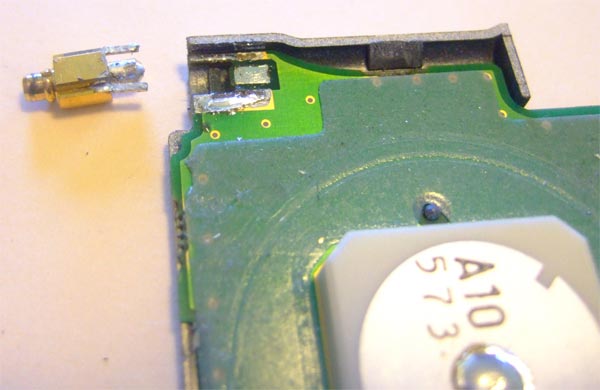
i fixed one a week ago... it is a DIY repair if you can solder that is:aidan

the lid on the Aerial bit has a silicone type seal round it you have to break the seal on.
the join bit on the Aerial to the unit breaks away from the circuit board... that's what needs fixed
 

that's like the one I did

238066.jpg
 
AN UPDATE,

ok I gave up and rang Garmin today, who said, hard reboot (done that),

how long did you leave it (30 minutes)

try 45 to 1 hour ( ok I said :augie)

and wow, it had located 2 satellites, so I turned it off and did the ZOOM OUT button and POWER (auto locate I think) and after 10 mins it had good satellites and found my back garden :thumb2

but then lost them again and then found them again.

It does seem to be the aerial so if it continues to play up I will carefully rip the aerial apart and re-solder as above.

big thx for all your help and linky's :beer: when I see you in a pub (terms and conditions apply)
 
My fecker did the same on Saturday. Worked okay getting to the start point for the National Rally, come 2pm the fecker had gone tits up with my route in it.

It said it was acquiring satellites which it didn't.

Once home I reset it using the hard reset, powered on and left it in the garden for a while to find satellites and the screen showed the USA.

I then plotted a route from current location to Garmin UK which is the only waypoint in the unit. Works now.

Loaded maps etc and it still works. Sods law it would **** up when needed the most. Next time I'll take the Samsung Q1 with me and load the maps etc again!
 
what a coincidance, mine has been playing up all the time now, constantly loosing then acquiring again. sometimes after 5 minutes, sometimes 1 hour.

I took the aerial to bits and the connector looked ok where it is soldered to the board, I ran the iron over it anyway incase of a dry joint.

tried it again and still crappy.
so this time I noticed on the back of the board, the center contact track on the PCB, the hole appeared to have no solder in it compaerd to the outer contact holes. So I have solderded in a bit of wire into the hole and onto the track itself, this is achieved by lightly scratching away the laquer.

I cant recommend this to anyone, as the soldering required is very delicate..

I'll try and get some pics on soon
 
a couple of pics to show what I did, please ignore the mess, I was having a bad hair day :eek:
All I have left to do now is seal the lid back on and then give it a try on a run, if it works for 1 hour then I will consider it fixed

Garminaerial1.jpg


Garminaerial2.jpg
 
looks like you've made a right arse of getting it to bits, did you use a lump hammer or just a 2lb hammer and chisel.:D
 
its been a month now since its operation, and it hasn't missed a beat yet :thumb2

so if you have a quest not playing ball, there is hope :D


Back
Top Bottom