Quest Route Query

Cooky

Active member
UKGSer Subscriber
Joined
Dec 30, 2002
Messages
455
Reaction score
1
Location
London, England
I have City Select v7 on Mapsource and loaded onto the Quest. I've plotted a route on Mapsource and downloaded it and all neccesary maps onto the Quest. When I ask to view the route on the Quest it tells me that the route is not compatable with the maps.

Anyone else have this problem or know what it's caused by and how to fix?

Although my version of City Select is only v7, the unit and Mapsource all have the latest updates.


:nenau
 
yes - started with v6 and now on v7 but this route was plotted after upgrade to v7 on both Mapsource and Quest.
 
Have you got v6 and 7 of the maps installed (on your PC) at the same time? If so, have you plotted the route while using the v6 maps? There's a drop down menu in MapSource to select which mapping product it's currently using.
 
You need to make sure that the v7 maps are selected in Mapsource (in the "maps" section), the routes calculated on the PC with v7, ensure that the v7 maps are in the Quest, and all the routes are re-sent. Sending v7 maps should over write any other maps in the unit (apart from the basemap). It should then work if the Quest follows similar protocols to the 2610 etc.

Probably.
 
thanks Mouse and John - yes I had done all that - everything in V7 including the drop down menu on Mapsource.

It's a mystery. :eek
 
In the "settings" menu of the Quest go to "Map Info" and check that the correct version of maps is ticked :)
 
Also check that you have included every segment of maps required for the route. If the route uses even a small part of an unloaded segment then you will get this message :)
 
been there done that.

I think that when actually using the routes on the road it may not be a problem - it's just that when i try and view the route on the map on the quest it flags up a warning.

i plotted the route before i updated Mapsource to the latest version but after v7 was loaded onto everything. Maybe that's the problem, but i can't be bothered to replot all the routing again.

thanks anyway :beerjug:
 
Andrew C said:
i plotted the route before i updated Mapsource to the latest version but after v7 was loaded onto everything. Maybe that's the problem, but i can't be bothered to replot all the routing again.

thanks anyway :beerjug:

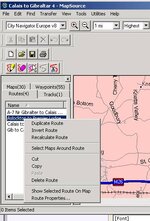
It's not time consuming to recalculate. Right click on the route in the list on the left and select recalculate :thumb
 

Attachments

  • ScreenShot029.jpg
    ScreenShot029.jpg
    42.3 KB · Views: 102
Andrew C said:
Good idea. Did it. But problem still there. :confused:
Face it, you don't have the same maps in the unit as you used in MapSource when "recalculating" the route.

Select all map sets involved in the route in question and upload them to the unit. Recalculating in the unit doesn't work if you have manually selected "nice roads" in MapSource. It never does.


Back
Top Bottom