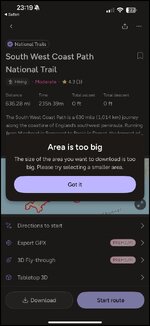
Question on OS Maps (Ordnance Survey) - File download problem - ‘Area is too big’

Pepsi

Well-known member
UKGSer Subscriber
Joined
Apr 3, 2023
Messages
563
Reaction score
512
Location
Yorkshire
I pay for a subscription with OS Maps and occasionally I get recommendations for various routes, the latest being The Salt Path.

The route is over 1000kms, so whilst I can start the route there is always the possibility that areas of the route will be in dead spots with no cellphone reception which will make navigation difficult. How do I download the route when the file size is so large? If you try to download it you get this message.

=======

Title edited.

Richard
 

Attachments
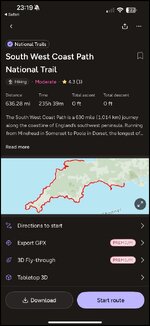
  • IMG_1510.jpg
    IMG_1510.jpg
    69 KB · Views: 22
  • IMG_1511.jpg
    IMG_1511.jpg
    64 KB · Views: 22
Last edited by a moderator:
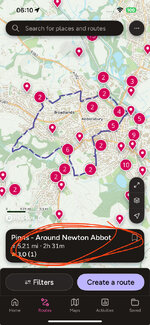
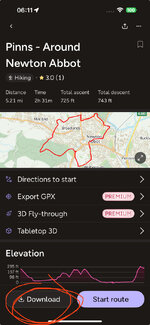
Simply tap on the route, tap on the box, tap on download.


View attachment 412908View attachment 412909
The file size is too large. The screenshot in my second photo says file too large so it won’t download. I’ve had this message before with certain sections of The TET. This happens when there are over a certain number of Waypoints or something.
Is there a way within OS Maps to edit the entire route and create the route in smaller sections, maybe three or four thereby reducing the number of Waypoints within each section which would then permit the file to be downloaded.
 
The file size is too large. The screenshot in my second photo says file too large so it won’t download. I’ve had this message before with certain sections of The TET. This happens when there are over a certain number of Waypoints or something.
Is there a way within OS Maps to edit the entire route and create the route in smaller sections, maybe three or four thereby reducing the number of Waypoints within each section which would then permit the file to be downloaded.
Never had that.
Are you paying for the premium?
 
May I suggest that you are confusing
The route
The waypoints
And the maps
Yes you may suggest that as often as you wish, however I’m trying to download a GPX file from OS Maps and currently I’m getting the message which I’ve shown in the photos. It’s a simple download button which when pressed says FILE TO BIG.
That’s the issue I’m trying to resolve and whether I’m confusing the route with the waypoints or the maps that still doesn’t help me to download something which I’ve been sent by OS MAPS 😂
 
I only ask as bods often put OS, when they mean Open Street.

Two seconds of your time to clarify for other bods’ benefit.

Thank you.
 
I only ask as bods often put OS, when they mean Open Street.

Two seconds of your time to clarify for other bods’ benefit.

Thank you.
I thought the photos would have clarified the software. Ordnance Survey is what we’re talking about. 👍
 
Maybe it would be worth allowing someone else to attempt downloading the file?
Without trying it, I cannot shed any more light on it.
The download size maybe restricted by your network, the actual website itself or you have pc problems.
A gpx file isn't likely to be very large.
 
According to Google’s AI response:

If the area you're trying to download is too large, it means the Ordnance Survey app is exceeding the maximum storage or download size for your iPhone. You can either reduce the download area, change your storage settings, or check your subscription to ensure it allows offline downloads.

Here's a more detailed breakdown:

1. Reduce the Download Area:
  • Zoom in on the map:
    Zoom in to focus on the specific area you need, then download that smaller section.
  • Use the "Download Area" feature:
    Some OS Maps versions have a "Download Area" tool that allows you to draw a custom boundary, ensuring you only download the necessary region.
2. Check Your Storage Settings:
  • Ensure offline maps are saving to your phone:
    Some mobile devices may automatically save downloaded content to the cloud. Check your phone's settings to make sure offline maps are saving to your device's storage, not the cloud.
  • Free up storage space:
    Delete unnecessary apps, photos, or files on your iPhone to create more room for the download.
3. Verify Your Subscription:
  • Check your subscription type: Some OS Maps subscriptions may have limits on the amount of offline data you can download or the number of devices you can use.
  • Ensure you have a valid subscription: Make sure your subscription is active and allows offline map downloads.
4. Other Troubleshooting Tips:
  • Restart your iPhone: A simple restart can resolve temporary glitches.

  • Update the OS Maps app: Make sure you're using the latest version of the app, which may have bug fixes and improvements.

  • Contact OS Maps support: If you're still having trouble, reach out to OS Maps support for further assistance.
 
On your computer, open the OS program. Open the full file for the route. Save the route.

Then copy the route and rename the file say Day 1. With the Day 1 route open, start to delete the waypoints until you get a smaller file.

Then repeat above with say Day 2 file.

In the end you will end up with a series of smaller files which will appear on your phone app.

Now you can download these to use offline.

RobA.
 
On your computer, open the OS program. Open the full file for the route. Save the route.

Then copy the route and rename the file say Day 1. With the Day 1 route open, start to delete the waypoints until you get a smaller file.

Then repeat above with say Day 2 file.

In the end you will end up with a series of smaller files which will appear on your phone app.

Now you can download these to use offline.

RobA.
Does this have to be done on a PC, rather than a phone?
 
TBH - if you download the TET from the website then it’s broken down into individual sections within that file anyway.
 
Pepsi
There a similar issues with trying to download Birdseye MAP imagery which exceeds max size.
I do not think (without more info) that your problem is down to the size of the gpx file but to the size of the MAP (number of map tiles)
If you would like me to have a look, you can reach me by DM, I'll be glad to help

AND .................. A wee while later and some digging around...
The file contains 58 tracks and their corresponding 58 routes and the gpx file is only 5.42Mb
the .kml is only 308KB

This confirms that your problem is down to your trying to download the OS MAPS.
 
Last edited:


Back
Top Bottom